

Imagicle Contact Manager is a unified contact management solution designed to help organizations centralize business contacts, improve directory accessibility, and enhance communication workflows. An Imagicle Contact Manager License enables users to access structured contact information across enterprise communication environments and improve collaboration efficiency.
Quick Benefits
- Centralized management of business contacts
- Improved access to corporate directories
- Better user experience for communication teams
- Integration with enterprise collaboration platforms
- Simplified contact search and retrieval
- Consistent contact information across users
- Reduced dependency on disconnected address books
- Improved collaboration between departments
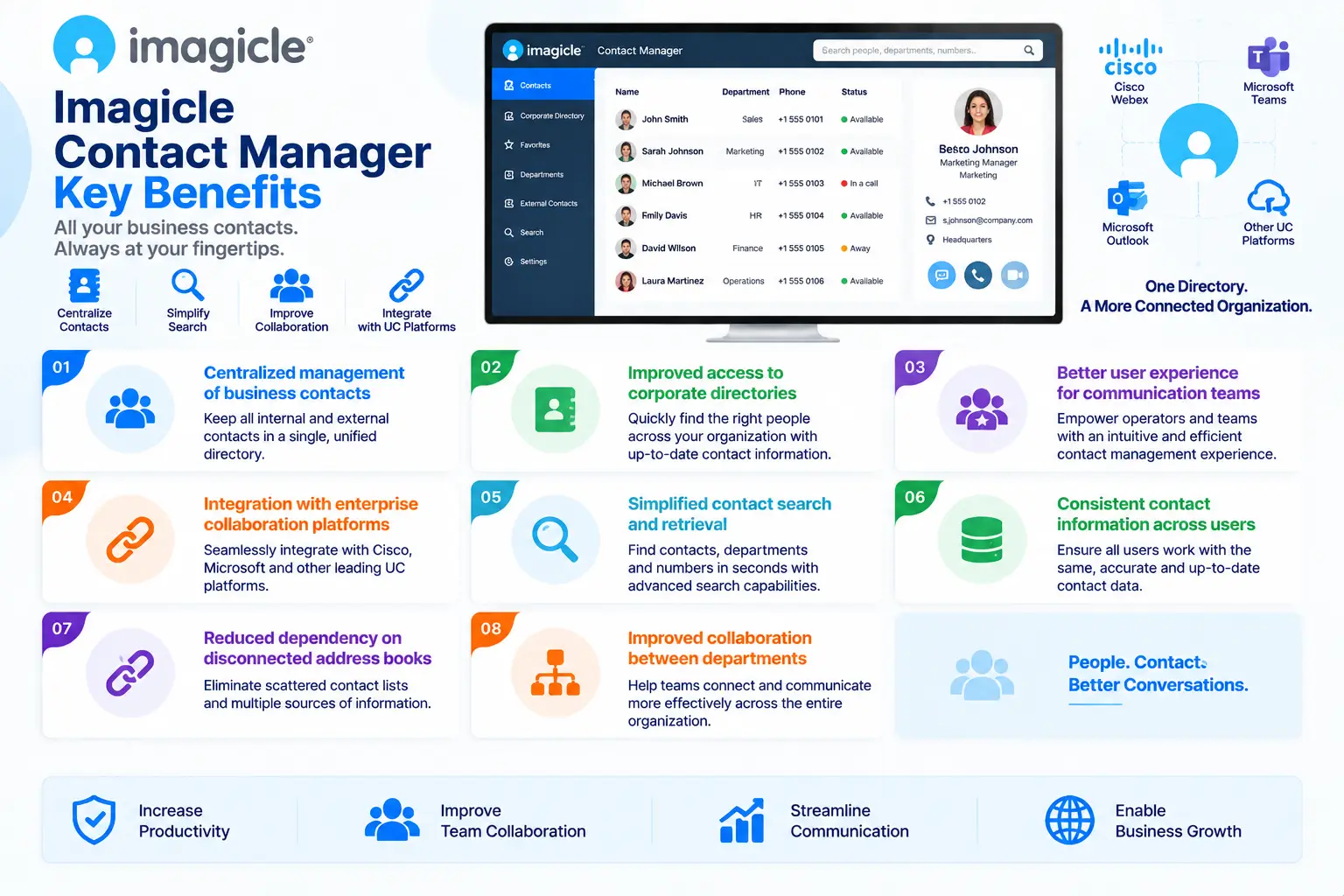
Imagicle Contact Manager At a Glance
What it is: Enterprise contact management and directory solution
Parent category: Imagicle License
Primary role: Centralize, organize, and improve access to business contact information
Main users: Enterprises, IT administrators, communication teams, and employees requiring shared contact access
Core capabilities: Contact directories, centralized information management, search, synchronization, and communication integration
Integration platforms: Cisco Unified Communications Manager, Cisco Webex, and supported collaboration environments

License Overview
An Imagicle Contact Manager License is generally determined by the number of users requiring access to centralized contact information and the communication environment where the solution is deployed. Unlike call routing or recording solutions that focus on specific communication events, contact management licensing is mainly related to users, directories, synchronization requirements, and enabled functionality. Organizations should evaluate how many employees require access to shared contacts, which systems need integration, and what level of contact management is required.
Businesses with a smaller communication environment may only need basic directory access, while larger organizations may require broader synchronization, centralized administration, and integration with multiple communication platforms. The required licensing model can also depend on the selected deployment approach and additional capabilities such as directory management, contact synchronization, and enterprise search features. When selecting an Imagicle Contact Manager License, organizations should consider current communication requirements and future growth to ensure that contact information remains accessible as the business expands.
Product Overview
Centralized Business Contact Management
In modern organizations, contact information is often distributed across multiple systems, applications, and user devices. This can create inconsistent information, duplicated records, and difficulties when employees need to quickly find the right person or department. Imagicle Contact Manager provides a centralized approach for organizing and managing business contacts, allowing users to access reliable communication information through a structured platform. By maintaining consistent contact data, organizations can improve communication efficiency and reduce time spent searching through multiple directories.
Enterprise Directory Access
Large organizations often maintain thousands of users, departments, extensions, and external contacts. Finding accurate information quickly becomes increasingly important as communication environments grow. Imagicle Contact Manager improves directory accessibility by providing users with a more organized way to search and access contact information. This helps employees connect with colleagues, departments, and business contacts more efficiently.
Contact Synchronization and Information Consistency
One common challenge in enterprise environments is keeping contact information synchronized across different communication systems. Outdated directories can lead to incorrect transfers, failed communication attempts, and reduced productivity. Imagicle Contact Manager helps organizations maintain more consistent contact information by supporting structured management and synchronization workflows. This ensures users can rely on available contact data when managing daily communication activities.
Core Technical Flow
Business Contact Sources
→ Imagicle Contact Manager Platform
→ Contact Organization and Synchronization
→ Directory Search and User Access
→ Communication Platform Integration
→ Improved Collaboration Workflow
Options and Licensing Models
| Licensing Factor | Description | Suitable For |
|---|---|---|
| Users | Number of employees requiring contact access | Organizations with different user populations |
| Directories | Number of contact sources and information repositories managed | Businesses with multiple contact databases |
| Integrations | Communication platforms and systems connected to the solution | Enterprise UC environments |
| Synchronization Features | Required contact update and management capabilities | Organizations needing consistent directories |
| Advanced Features | Additional search, management, and administration capabilities | Businesses requiring enhanced control |
| Support and Subscription | Updates, maintenance, and technical assistance | Long-term production deployments |
Features and Benefits
Imagicle Contact Manager helps organizations improve communication efficiency by creating a more structured approach to managing contact information. Instead of relying on separate personal address books or disconnected directories, businesses can provide users with centralized access to important communication data. A major benefit is improved productivity. Employees can locate colleagues, departments, and business contacts faster, reducing delays during everyday communication activities.
The solution also improves information consistency by helping organizations maintain more reliable contact records across communication environments. For enterprises with large user populations or complex collaboration systems, centralized contact management reduces administrative complexity and creates a more efficient communication experience.
Compatibility and Requirements
Before deploying Imagicle Contact Manager, organizations should evaluate their communication infrastructure and contact management requirements.
Important considerations include:
- Existing collaboration platform
- Number of users requiring access
- Current contact sources
- Directory synchronization needs
- Integration requirements
- Security and access policies
- Deployment architecture
Imagicle Contact Manager is commonly deployed alongside Cisco Unified Communications Manager and Cisco Webex environments. Organizations should evaluate existing directory structures and integration requirements before implementation. A proper assessment ensures that contact information is organized correctly and accessible according to business requirements.
Activation and Deployment
Imagicle Contact Manager deployment begins with activating the purchased license and preparing the communication environment.
Typical deployment steps include:
- License registration and activation
- Connecting contact data sources
- Configuring synchronization settings
- Integrating with collaboration platforms
- Testing directory access and search functions
Pricing and Quote Process
Pricing for an Imagicle Contact Manager License depends mainly on the number of users, required integrations, contact sources, enabled features, and deployment requirements.
Before requesting a quote, organizations should define:
- Number of users requiring access
- Existing directory sources
- Required integrations
- Synchronization requirements
- Deployment model
- Support and subscription needs
Accurate planning helps organizations select the appropriate license capacity while avoiding unnecessary features. Organizations should also consider future growth because additional users, departments, and communication systems may increase contact management requirements.
Imagicle pricing depends on your selected applications, licensing model, deployment environment, subscription term, and support needs.