

FortiAnalyzer is Fortinet’s centralized logging, security analytics, reporting, and threat-investigation platform. It collects telemetry from FortiGate firewalls and other Fortinet Security Fabric products, then organizes that information into searchable logs, dashboards, incidents, reports, and security analytics that network and SOC teams can use from one location.
For a small environment, FortiAnalyzer may primarily provide long-term FortiGate logging and compliance reports. In a larger organization, its role can expand considerably. Fortinet now includes a unified data lake, threat correlation, IOC and outbreak detection, built-in SIEM and SOAR functionality, XDR-ready analytics, automation content packs, and FortiAI-assisted investigation.
A FortiAnalyzer license should therefore be sized around the amount and type of telemetry being collected rather than simply counting firewalls. Daily log volume, logs per second, retention period, device and VDOM scale, ADOM requirements, reporting workload, HA, and deployment type can all change the appropriate platform.
Key Benefits
- Centralized Fortinet Security Fabric logging
- Unified security and network data lake
- FortiGate traffic, event and threat analytics
- Built-in SIEM and SOAR capabilities
- IOC and FortiGuard outbreak detection
- Automated threat correlation and incident prioritization
- FortiAI-assisted investigation and SOC workflows
- Prebuilt reports and compliance dashboards
- FortiView visualization and threat hunting
- ADOM separation for regions, customers or business units
Review FortiAnalyzer Price List and request a quote tailored to your licensing needs.
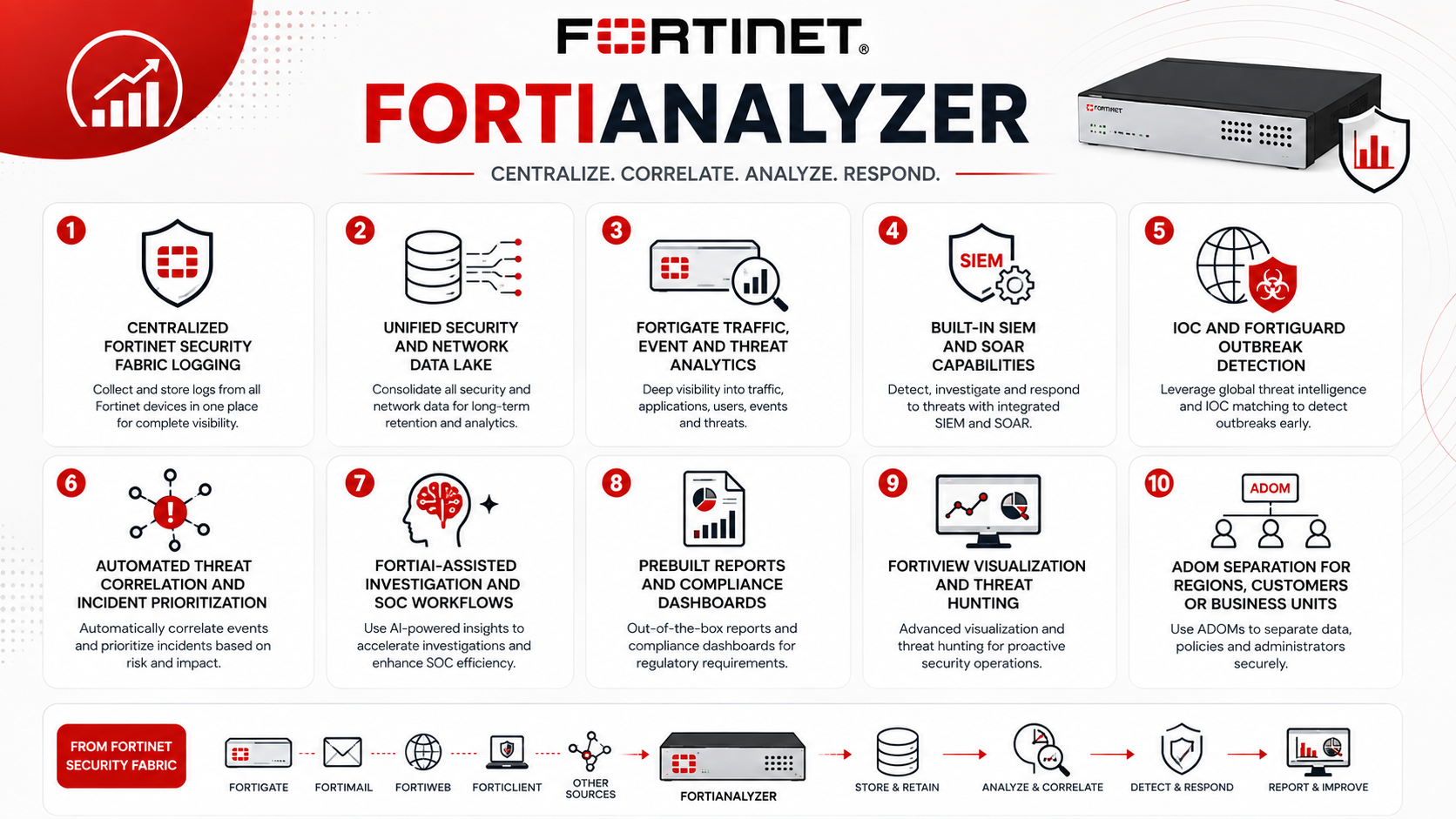
FortiAnalyzer At a Glance
What it is: Centralized logging, analytics and security operations platform
Parent category: Fortinet License
Primary role: Log collection, analysis, reporting, threat detection and SOC visibility
Current hardware models: FAZ-150G, 300G, 810G, 1000G, 3100G, 3510G and 3750G
Virtual option: FortiAnalyzer VM
Cloud option: FortiAnalyzer Cloud
Primary licensing metric: GB of logs ingested per day
Additional sizing metrics: Sustained logs/sec, storage, retention, devices/VDOMs and ADOMs
Operation modes: Analyzer and Collector
License Overview
FortiAnalyzer licensing differs depending on whether the organization chooses a physical appliance, virtual machine, or FortiAnalyzer Cloud. Physical appliances provide predefined logging and storage capacities. Fortinet’s current range starts with FAZ-150G at up to 25 GB/day and extends through larger systems such as FAZ-300G at 100 GB/day, FAZ-810G at 200 GB/day, FAZ-1000G at 660 GB/day, FAZ-3100G at 3,000 GB/day, FAZ-3510G at 5,000 GB/day and FAZ-3750G at up to 8,300 GB/day. Storage and analytic log-rate capacity increase with each platform.
FortiAnalyzer VM is more flexible. Its perpetual licensing model is based on GB/day of log ingestion, with stackable capacity licenses such as 1, 5, 25, 100, 500 and 2,000 GB/day. This allows an organization to begin with a smaller entitlement and add additional log capacity as the environment expands. Fortinet also offers subscription VM packages that combine log capacity with FortiCare and security services. FortiAnalyzer Cloud follows another model. Licensing can be associated with individual FortiGate devices or purchased as shared GB/day capacity. Current Fortinet documentation also provides 5, 50 and 500 GB/day cloud capacity add-ons.
Product Overview
Centralized Logging and the Security Fabric Data Lake
The simplest FortiAnalyzer use case is moving logs away from individual FortiGate appliances and storing them centrally.
That provides operational benefits immediately. Administrators can investigate an event across several firewalls without logging into each appliance separately, search historical traffic, review VPN and authentication activity, investigate blocked threats, and generate reports covering the entire network.
Fortinet now describes FortiAnalyzer as the unified data lake of the Security Fabric. Telemetry can be normalized and enriched across network, endpoint and cloud environments, with dashboards for areas such as SOC operations, email security, IoT and endpoint vulnerabilities.
Threat Detection and SOC Analytics
FortiAnalyzer is no longer limited to storing information after an incident.
FortiGuard threat intelligence can enrich events with indicators of compromise and outbreak information. Correlation and risk scoring can then help identify groups of related events that deserve analyst attention. Fortinet also maps detection context to MITRE ATT&CK and provides automation content packs that are updated regularly.
For lean security teams, this can provide a practical entry point into security operations without immediately deploying a separate enterprise SIEM and SOAR stack.
Reporting and Compliance
Reporting remains one of the most common reasons organizations deploy FortiAnalyzer.
Instead of manually extracting FortiGate logs, administrators can generate scheduled or on-demand reports covering traffic, security incidents, web activity, VPN usage, applications, threats and other operational data.
Retention requirements should be considered carefully here. A company that needs ninety days of searchable operational data has a different storage requirement from a regulated organization that must retain security logs for a year or more.
How FortiAnalyzer Works
Fortinet devices send logs to FortiAnalyzer over the network. These logs may include traffic sessions, security events, antivirus detections, IPS activity, web filtering, VPN connections, system events, authentication and other telemetry depending on the product and logging policy.
FortiAnalyzer receives the events and stores them for analytics and archive purposes. In Analyzer Mode, the platform indexes and analyzes the logs so they can be used by FortiView, incidents, reports, threat detection and SOC workflows.
In larger distributed environments, another FortiAnalyzer can operate in Collector Mode. A collector receives and archives logs close to the source, then forwards them to an Analyzer for centralized analytics and reporting. Fortinet specifically supports Analyzer–Collector architectures for geographically distributed networks.
This can be useful when hundreds of branches should not continuously send all security telemetry directly across long-distance WAN links to one central appliance.
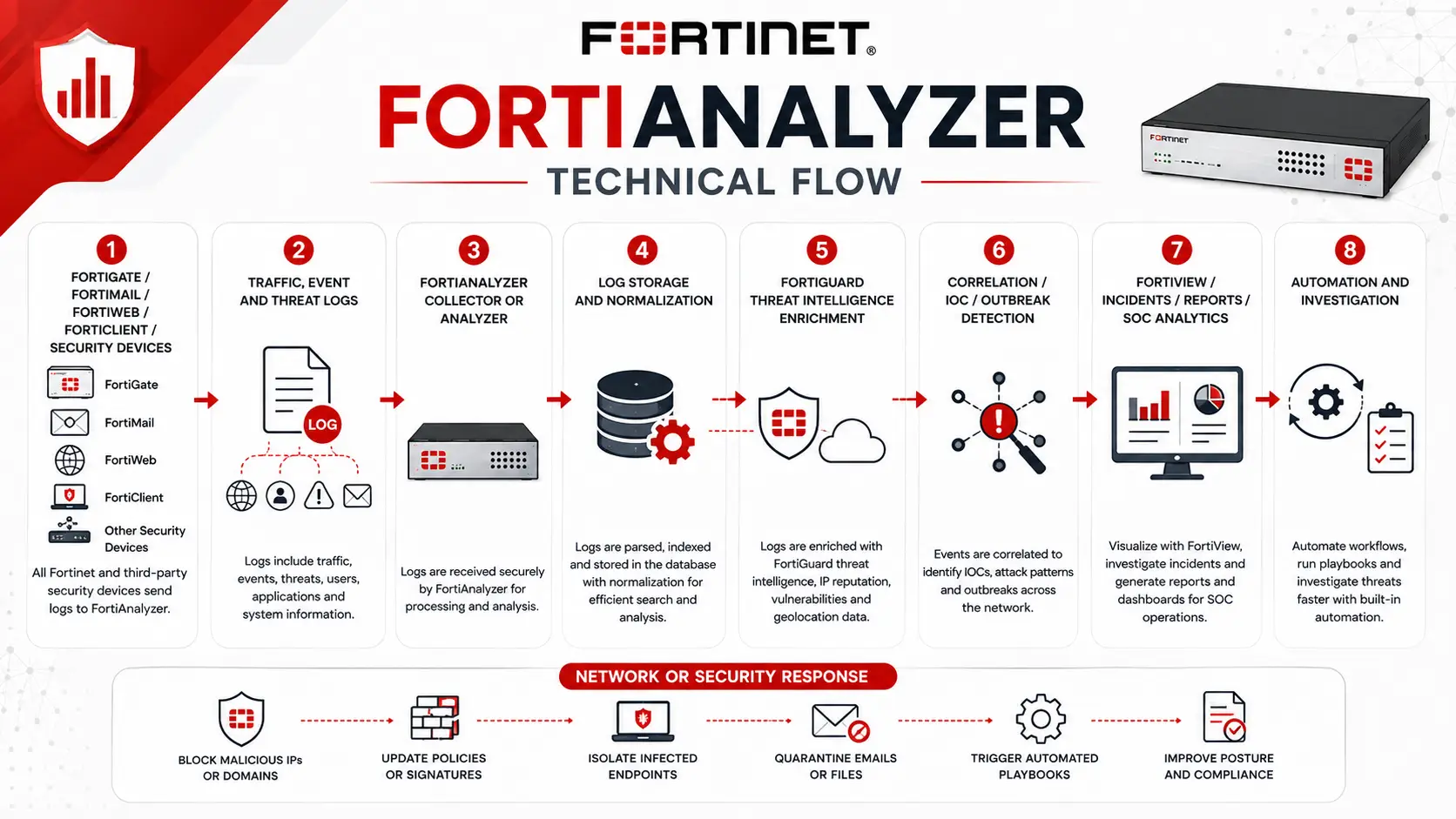
Core Technical Flow
FortiGate / FortiMail / FortiWeb / FortiClient / Security Devices
→ Traffic, Event and Threat Logs
→ FortiAnalyzer Collector or Analyzer
→ Log Storage and Normalization
→ FortiGuard Threat Intelligence Enrichment
→ Correlation / IOC / Outbreak Detection
→ FortiView / Incidents / Reports / SOC Analytics
→ Automation and Investigation
→ Network or Security Response
In smaller networks, the Collector stage may not be required and devices can send logs directly to the main Analyzer.
Options and Licensing Models
Physical FortiAnalyzer makes sense where the organization wants predictable storage and dedicated on-premises resources. The hardware should be selected from GB/day, sustained analytic log rate and storage capacity together rather than any one specification. For example, the current FAZ-150G supports 25 GB/day with an analytic rate around 500 logs/sec, while FAZ-1000G increases to 660 GB/day and around 20,000 analytic logs/sec. At the high end, FAZ-3750G is rated for 8,300 GB/day and around 100,000 analytic logs/sec.
FortiAnalyzer VM is more adaptable when virtualization infrastructure already exists or when logging capacity is expected to grow gradually. Since perpetual GB/day entitlements are stackable, additional capacity can be added without replacing the virtual appliance license architecture. FortiAnalyzer Cloud reduces the need to manage storage infrastructure locally. It can be licensed on a per-device basis or using pooled GB/day capacity, which can make it attractive for distributed FortiGate environments.
Features and Benefits
The primary benefit of FortiAnalyzer is context. A FortiGate may show that a connection was blocked, but FortiAnalyzer can help an administrator determine whether similar activity occurred on other firewalls, which endpoint was involved, whether related indicators have appeared previously, and whether the event aligns with a broader outbreak. For network teams, this improves troubleshooting as well as security. Historical SD-WAN events, VPN failures, policy activity and system events can be reviewed after the original condition has disappeared.
For SOC teams, the platform increasingly acts as a lightweight security-operations foundation. Fortinet now includes built-in SIEM, SOAR and XDR capabilities along with automated content packs and FortiAI assistance for investigation, triage and response. FortiAnalyzer can also coexist with another SIEM. Fortinet specifically positions the platform as able to complement existing SIEM or logging systems rather than forcing organizations to replace them.
Compatibility and Requirements
Start sizing FortiAnalyzer by measuring actual daily logging volume. Device count alone is misleading. Two FortiGate appliances protecting busy data-center environments can generate more logs than dozens of lightly used branch firewalls. Peak logs per second should be reviewed as well. A network can remain within its daily GB allowance while still creating very high short-term event rates during an attack, outage or major policy change.
Next, determine how long logs need to remain searchable and how long they need to remain archived. Storage calculations should account for retention policy, analytics requirements and expected growth rather than only today’s traffic. ADOM design also deserves attention. ADOMs can separate devices and data by customer, region, business unit or product type. Fortinet requires ADOM functionality for FortiMail and FortiWeb logging/reporting, and current FortiAnalyzer VM subscription licenses include five ADOMs by default. For geographically distributed enterprises, consider whether a central Analyzer alone is enough or whether Collector nodes should be placed closer to remote locations.
How Activation and Deployment Work
Deployment normally starts by registering and licensing the selected FortiAnalyzer hardware or VM. For FortiAnalyzer VM, the license defines the allowed log-ingestion capacity and related entitlements. FortiGate and other supported devices are then authorized in FortiAnalyzer and configured to forward the required logs. ADOMs can be introduced where administrative or data separation is required.
The logging policy should be reviewed before production rollout. Sending every possible event from every device can consume large amounts of storage without necessarily improving investigations. On the other hand, overly aggressive filtering may leave the SOC without enough historical data when an incident occurs.
For critical environments, FortiAnalyzer supports HA clusters with one primary and up to three secondary units. Cluster members must belong to the same FortiAnalyzer series and operate in the same Analyzer or Collector mode. Logs and relevant data are synchronized, while secondary systems can also assist with tasks such as reporting.
Pricing and Quote Process
The price of a FortiAnalyzer license should be calculated from the logging architecture rather than only the number of Fortinet devices. For a useful quote, determine average and peak GB/day, expected logs per second, required retention period, current storage requirement, number of FortiGate and other Security Fabric devices, VDOM count, ADOM requirements, and whether the system will operate as an Analyzer, Collector or both.
Also identify whether the preferred deployment is a hardware appliance, VM or FortiAnalyzer Cloud. For VM deployments, include the current GB/day requirement and expected growth so additional licensing does not need to be purchased immediately after deployment.
If HA is required, the quote should include the cluster architecture. Where FortiAI, IOC, Security Automation, SOC services or other subscriptions are required, those services should also be specified separately rather than assuming they are included in every base license.
Fortinet pricing depends on your product edition, FortiGate model, security services, license term, deployment model, and support requirements.