

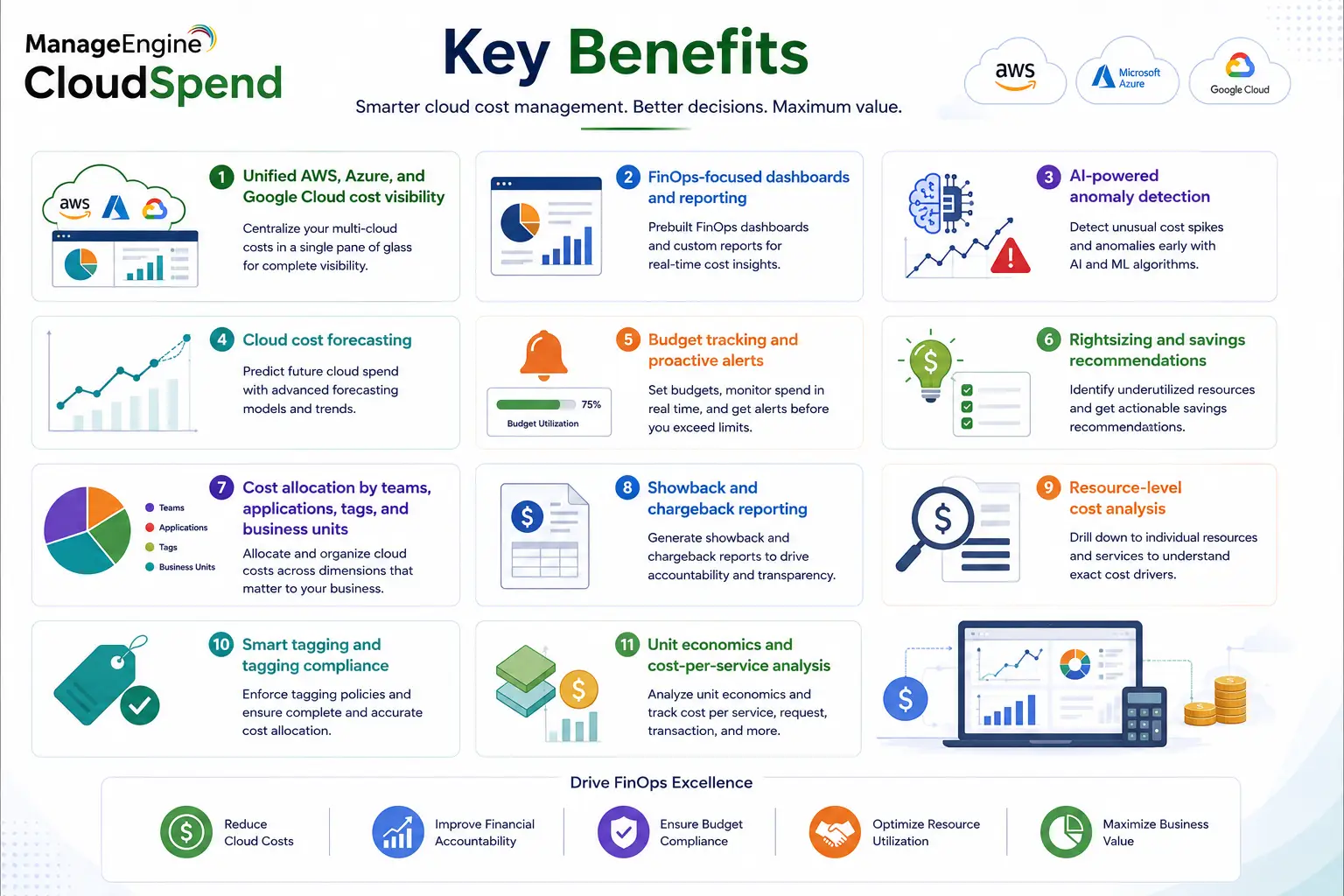
ManageEngine CloudSpend is a cloud cost management and FinOps platform designed to help organizations understand, allocate, control, and optimize spending across AWS, Microsoft Azure, and Google Cloud. Instead of relying on separate billing consoles from each cloud provider, CloudSpend brings financial and usage information into a common view so finance, engineering, FinOps, and IT teams can work from the same cost data.
The platform goes beyond monthly cloud-bill reporting. It can identify unusual spending patterns, forecast future costs, highlight idle or oversized resources, organize expenses by business unit or application, and alert teams before budgets are exceeded. ManageEngine also supports showback and chargeback workflows, making ManageEngine CloudSpend relevant for organizations that need to connect technical cloud consumption with internal financial accountability.
Quick Benefits
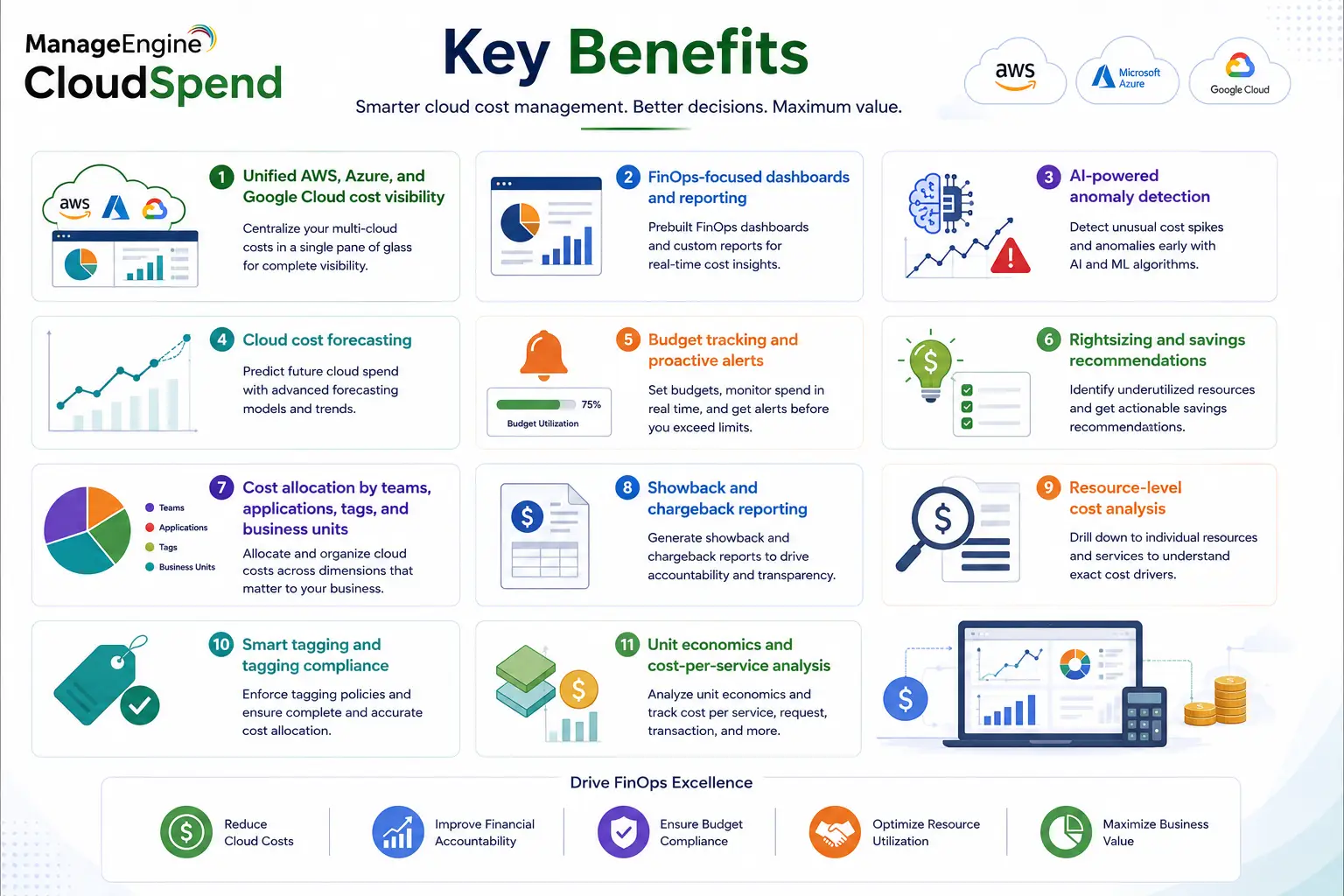
- Unified AWS, Azure, and Google Cloud cost visibility
- FinOps-focused dashboards and reporting
- AI-powered anomaly detection
- Cloud cost forecasting
- Budget tracking and proactive alerts
- Rightsizing and savings recommendations
- Cost allocation by teams, applications, tags, and business units
- Showback and chargeback reporting
- Resource-level cost analysis
- Smart tagging and tagging compliance
- Unit economics and cost-per-service analysis
ManageEngine CloudSpend At a Glance
What it is: Cloud cost management and FinOps platform
Parent category: ManageEngine License
Supported clouds: AWS, Microsoft Azure, and Google Cloud
Primary role: Cost visibility, optimization, budgeting, forecasting, and governance
Deployment model: SaaS
Cost allocation: Accounts, cost centers, tags, teams, workloads, and applications
Optimization: Rightsizing, idle-resource detection, commitment analysis, and recommendations
License Overview
A ManageEngine CloudSpend license is currently selected according to the amount of cloud expenditure that needs to be tracked.
ManageEngine moved CloudSpend away from its earlier usage-linked pricing approach toward a fixed slab-based subscription model. Organizations now select a plan according to expected annual cloud spend, which makes the CloudSpend subscription itself more predictable even if monthly infrastructure consumption fluctuates.
For example, the Professional plan currently covers up to $250,000 of annual cloud spend, Elite covers up to $500,000, and Enterprise extends coverage to $1 million. Organizations spending more than $1 million annually move into the Custom tier. Add-on coverage is also available for most paid plans, allowing an organization to expand tracked spending without immediately replacing its base subscription.
The important point is that the license is not based simply on the number of virtual machines, cloud users, or resources. A company with a relatively small number of expensive database or analytics workloads can require a larger plan than an organization managing hundreds of low-cost resources.
Product Overview
Multi-Cloud Cost Visibility
CloudSpend consolidates billing and cost information from AWS, Azure, and Google Cloud into a single analytics environment. This is especially useful in hybrid or multi-cloud organizations where each provider uses different billing structures, discounts, tags, and reporting terminology.
Administrators can drill into expenses by service, resource, account, region, project, subscription, tags, or business unit. This helps answer practical questions such as which application drove a monthly increase, which development environment is consuming unnecessary resources, or which business unit should be charged for a shared cloud service.
Cost Optimization and Recommendations
Visibility alone does not reduce spending. CloudSpend also identifies optimization opportunities. The platform provides data-driven recommendations for underutilized or oversized resources and can highlight idle infrastructure that is creating unnecessary cost. Commitment reports help teams understand reservation and savings-plan coverage, while automation can be used to act on selected resources in environments where optimization workflows are approved. This is particularly useful in development and test environments, where resources may continue running after they are no longer needed.
AI, Forecasting, and Anomaly Detection
CloudSpend uses historical spending and current usage patterns to forecast future cloud expenditure. Forecasts can be broken down by services, resources, teams, or other organizational structures, helping finance and engineering teams plan before monthly bills arrive.
AI-driven anomaly detection provides another layer of control. Instead of waiting until month-end to discover an unexpected increase, CloudSpend can identify unusual cost spikes and help narrow the cause to a specific service, account, region, or workload. In 2026, ManageEngine also expanded CloudSpend with Zia Agents, allowing teams to create AI-driven FinOps workflows around cost analysis, anomaly detection, governance, and reporting.
How ManageEngine CloudSpend Works
CloudSpend connects to the organization’s AWS, Azure, and GCP billing environments and imports cloud cost and usage data into a centralized platform. The data is then categorized and enriched using accounts, tags, business units, cost centers, services, and resource metadata. This creates a structure that both technical and financial teams can understand.
Once that baseline is available, CloudSpend applies forecasting, anomaly detection, optimization recommendations, budget rules, and governance checks. A finance team may use the platform to monitor monthly budget performance, while an engineering team uses the same data to identify oversized instances or resources that are running unnecessarily. The goal is to turn provider billing information into an operating process rather than treating cloud costs as a report that finance reviews after the money has already been spent.
Core Technical Flow
AWS / Azure / Google Cloud Billing Data
→ CloudSpend Data Collection
→ Account / Resource / Tag / Cost Center Mapping
→ Unified Cost Analytics
→ AI Forecasting and Anomaly Detection
→ Optimization Recommendations
→ Budgets / Governance / Chargeback
→ FinOps, Engineering, IT, and Finance Decisions
CloudSpend can also apply checks at account, business-unit, cost-center, or reporting levels, helping organizations enforce budget and anomaly thresholds across different parts of the cloud estate.
Options and Licensing Models
| Plan | Tracked cloud spend | Cloud accounts | Data retention | Typical fit |
|---|---|---|---|---|
| Free | Up to $3,000/month | Up to 3 | 6 months daily / 1 year monthly | Evaluation or very small cloud environments |
| Lite | Up to $100,000/year | Up to 3 | 6 months daily / 1 year monthly | Smaller organizations needing basic cost visibility |
| Starter | Up to $100,000/year | Up to 5 | 15 months daily / 3 years monthly | Growing teams needing broader cost-management capabilities |
| Professional | Up to $250,000/year | Flexible | 15 months daily / 3 years monthly | Established FinOps environments |
| Elite | Up to $500,000/year | Flexible | 15 months daily / 3 years monthly | Larger multi-cloud estates |
| Enterprise | Up to $1 million/year | Flexible | 15 months daily / 3 years monthly | Enterprise-scale cost governance |
| Custom | Above $1 million/year | Flexible | 15 months daily / 3 years monthly | Large or highly customized cloud environments |
Current plans differ not only by tracked spend but also by advanced reporting, allocation, tagging compliance, inventory, vendor-cost reporting, and governance capabilities. Additional cloud-spend coverage can also be added to supported paid tiers without immediately moving to another base plan.
Features and Benefits
CloudSpend can improve accountability by assigning infrastructure costs to the teams or applications that actually generate them.
For example, shared Azure services can be grouped into separate cost centers for development, production, data analytics, or different business units. Finance can then use showback reports to demonstrate consumption, or chargeback models where those costs need to be allocated internally.
Budgeting adds a proactive layer. CloudSpend supports recurring budgets and can alert teams when spending approaches or exceeds configured thresholds. Notifications can be delivered through channels such as email, Slack, or Microsoft Teams, allowing the responsible team to react before an overspend becomes a month-end surprise.
Tagging compliance is equally important. Poor tagging makes it difficult to understand who owns a resource or which application generated its cost. CloudSpend can identify untagged resources and quantify their financial impact, helping FinOps teams improve governance rather than simply report cloud bills.
Compatibility and Requirements
Before adopting CloudSpend, the organization should first identify all cloud billing accounts that need to be included. AWS accounts, Azure subscriptions, and Google Cloud projects may belong to different teams or business units, so ownership and access should be mapped before onboarding.
Existing tagging quality should also be reviewed. If resources are poorly tagged, CloudSpend can still provide provider-level cost data, but showback, chargeback, and application-level allocation will be more useful once tagging and cost-center structures are defined.
Budgeting and anomaly detection need realistic thresholds. A seasonal e-commerce environment, for example, should not use the same anomaly tolerance during a known peak period as during a normal month.
Organizations using reservations, savings plans, Kubernetes, Databricks, or vendor technologies should also identify those cost areas before selecting a plan because advanced tiers provide broader reporting and optimization capabilities.
How Activation and Deployment Work
CloudSpend is SaaS-based, so there is no dedicated application server to install.
Deployment begins by connecting the required AWS, Azure, or GCP accounts and granting the permissions necessary for billing and cost visibility. The platform then imports historical and current cost information and begins organizing the data for reporting.
The next step should be cost allocation. Accounts, tags, and resources can be grouped into business units or cost centers so teams can understand which services they own.
Budgets, anomaly checks, governance profiles, and automation should be added after the basic cost model is validated. This avoids creating alerts around incorrectly categorized resources or incomplete billing data.
For mature FinOps environments, CloudSpend can then be used as an ongoing operating layer where optimization recommendations, forecasting, tagging compliance, and cost reviews become recurring processes rather than one-time cleanup exercises.
Pricing and Quote Process
Pricing for a ManageEngine CloudSpend license is primarily determined by the amount of annual cloud spending that needs to be tracked. For an accurate quote, start with the combined AWS, Azure, and GCP spend expected over the next twelve months. Include future projects rather than only the current billing run, particularly if new cloud workloads or migrations are planned.
The number of cloud accounts should also be reviewed because lower plans limit configurable accounts while higher tiers provide more flexibility. Retention requirements, reporting needs, cost-allocation complexity, tagging governance, and whether advanced optimization capabilities are required can influence which plan offers the best value.
If cloud spend is expected to temporarily exceed the current tier, compare the available spend add-ons with upgrading to the next plan. ManageEngine’s current pricing structure was specifically designed to allow additional coverage without automatically forcing customers into a higher subscription level.
ManageEngine pricing depends on your license edition, users, devices, deployment model, term, and support needs.