

Cisco UCS License refers to the licensing structure used to activate, manage, expand, and support Cisco Unified Computing System environments across servers, Fabric Interconnects, management software, and infrastructure operations. Cisco UCS environments may include Cisco UCS X-Series, B-Series, C-Series, Cisco UCS Manager, Cisco Intersight, Cisco UCS Central, and Cisco Fabric Interconnects, while license-dependent software features, port activation, management subscriptions, and related entitlements must be planned based on the selected UCS architecture and activation method.
Key Benefits
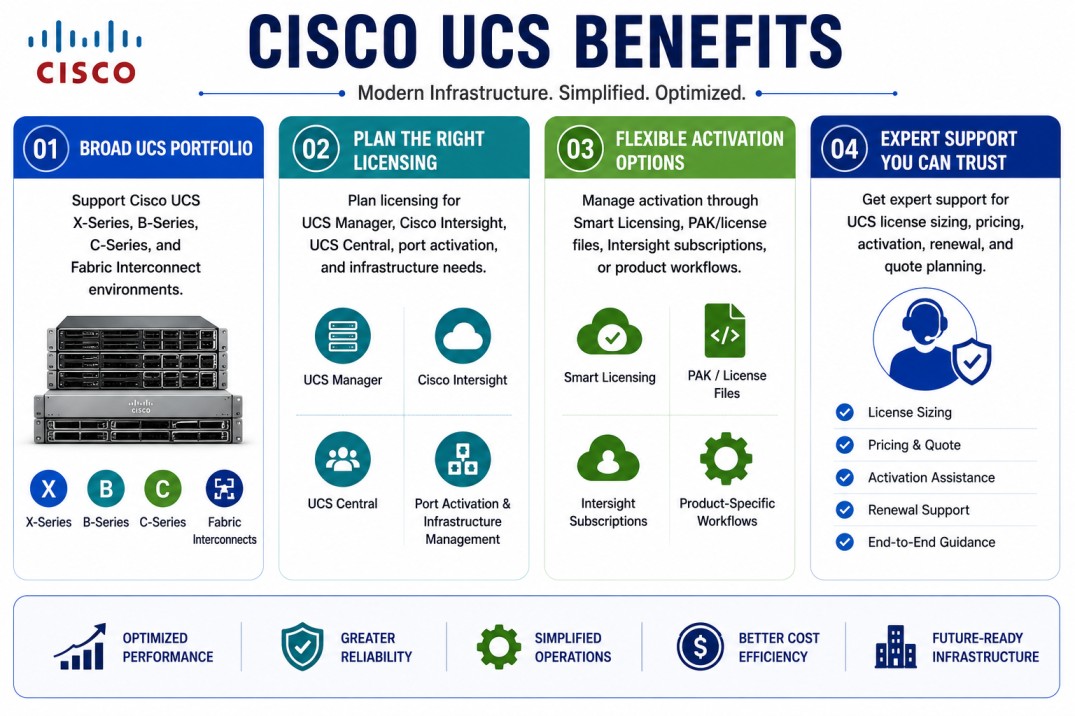
- Support Cisco UCS X-Series, B-Series, C-Series, and Fabric Interconnect environments
- Plan licensing for UCS Manager, Cisco Intersight, UCS Central, port activation, and infrastructure management needs
- Manage activation through Smart Licensing, PAK/license files, Intersight subscriptions, or product-specific workflows where applicable
- Get expert support for Cisco UCS License sizing, pricing, activation, renewal, and quote planning
Review Cisco UCS License Price List and request a quote tailored to your licensing needs.
Cisco UCS License At a glance
What it does : Cisco UCS License helps organizations activate and manage license-dependent UCS components, including Fabric Interconnect ports, infrastructure management software, Intersight subscriptions, UCS Central licensing, and related server management features.
Product category : Cisco Data Center License
Main Cisco platforms : Cisco UCS X-Series, Cisco UCS B-Series, Cisco UCS C-Series, Cisco UCS Fabric Interconnects, Cisco UCS Manager, Cisco Intersight, and Cisco UCS Central.
License type : Licensing depends on the UCS environment. It may include Fabric Interconnect port licenses, perpetual software licenses, Cisco Intersight subscription tiers, UCS Central licensing, PAK-based license files, or Smart Licensing where supported.
Who needs it : Organizations using Cisco UCS servers for virtualization, private cloud, enterprise applications, databases, infrastructure management, data center compute, and hybrid cloud operations.

License Overview
Cisco UCS licensing is not based on one universal license. The required license depends on the UCS server family, Fabric Interconnect model, management software, enabled ports, software version, support coverage, and operational features needed in the environment. A Cisco UCS License may be required for different areas of the infrastructure. Some deployments need port activation licenses for Cisco UCS Fabric Interconnects. Some environments need Cisco Intersight subscriptions for centralized monitoring, inventory, firmware visibility, policy management, and lifecycle operations. Other UCS environments may use UCS Central, UCS Manager, PAK-based license files, or Smart Licensing depending on the version and deployment model.
Fabric Interconnect licensing is one of the most important areas to review. Some Fabric Interconnect generations use port-based licensing, where additional ports require valid activation licenses. Other newer models may use a perpetual software license model that activates ports and software features in a simpler way. Cisco Intersight is also important for modern UCS environments. It provides centralized infrastructure operations and is commonly licensed through subscription tiers such as Essentials and Advantage, depending on the level of management, visibility, and operational control required. A properly planned Cisco UCS License helps organizations avoid missing port activation, limited management visibility, unsupported expansion, renewal gaps, and deployment delays during UCS growth or upgrade projects.
Product Overview
Cisco UCS, or Cisco Unified Computing System, brings server and compute infrastructure into the wider Cisco Networking portfolio for enterprise data center environments. It combines compute hardware, networking, storage access, management software, and policy-based operations into one infrastructure model.
In a traditional server environment, administrators may need to manage server identity, firmware, network connectivity, boot settings, adapters, and hardware configuration separately. Cisco UCS simplifies this process by using centralized management and policy-based configuration to make server deployment more consistent.
Cisco UCS environments can include different server families. Cisco UCS X-Series is used for modern modular compute environments. Cisco UCS B-Series provides blade server infrastructure for dense data center deployments. Cisco UCS C-Series provides rack server options for standalone, managed, virtualization, database, and application workloads.
Management can be handled through Cisco UCS Manager, Cisco Intersight, Cisco UCS Central, or Cisco IMC depending on the deployment model. These tools help administrators manage server profiles, policies, firmware, inventory, system health, and lifecycle operations.
The main value of Cisco UCS is that it helps organizations operate compute infrastructure with better consistency, centralized control, scalability, and lifecycle visibility.
Core technical flow
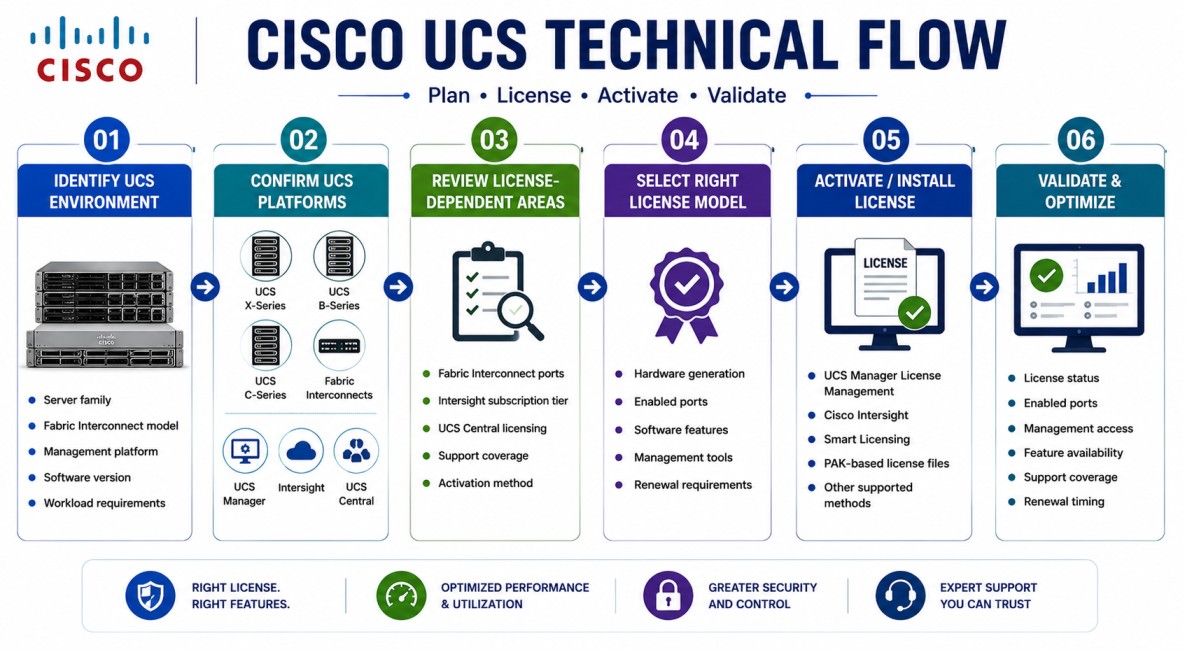
- Identify the Cisco UCS environment, including server family, Fabric Interconnect model, management platform, software version, and workload requirements.
- Confirm the UCS platforms in scope, such as UCS X-Series, B-Series, C-Series, Fabric Interconnects, UCS Manager, Intersight, UCS Central, or Cisco IMC.
- Review license-dependent areas such as Fabric Interconnect ports, Intersight subscription tier, UCS Central licensing, support coverage, and activation method.
- Select the correct Cisco UCS License model based on the hardware generation, enabled ports, software features, management tools, and renewal requirements.
- Activate or install the required license through the correct workflow, such as UCS Manager license management, Cisco Intersight, Smart Licensing, PAK-based license files, or another supported Cisco licensing method.
- Validate license status, enabled ports, management access, feature availability, support coverage, and renewal timing after activation.
Options & Licensing Models
| Licensing model | Best for | Typical scope | What affects pricing |
|---|---|---|---|
| Fabric Interconnect port licensing | UCS domains that need additional enabled ports | Ethernet, Fibre Channel, unified ports, or server connectivity ports | FI model, port speed, number of ports, and expansion plan |
| Perpetual software licensing | Supported newer Fabric Interconnect platforms | Activating ports and software features through a simplified perpetual model | Platform generation and supported release |
| Cisco Intersight Essentials | Standard UCS visibility and infrastructure operations | Inventory, health monitoring, firmware visibility, dashboards, and core management | Number of managed systems and management scope |
| Cisco Intersight Advantage | Advanced infrastructure management | Policy management, deeper operations, lifecycle workflows, and stronger visibility | Feature depth and operational requirements |
| Cisco UCS Central licensing | Multi-domain UCS Manager environments | Centralized management across multiple UCS domains | Server/domain scale and licensing workflow |
| PAK-based license files | Traditional or older UCS licensing workflows | Product-specific license files generated from Cisco licensing tools | Product version and license type |
| Smart Licensing | Modern Cisco entitlement tracking where supported | Smart Account, Virtual Account, product registration, and entitlement visibility | Product support and activation method |
| Support and renewal coverage | Ongoing UCS operations | Software access, technical support, lifecycle planning, and renewal continuity | Term, support level, and product scope |
Features & Benefits
Cisco UCS License planning helps organizations keep server infrastructure, Fabric Interconnects, management software, and support coverage aligned with real operational requirements.
One major benefit is better infrastructure control. With Cisco UCS Manager or Cisco Intersight, administrators can manage server profiles, policies, firmware, inventory, and system health from a structured management platform.
Another benefit is scalability. As the organization adds servers, enables more Fabric Interconnect ports, expands UCS domains, or adds Intersight-managed systems, licensing can be reviewed and expanded according to the actual environment.
Cisco UCS licensing also supports lifecycle management. The correct license and support coverage help ensure that required management features, software access, updates, and operational tools remain available during upgrades, expansion, and renewal cycles.
For environments using UCS X-Series, B-Series, C-Series, Fabric Interconnects, UCS Manager, and Intersight, a properly planned licensing model helps reduce deployment delays, avoid missing entitlements, and simplify long-term compute operations.
Compatibility & Requirements
Common environments
- Cisco UCS X-Series modular systems
- Cisco UCS B-Series blade server environments
- Cisco UCS C-Series rack server environments
- Cisco UCS Fabric Interconnect domains
- Cisco UCS Manager deployments
- Cisco Intersight-managed infrastructure
- Cisco UCS Central multi-domain environments
- Cisco IMC-managed rack server environments
Technical requirements
- Supported UCS server family and software release
- Fabric Interconnect model and enabled port requirements
- UCS Manager, Intersight, UCS Central, or Cisco IMC deployment status
- Cisco Smart Account, PAK/license file, or product-specific activation workflow where applicable
- Support contract, subscription term, and renewal requirement
- Server inventory, firmware version, management mode, and expansion plan
How activation works
Cisco UCS license activation depends on the product and licensing model being used. Fabric Interconnect licenses may be installed, viewed, or validated through Cisco UCS Manager depending on the FI model and software release.
For Cisco Intersight, activation is normally handled through the Intersight licensing workflow and Cisco account-based subscription management. Administrators should confirm that the required subscription tier is active and that the correct systems are covered.
For Cisco UCS Central, licensing may use Cisco Smart Licensing or traditional PAK-based licensing depending on the version and deployment model. Some older or product-specific UCS workflows may also require license files generated from Cisco licensing tools.
After activation, administrators should validate enabled ports, license status, subscription tier, product registration, feature availability, support coverage, and renewal timing.
This is important because a missing Cisco UCS License can affect port activation, management visibility, software features, infrastructure control, or long-term support readiness.
Pricing factors + quote process
Pricing for Cisco UCS License depends on the UCS platforms involved, the management software required, the Fabric Interconnect model, the number of enabled ports, the Intersight subscription tier, support coverage, and the subscription or renewal term.
A small UCS C-Series environment may need a different license scope than a larger UCS domain with B-Series blade servers, X-Series systems, Fabric Interconnects, Intersight, and multi-domain management.
The main pricing factors usually include server family, Fabric Interconnect generation, port activation needs, Intersight Essentials or Advantage requirements, UCS Central usage, support level, software version, and expansion plan.
During the quote process, the Cisco UCS environment is reviewed first. Then the required servers, management software, port licenses, subscription tiers, activation workflow, and support coverage are mapped into the correct quote.
After you request a quote
- We review your Cisco UCS environment and server requirements
- Identify the required Cisco UCS License model and license scope
- Check Fabric Interconnect, UCS Manager, Intersight, UCS Central, and port licensing considerations
- Provide pricing, delivery details, and activation guidance
Cisco UCS pricing depends on your license type, deployment model and support requirements.