

Cisco SNA also known as Cisco Secure Network Analytics and formerly known as Cisco StealthWatch, analyzes network telemetry to improve threat visibility, behavioral detection, and security investigation workflows across enterprise networks. Cisco describes Secure Network Analytics as a network threat detection and response solution that continuously monitors network and cloud traffic to identify hidden threats before they become major incidents.
Key Benefits
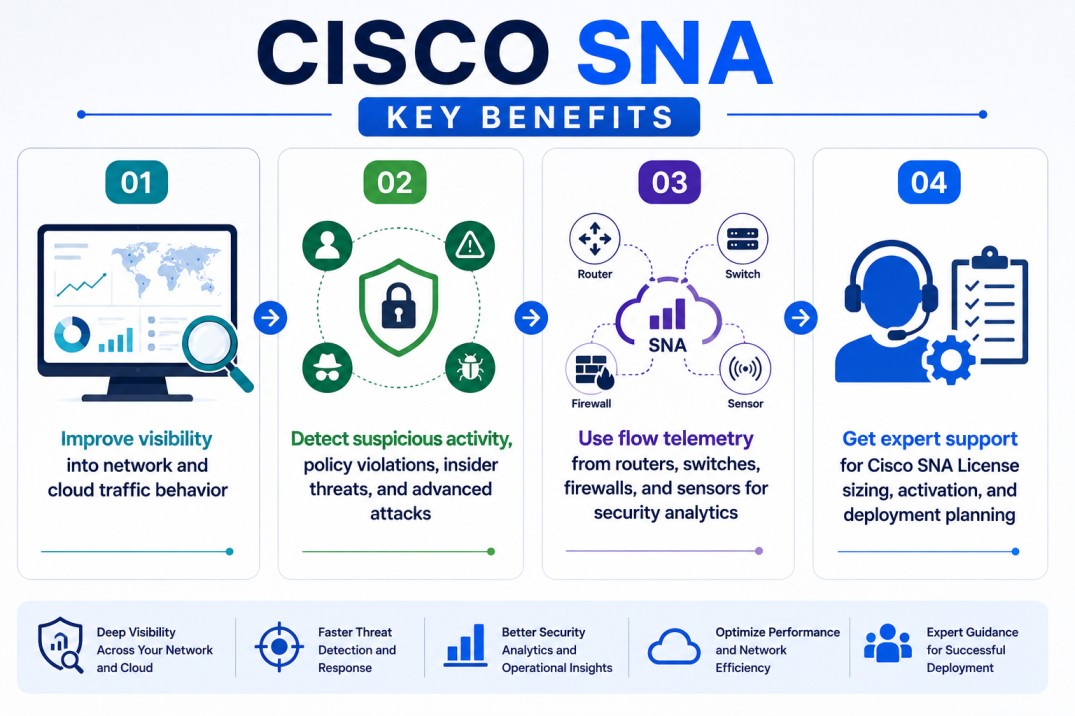
- Improve visibility into network and cloud traffic behavior
- Detect suspicious activity, policy violations, insider threats, and advanced attacks
- Use flow telemetry from routers, switches, firewalls, and sensors for security analytics
- Get expert support for Cisco SNA License sizing, activation, and deployment planning
Review Cisco SNA Price List and request a quote tailored to your licensing needs.
Cisco SNA At a glance
What it does : Cisco SNA provides network threat detection and response by collecting, analyzing, and correlating flow telemetry from enterprise network, data center, branch, and cloud-connected environments.
Product category : Cisco Security
License type : Smart Licensing-based, with licensing commonly planned around Flow Rate capacity measured in Flows Per Second (FPS), plus optional licensed components or features depending on deployment scope. Cisco’s Secure Network Analytics data sheet states that the Flow Rate License is required to collect, manage, and analyze flow telemetry aggregated at the Secure Network Analytics Manager, and that it is licensed based on FPS.
Typical term : Commonly subscription-based, with term and scope depending on Cisco ordering model, deployment size, and selected features.
Activation method : Cisco Smart Licensing through Cisco Smart Software Manager, with transport options for direct connectivity, proxy, or Transport Gateway / Smart Software Manager On-Prem depending on the environment. Cisco’s Smart Licensing guide notes that Secure Network Analytics uses Smart Accounts and Smart Software Manager for registration, license management, reporting, and notifications.
Who needs it : Organizations that need network detection and response, behavioral analytics, encrypted traffic visibility, flow-based threat detection, insider threat detection, and security monitoring across distributed environments.

License Overview
Organizations deploying Cisco Secure Network Analytics usually need licensing that reflects telemetry volume, flow collection scope, deployment architecture, and required security analytics capabilities. The Cisco SNA License is generally aligned with Flow Rate capacity, measured in Flows Per Second, and the overall telemetry volume collected from exporters such as routers, switches, firewalls, Flow Sensors, and other supported sources. Cisco documentation states that the Flow Rate License defines the volume of flows that may be collected and that licenses can be combined to achieve the desired flow capacity.
For Cisco SNA deployments within the wider Cisco License portfolio, planning should account for Secure Network Analytics Manager, Flow Collectors, Flow Sensors, UDP Directors, Data Store components, optional threat feeds, and the actual telemetry volume rather than only the number of devices. A properly aligned Cisco SNA License helps organizations avoid FPS under-sizing, maintain flow collection continuity, support investigation workflows, and keep network detection coverage aligned with the real traffic profile of the environment.
Product Overview
Security teams often struggle to detect threats that move through trusted network paths, especially when attackers use valid credentials, encrypted traffic, or internal systems to avoid obvious perimeter alerts.
Cisco SNA is designed to reduce this visibility gap by using flow telemetry and behavioral analytics to identify suspicious network activity across the environment.
In practice, the platform collects telemetry from network devices and sensors, analyzes communication patterns, identifies anomalies, and helps teams investigate potential threats such as policy violations, malware activity, lateral movement, command-and-control behavior, or data exfiltration.
One of the key strengths of Cisco Secure Network Analytics is that it turns the network into a security sensor. Instead of relying only on endpoint alerts, teams can monitor how systems communicate and detect behavior that may indicate compromise.
For organizations that previously used Cisco StealthWatch, Cisco SNA represents the modern naming and licensing direction for the same security analytics family. Cisco’s Smart Licensing guide notes that Cisco Stealthwatch Enterprise products were rebranded to Cisco Secure Network Analytics in v7.4.0, while the former Stealthwatch name may still appear in some Cisco Smart Account contexts.
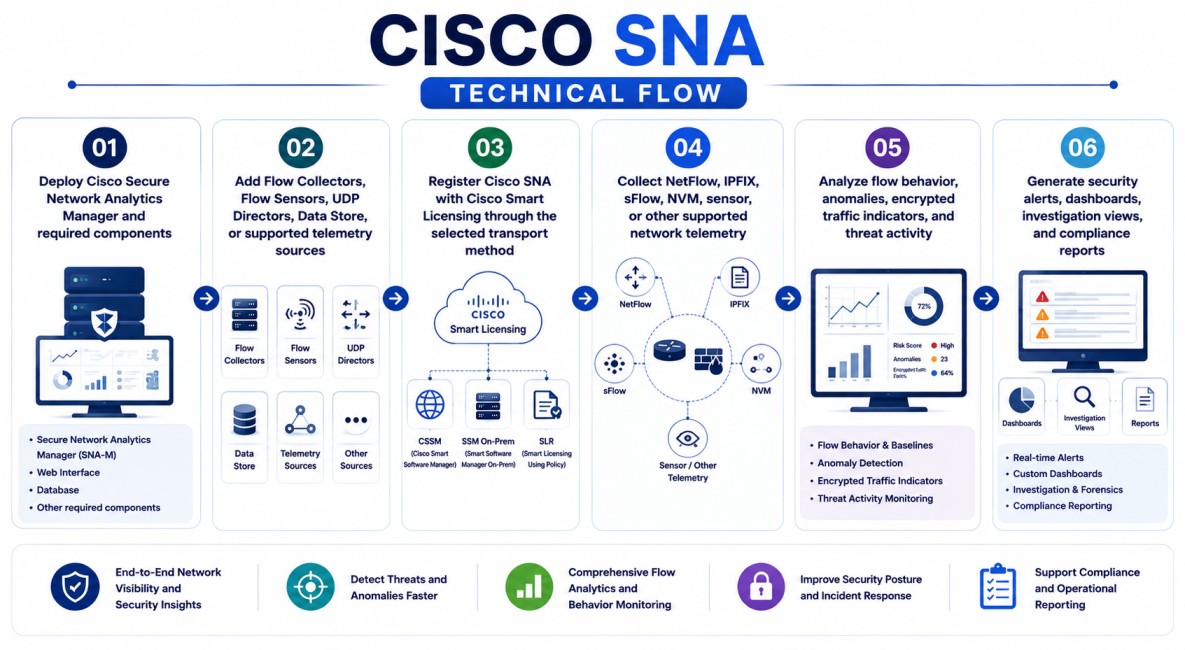
Core technical flow
- Deploy Cisco Secure Network Analytics Manager and required components
- Add Flow Collectors, Flow Sensors, UDP Directors, Data Store, or supported telemetry sources
- Register Cisco SNA with Cisco Smart Licensing through the selected transport method
- Collect NetFlow, IPFIX, sFlow, NVM, sensor, or other supported network telemetry
- Analyze flow behavior, anomalies, encrypted traffic indicators, and threat activity
- Generate security alerts, dashboards, investigation views, and compliance reports
Options & Tiers
| Licensing Model | Best for | Typical Scope | What affects pricing |
|---|---|---|---|
| Flow Rate License | Core SNA deployments | Flow telemetry collection and analytics | FPS capacity |
| Flow Sensor licensing | Deeper telemetry visibility | Network segments without native flow export or needing extra context | Sensor type and deployment scale |
| Threat Feed / Threat Intelligence | Advanced security analytics | Additional threat context and intelligence | Feature requirement |
| Data Store deployment | Large telemetry environments | Scalable storage and long-term flow retention | Data volume and retention needs |
| Smart Licensing transport options | Connected or controlled environments | CSSM, proxy, or SSM On-Prem / Transport Gateway | Activation model |
Features & Benefits
Hidden network threats are difficult to investigate when teams only have fragmented logs, device-specific alerts, or limited visibility into internal traffic behavior. Cisco SNA helps reduce this risk by centralizing network telemetry analysis and applying behavioral analytics to detect suspicious communication patterns.
One of the major benefits is improved threat visibility. Cisco highlights Secure Network Analytics use cases such as detecting unknown malware, insider threats, data exfiltration, policy violations, and other sophisticated attacks. The platform also supports encrypted traffic analysis without requiring traditional decryption. Cisco states that Secure Network Analytics can help identify and isolate threats in encrypted traffic without compromising privacy and data integrity. Over time, Cisco SNA helps organizations improve incident investigation, reduce blind spots, and maintain stronger network detection and response capabilities across complex enterprise environments.
System Requirements
Common environments
- Enterprise network detection and response environments
- Data center, branch, cloud-connected, and campus networks
- NetFlow, IPFIX, sFlow, and telemetry-enabled network infrastructures
- Security operations teams using Cisco Secure Network Analytics or Cisco StealthWatch workflows
Technical requirements
- Cisco Secure Network Analytics Manager deployment
- Flow Collectors, Flow Sensors, Data Store, or supported telemetry components as required
- Cisco Smart Account and Virtual Account access
- CSSM connectivity, proxy, Transport Gateway, or Smart Software Manager On-Prem design
- Flow telemetry exported from supported routers, switches, firewalls, sensors, or endpoint telemetry sources
Cisco’s licensing guide lists Smart Software Licensing for Secure Network Analytics features such as Flow Sensors Virtual Edition, UDP Directors, Threat Feed, Security Analytics and Logging, and Flow Rate licensing. It also notes that starting with version 7.5.1, NVM traffic is included with NetFlow when calculating Flow Rate licensing requirements.
How activation works
Activating Cisco SNA usually starts after the Secure Network Analytics deployment is installed and the required Cisco Smart Account, Virtual Account, and license entitlements are prepared.
In connected environments, the Manager registers with Cisco Smart Software Manager. Cisco’s licensing guide explains that administrators can register the product instance using a token from Cisco Smart Software Manager and then review registration status, authorization status, and license usage from Secure Network Analytics.
For controlled environments, transport settings can be configured so the Manager communicates through Transport Gateway, also known as Satellite or Smart Software Manager On-Prem, instead of directly reaching Cisco Smart Account services. Cisco documents Direct, Transport Gateway, and HTTP/HTTPS Proxy options for Secure Network Analytics Smart Licensing transport settings.
After registration, administrators should review Smart License Usage, Flow Rate status, authorization status, and out-of-compliance alerts. Cisco documentation notes that Flow Rate usage is calculated using the previous 24-hour period and that Secure Network Analytics reports the 95th percentile of daily Flow Rate usage to the Cisco Smart Account.
For restricted or air-gapped environments, the correct activation approach should be reviewed before deployment because Cisco’s SNA licensing guide directs closed or airgap licensing option discussions through Cisco Support Case Manager under security-related licensing administration.
Pricing factors + quote process
Organizations usually size Cisco SNA licensing according to flow telemetry volume, measured by Flow Rate / FPS, and the components required for the deployment.
Environments with many routers, switches, firewalls, branch sites, data centers, Flow Sensors, NVM telemetry, or encrypted traffic analytics requirements may require more careful FPS estimation and licensing planning.
Additional considerations, such as Data Store needs, retention requirements, Threat Feed licensing, Smart Licensing transport model, support coverage, deployment size, and subscription term, can also influence the final Cisco SNA License scope.
During the quote process, flow telemetry sources, expected FPS, security analytics use cases, deployment architecture, and activation requirements are reviewed first so the licensing approach can match the organization’s network threat detection strategy more accurately.
After you request a quote
- We review your Cisco SNA or Cisco StealthWatch environment
- Estimate the required Flow Rate / FPS licensing scope
- Recommend the suitable Cisco Secure Network Analytics License model
- Provide official pricing and delivery details
- Share Smart Licensing and activation guidance
Cisco SNA pricing depends on your license type, deployment model and support requirements.