

Cisco MDS 9200 Series is a Cisco multiservice SAN switching family designed for Fibre Channel storage connectivity, SAN extension, FCIP, IP storage services, remote SAN access, and enterprise storage fabric expansion. Unlike Cisco Catalyst switches used for campus Ethernet networks, Cisco MDS 9200 switches are built for storage networking environments where Fibre Channel speed, SAN extension design, activated ports, software features, optics, support status, and licensing must be checked carefully. This page helps buyers understand Cisco MDS 9200 ordering considerations, review licensing and part-number requirements, and move to the related Cisco MDS 920 software features, optics, support status, and licensing must be checked0 part numbers for accurate quote planning.
Series Highlights
- Suitable for SAN extension, Fibre Channel fabrics, FCIP, remote storage connectivity, and multiservice SAN environments
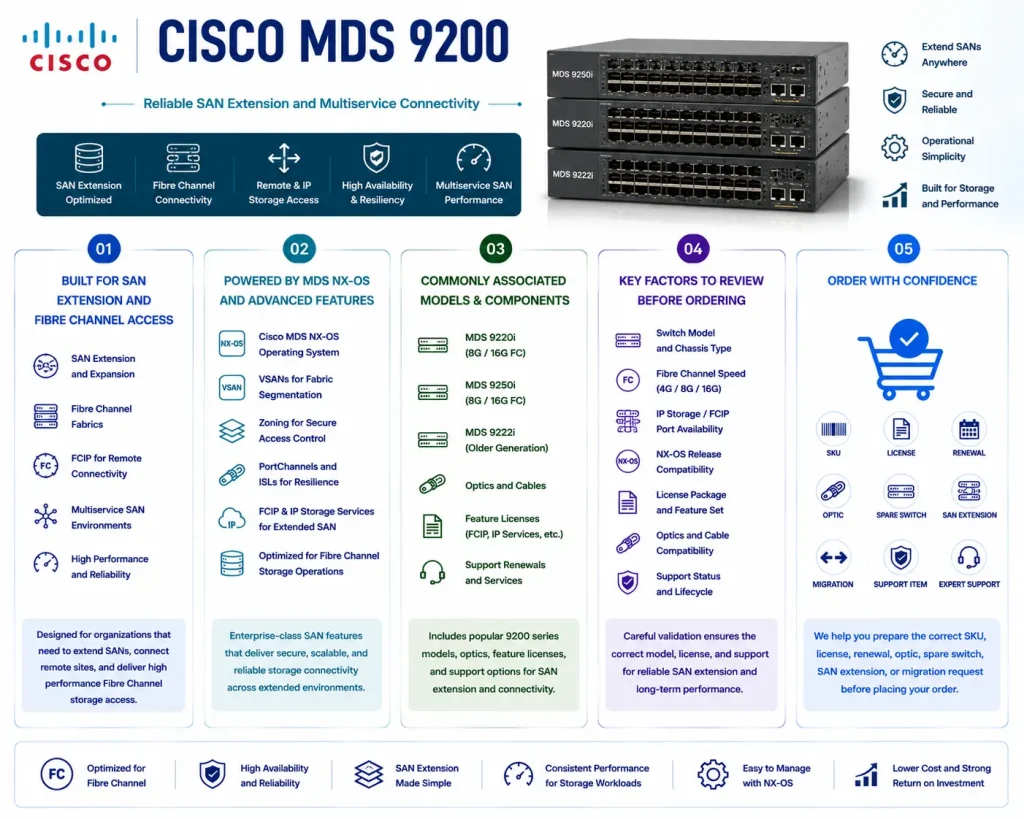
- Supports Cisco MDS NX-OS, VSANs, zoning, PortChannels, ISLs, FCIP, IP storage services, and Fibre Channel operations
- Commonly associated with MDS 9220i, MDS 9250i, older MDS 9222i environments, optics, feature licenses, and support renewals
- Requires careful review of switch model, Fibre Channel speed, IP storage ports, NX-OS release, license package, optics, and lifecycle status
- Helps buyers prepare the correct SKU, license, renewal, optic, spare switch, SAN extension, or migration request before ordering
Review Cisco MDS 9200 Price List and request a quote tailored to your licensing needs.
Cisco MDS 9200 At a glance
What it is : Cisco MDS 9200 Series is a multiservice Cisco MDS SAN switch family for Fibre Channel and SAN extension environments.
Product family : Cisco MDS License
Typical use : SAN extension, Fibre Channel switching, FCIP, remote SAN connectivity, disaster recovery storage links, VSAN design, zoning, ISL connectivity, and storage network expansion.
License or ordering scope : Switch model, Fibre Channel speed, IP storage service requirement, FCIP feature need, MDS NX-OS release, Enterprise Package, SAN extension licensing, optics, support renewal, and activation workflow.
Who needs it : Storage, backup, virtualization, disaster recovery, and data center teams that need the correct Cisco MDS 9200 part number, license, support renewal, optic, replacement switch, or SAN extension item.
Series Overview
Cisco MDS 9200 Series is built for SAN environments that need more than basic Fibre Channel switching. It is commonly used where storage teams need to connect local and remote SAN fabrics, support disaster recovery designs, extend Fibre Channel over IP, or combine Fibre Channel switching with IP storage services.
In a typical deployment, Cisco MDS 9200 switches may connect servers, storage arrays, backup systems, remote sites, and inter-switch links. Models such as MDS 9220i and MDS 9250i are often reviewed for SAN extension and multiprotocol storage environments, while older MDS 9200 platforms may appear in renewal, replacement, or migration requests.
The value of Cisco MDS 9200 is its multiservice role. Buyers are not only selecting a Fibre Channel switch; they may also need SAN extension features, IP storage ports, FCIP capability, optics, support coverage, software entitlement, and compatibility with the existing fabric. Because SAN extension projects can affect storage replication and disaster recovery, the final part number should be selected only after reviewing the current SAN design, active licenses, software version, port requirements, and future expansion plan.
Licensing and Part Number Guidance
Choosing the correct part number for Cisco MDS 9200 depends on the exact switch model, Fibre Channel speed, SAN extension requirement, FCIP requirement, port count, optics, NX-OS release, software feature needs, support term, and activation method.
Some requests may involve a fixed multiservice SAN switch. Others may require software feature licensing, Enterprise Package features, SAN extension capabilities, FCIP-related functionality, optics, support renewal, or replacement hardware. For older environments, lifecycle and support status should also be reviewed before a quote is prepared.
The quote should clearly separate hardware SKUs, software licenses, support items, optics, and any SAN extension or IP storage service requirements. For existing fabrics, current license output and inventory should be checked before ordering.
Common Use Cases
| Use case | Why it matters |
|---|---|
| SAN extension | Helps connect storage fabrics across sites for replication, backup, or disaster recovery |
| FCIP connectivity | Supports Fibre Channel over IP designs where storage traffic must cross IP networks |
| Fibre Channel switching | Connects servers, storage arrays, and SAN fabrics through dedicated Fibre Channel ports |
| Remote office or departmental SAN | Provides multiservice SAN connectivity for smaller or distributed storage environments |
| Renewal or replacement planning | Helps validate support status, license package, optics, software release, and lifecycle condition |
| Migration planning | Supports transition from older MDS 9200 platforms toward newer MDS SAN switching options |
Models, Licenses, and Ordering Scope
| Area to check | What to confirm |
|---|---|
| Switch model | Exact Cisco MDS 9220i, MDS 9250i, MDS 9222i, or related MDS 9200 requirement |
| Fibre Channel speed | Required host-port speed, storage-port speed, ISL speed, and fabric compatibility |
| SAN extension role | FCIP, disaster recovery link, remote SAN, replication design, or IP storage service requirement |
| License type | Enterprise Package, SAN extension license, FCIP feature, software entitlement, support renewal, or product-specific license |
| SAN features | VSANs, zoning, PortChannels, ISLs, security, fabric services, or multiprotocol storage needs |
| Hardware scope | Switch, optics, power supplies, fans, rack kit, cables, spare unit, or replacement component |
| Software version | Cisco MDS NX-OS release, feature support, upgrade path, and interoperability requirement |
| Quantity | Number of switches, ports, optics, licenses, support renewals, or spare units |
| Activation method | License file, Smart License, SLP, Cisco licensing portal workflow, or supported activation method |
| Part number | Correct Cisco MDS 9200 hardware SKU and related license, optic, renewal, support, or accessory item |
What to Check Before Requesting a Quote
Before requesting a quote for Cisco MDS 9200, confirm the exact switch model, Fibre Channel speed, SAN extension requirement, IP storage port need, optics, NX-OS release, license status, support term, and SAN role.
You should also define whether the request is for a new SAN switch, FCIP design, remote SAN link, license renewal, optic bundle, support renewal, spare switch, replacement unit, or migration project. Each case can change the final SKU and licensing scope.
For existing environments, prepare the current inventory first. This should include model number, serial number, installed NX-OS release, active licenses, used ports, optics, VSAN design, FCIP configuration needs, and support coverage.
Activation and Delivery Notes
After the correct Cisco MDS 9200 part number is selected, activation depends on the switch model, MDS NX-OS release, license type, and Cisco-supported licensing workflow. Some MDS deployments may use license files or product-specific feature licenses, while newer environments may involve Smart Licensing or Smart Licensing Using Policy where supported. If SAN extension, FCIP, or Enterprise Package features are required, the current license status should be validated before delivery. For hardware delivery, compatibility should be checked before shipment. Switch model, optics, airflow, power supplies, NX-OS release, Fibre Channel speed, and SAN extension design should match the planned environment.
Cisco Switch pricing depends on your switch series, license type, deployment model and support requirements.