

SonarSource License provides access to software quality and application security solutions designed to continuously analyze source code, identify bugs and vulnerabilities, detect security hotspots, and improve maintainability throughout the software development lifecycle. SonarSource products are used by development and security teams to bring automated code analysis into IDEs, pull requests, CI/CD pipelines, and enterprise development workflows.
The Sonar portfolio includes SonarQube Server, SonarQube Cloud, SonarQube for IDE, and additional security capabilities for source code and software dependencies. Depending on the deployment model and subscription, organizations can use Sonar technologies for code quality, SAST, software composition analysis, compliance, and developer-focused remediation.
Quick Benefits
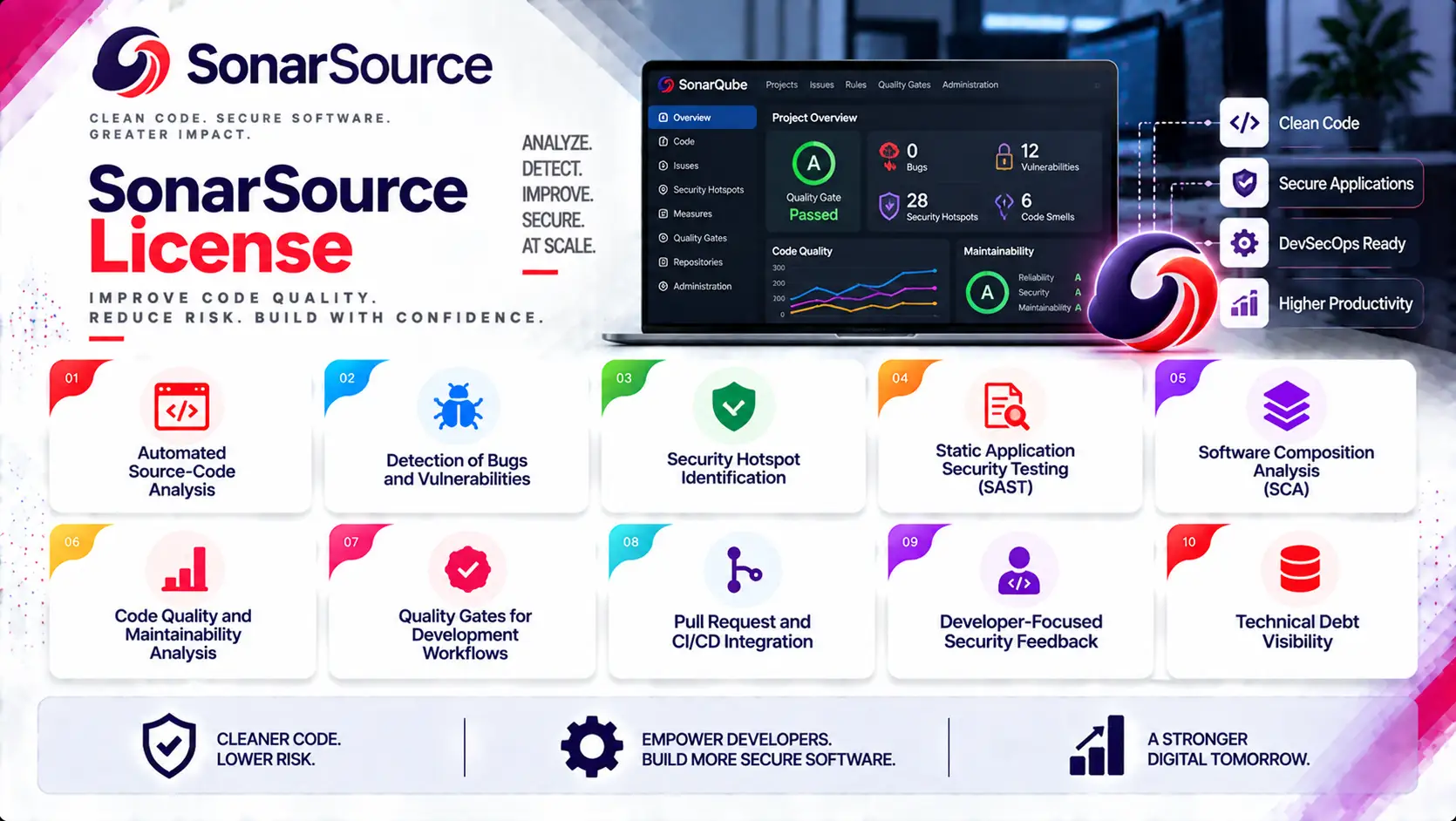
- Automated source-code analysis
- Detection of bugs and vulnerabilities
- Security hotspot identification
- Static Application Security Testing (SAST)
- Software Composition Analysis (SCA)
- Code quality and maintainability analysis
- Quality Gates for development workflows
- Pull request and CI/CD integration
- Developer-focused security feedback
- Technical debt visibility
SonarSource License At a Glance
What it is: Software quality and application security licensing portfolio
Primary products: SonarQube Server, SonarQube Cloud, SonarQube for IDE, and SonarQube Advanced Security
Primary role: Continuous code quality and security analysis
Security areas: SAST, SCA, vulnerability detection, security hotspots, dependency security, and compliance
Core technologies: Static code analysis, taint analysis, SCA, Quality Gates, and automated remediation
Deployment models: Cloud, self-managed, hybrid, and developer IDE environments
Typical environments: Enterprise software development, DevSecOps, financial services, healthcare, telecommunications, government, SaaS, and technology companies
Management: SonarQube Server, SonarQube Cloud, and centralized project administration
License model: Free and commercial subscription models depending on product and deployment
License Overview
A SonarSource License provides the software rights and subscription services required to use Sonar solutions for continuous code quality and application security analysis.
SonarSource uses different licensing approaches depending on the product.
For SonarQube Cloud, commercial plans are based on the maximum number of private Lines of Code (LOC) analyzed within an organization. The current cloud offering includes a free tier for smaller private projects, while Team and Enterprise plans provide expanded capabilities and scale.
For SonarQube Server, commercial editions are licensed per instance and per year according to the amount of analyzed source code measured in LOC. Current commercial editions include Developer, Enterprise, and Data Center.
This makes LOC an important consideration when calculating a SonarSource subscription. The number of scans alone does not determine the licensed code volume. For projects with branches, the largest branch is used when calculating the LOC contribution toward the applicable limit.
How SonarSource Licensing Works
Sonar licensing begins with identifying how the organization wants to analyze and manage its code.
A typical process includes:
Development Projects
→ Identify repositories and applications
Code Analysis
→ Analyze source code, dependencies, and supported infrastructure definitions
Quality and Security Rules
→ Apply coding, security, and quality standards
Quality Gate
→ Determine whether the analyzed code meets the required criteria
Remediation
→ Developers address identified issues
Continuous Monitoring
→ Repeat analysis through pull requests and CI/CD pipelines
This workflow allows security and development teams to treat code quality and security as continuous processes rather than separate activities performed only before release.
SonarSource Product Portfolio Overview
| SonarSource Solution | Primary Purpose |
|---|---|
| SonarQube Server | Self-managed code quality and application security analysis |
| SonarQube Cloud | Cloud-based continuous code quality and security analysis |
| SonarQube for IDE | Real-time code quality and security feedback inside developer IDEs |
| SonarQube Advanced Security | Advanced SAST and software composition security capabilities |
| SonarQube Community Build | Free edition for source-code quality and security analysis |
| SonarQube Server Enterprise | Enterprise governance, reporting, security, and scalability |
| SonarQube Server Data Center | High-availability and large-scale enterprise deployment |
Licensing Options and Models
| Licensing Option | Description | Suitable For |
|---|---|---|
| SonarQube Cloud Free | Free cloud-based analysis for eligible smaller private projects | Individual developers and small projects |
| SonarQube Cloud Team | Commercial cloud plan with increased LOC capacity and team capabilities | Development teams |
| SonarQube Cloud Enterprise | Enterprise cloud deployment with advanced governance and security capabilities | Large organizations |
| SonarQube Server Developer | Self-managed commercial edition with additional analysis and security capabilities | Small and medium development teams |
| SonarQube Server Enterprise | Enterprise self-managed edition with governance, reporting, security, and scalability features | Large software organizations |
| SonarQube Server Data Center | High-availability edition for large-scale deployments | Mission-critical enterprise environments |
| Advanced Security | Adds advanced SAST and SCA capabilities to eligible commercial plans | Organizations requiring deeper application security |
| SonarQube Community Build | Free edition for code quality and security analysis | Developers and open-source or smaller projects |
Features and Benefits
Static Code Analysis
SonarQube continuously analyzes source code to identify coding problems before they become production issues.
Analysis can detect:
- Bugs
- Vulnerabilities
- Code smells
- Security hotspots
- Maintainability problems
This gives developers security and quality feedback directly within their normal development workflow.
Security Analysis
SonarSource combines code quality analysis with application security capabilities.
Advanced security analysis can identify deeper vulnerabilities through techniques such as taint analysis and other security-focused rules.
This allows development teams to address security issues during implementation rather than waiting for a separate security assessment.
Software Composition Analysis
Modern applications depend heavily on third-party libraries.
Advanced Security capabilities provide Software Composition Analysis to identify vulnerabilities and risks in software dependencies.
This can provide visibility into:
- Known CVEs
- Vulnerable dependencies
- Software components
- SBOM information
- Open-source license concerns
SCA therefore complements source-code analysis by examining risks that do not necessarily exist in proprietary application code.
Compatibility and Requirements
Before selecting a SonarSource License, organizations should evaluate:
- SonarQube Cloud or Server deployment
- Number of projects
- Total Lines of Code
- Programming languages
- Number of developers
- Source-code repositories
- CI/CD platforms
- Pull request workflows
- SAST requirements
- SCA requirements
- Compliance requirements
Activation and Deployment
A typical SonarSource deployment includes:
- Select SonarQube Cloud or Server
- Determine required edition
- Calculate the applicable LOC volume
- Select additional security capabilities
- Activate the subscription
- Connect source-code repositories
- Configure projects and quality profiles
- Configure Quality Gates
- Integrate with CI/CD pipelines
- Review analysis results
For self-managed deployments, infrastructure sizing should also consider the number of projects analyzed concurrently, database requirements, storage, memory, CPU resources, and availability architecture.
Pricing and Quote Process
Pricing for SonarSource License depends on the selected product, deployment model, edition, analyzed Lines of Code, and additional security requirements.
Before requesting a quote, prepare:
- Cloud or self-managed deployment preference
- Total Lines of Code
- Number of applications
- Number of repositories
- Programming languages
- Number of development teams
- SAST requirements
- SCA requirements
- Compliance requirements
SonarSource pricing depends on your product edition, codebase size, SAST and SCA requirements, development environments, deployment model, license term, and support needs.