

Tenable Web App Scanning helps organizations identify vulnerabilities in web applications, giving security teams clear visibility into risks across modern web environments.
Quick benefits
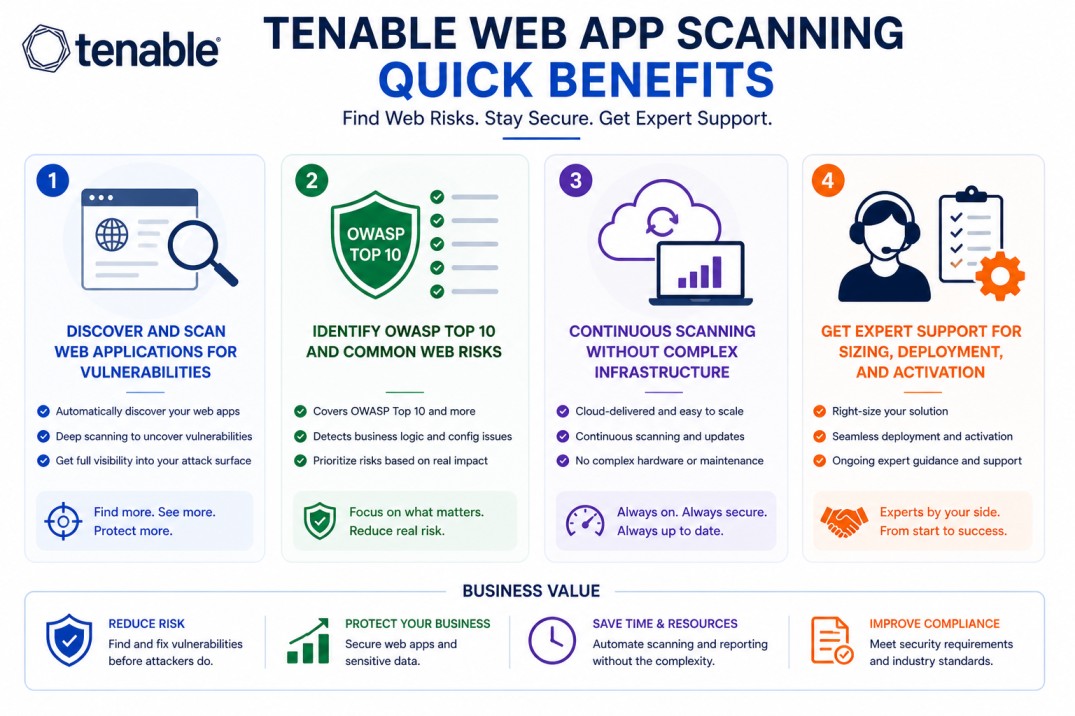
- Discover and scan web applications for vulnerabilities
- Identify OWASP Top 10 and common web risks
- Continuous scanning without complex infrastructure
- Get expert support for sizing, deployment, and activation
Tenable Web App Scanning At a glance
What it does : Tenable Web App Scanning identifies vulnerabilities in web applications by analyzing application behavior and responses.
License type : Subscription-based (application/URL-based)
Typical term : 1 year · 3 years · 5 years
Activation method : Cloud-based activation via Tenable platform
Who needs it : Organizations that develop, host, or manage web applications and need to identify and fix security vulnerabilities
License Overview
The Tenable Web App Scanning license is typically based on the number of web applications or URLs being scanned. Instead of counting infrastructure assets, this model focuses on application coverage. In most environments, each application or domain is considered within the licensed scope. As applications grow or new services are added, licensing may need to scale accordingly.
Because Tenable Web App Scanning is delivered as a cloud-based service, there is no need to deploy or maintain scanning infrastructure. The platform manages scanning logic, updates, and vulnerability detection centrally. Sizing the license correctly is important. Too few applications may leave gaps in coverage, while too many may increase cost without additional value. A balanced approach ensures all critical applications are assessed consistently.
Product Overview
Tenable Web App Scanning is designed to help teams identify vulnerabilities in web applications without requiring deep manual testing.
In practice, the platform interacts with web applications in a way similar to a user or attacker, analyzing responses to detect weaknesses such as injection flaws, misconfigurations, or authentication issues.
One of the key advantages is its ability to run scans continuously. As applications change or new features are deployed, the platform can reassess them to detect new vulnerabilities.
It also simplifies operations. Since it is cloud-managed, updates to scanning techniques and vulnerability signatures are handled automatically, allowing teams to focus on fixing issues rather than maintaining tools.
Core technical flow
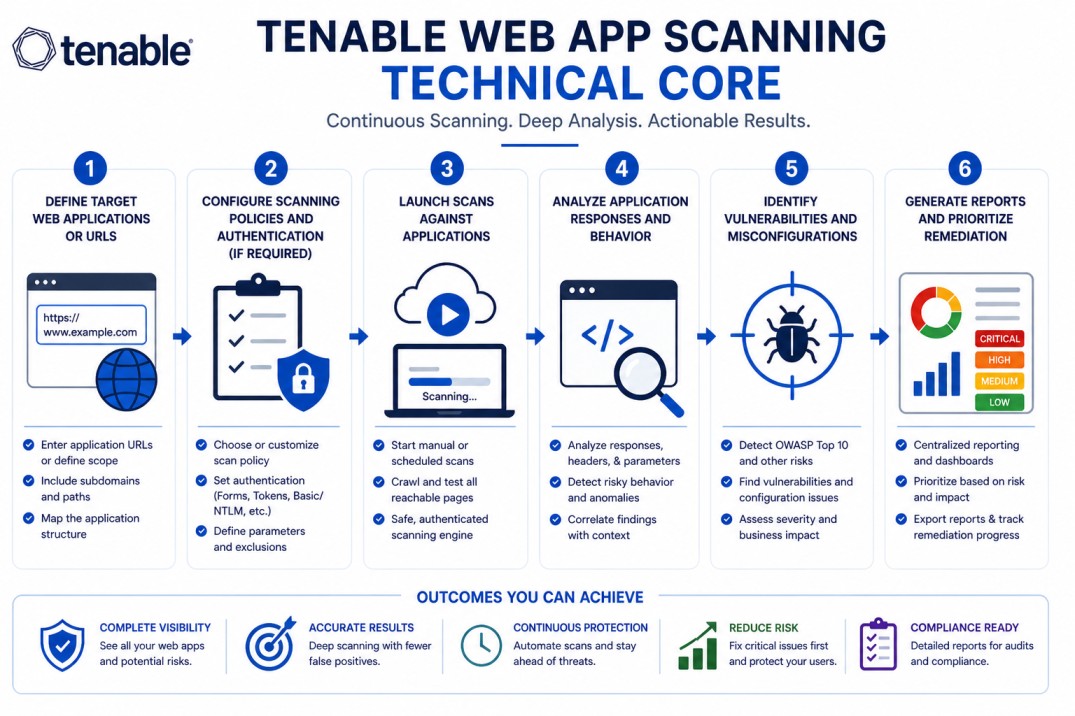
- Define target web applications or URLs
- Configure scanning policies and authentication (if required)
- Launch scans against applications
- Analyze application responses and behavior
- Identify vulnerabilities and misconfigurations
- Generate reports and prioritize remediation
Options & Tiers
| Plan / Model | Best for | Key inclusions | What affects price |
|---|---|---|---|
| Standard web scanning | Most organizations | Application scanning + reporting | App count, term |
| Authenticated scanning | Secure applications | Deep scanning with credentials | Scope, complexity |
| Continuous scanning | Dynamic environments | Ongoing vulnerability detection | Scan frequency |
| Enterprise deployment | Large portfolios | Scalable application coverage | Number of apps |
Features & Benefits
Tenable Web App Scanning helps organizations identify web application vulnerabilities before they can be exploited. Instead of relying only on manual testing, it provides automated and consistent scanning. A key benefit is improved coverage. By scanning applications regularly, teams can detect new vulnerabilities as changes are introduced. It also supports faster remediation. Clear findings and reports make it easier for teams to understand and fix issues. Over time, this leads to more secure applications and a stronger overall security posture.
Compatibility & Requirements
Supported Environments
- Public-facing web applications
- Internal web services
- Cloud-hosted applications
Technical requirements
- Access to application URLs
- Authentication credentials (for deeper scans, optional)
- Internet connectivity for cloud scanning
How activation works
Activating Tenable Web App Scanning begins with provisioning your cloud-based Tenable environment. Once your subscription is applied, the scanning service becomes available within your tenant. From there, you define the applications you want to scan and configure scanning policies. If deeper analysis is needed, authentication details can be added to allow the scanner to access protected areas of the application.
Because the platform is cloud-managed, there is no need to install scanning infrastructure. All scanning operations are handled by the Tenable platform. After activation, scans can be scheduled or run on demand. As results are generated, vulnerabilities are identified and presented for review. It’s important to monitor the number of applications being scanned to ensure it aligns with your licensed capacity and provides full coverage.
Pricing factors & quote process
Tenable Web App Scanning pricing is mainly based on the number of applications or URLs being assessed. Larger application portfolios will require broader licensing.
Other factors, such as authentication complexity, scan frequency, and application depth, can also influence pricing.
Subscription length plays a role as well, with longer terms typically offering better value.
The most accurate pricing comes from aligning the solution with your application environment and scanning requirements.
After you request a quote
- We review your application portfolio
- Recommend the most suitable scanning approach
- Provide official pricing and delivery details
- Share activation and configuration guidance
Tenable Pricing depends on your license edition, quantity, term, and deployment needs.