
Reviewed by GoLicense Technical Team · Last updated:
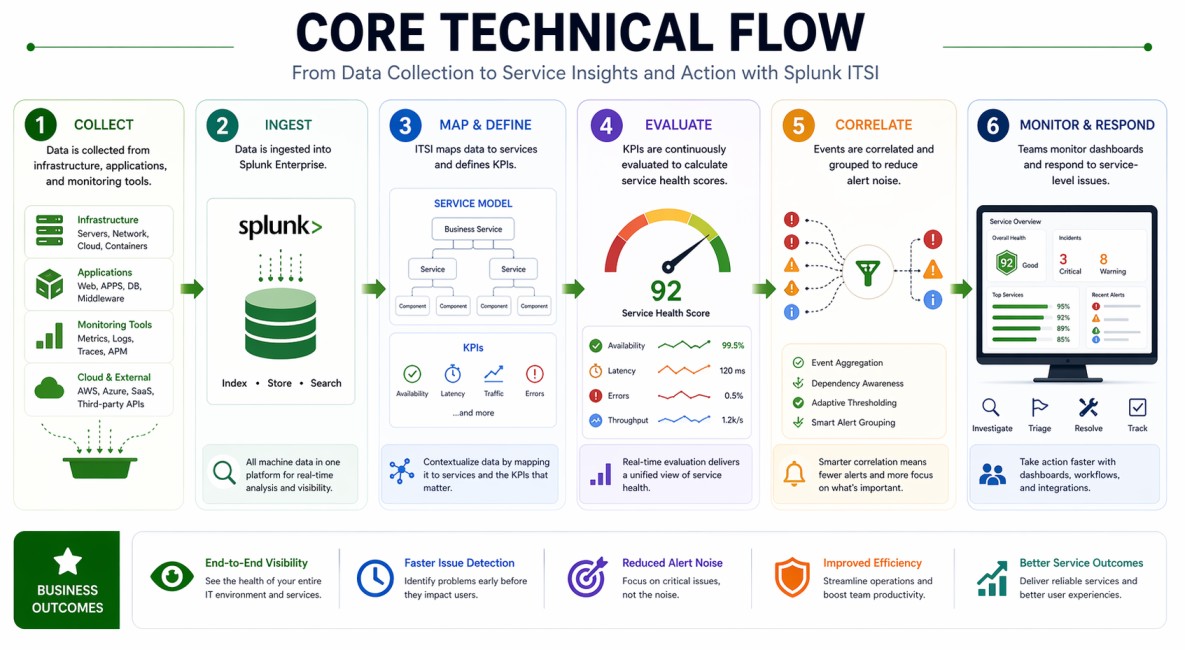
Splunk IT Service Intelligence (Splunk ITSI) is Splunk’s AIOps and service monitoring product. It turns the data you already collect in Splunk into services, key performance indicators (KPIs) and health scores, groups related alerts into episodes, and uses machine learning to predict incidents before users notice them. ITSI is a premium app licensed on top of a Splunk Enterprise or Splunk Cloud Platform license.
Start with the selection guide below to confirm that ITSI is the right product, then check how it is licensed, what ITSI 5.0 adds and what to include in your quote request.
- Core product: Splunk ITSI 5.0, a premium app for Splunk Enterprise and Splunk Cloud Platform.
- Requirement: a Splunk platform license; ITSI does not include the core Splunk license.
- License types: ingest (GB/day) or workload; the ITSI license must match the type of your Splunk Enterprise license.
- Key features: service and KPI monitoring, Service Analyzer, glass tables, Event iQ alert grouping and diagnosis, and predictive analytics.
- Free alternative: IT Essentials Work covers basic infrastructure and entity monitoring without the full service model.
- Delivery: license file for Splunk Enterprise, or enabled on your Splunk Cloud stack.
- Quotation basis: platform license type, the data volume ITSI will use and the term.
Request Splunk ITSI Pricing: Send your current Splunk Enterprise or Splunk Cloud license (GB/day or vCPU), the data sources ITSI will monitor, the number of services you plan to model and the term you need.
Tell us your Splunk platform license and the services you want to monitor, and receive a tailored Splunk ITSI licensing quotation.
Which Splunk ITSI License Do You Need?
| Your requirement | Option to evaluate | What to confirm before ordering |
|---|---|---|
| Monitor business services, KPIs and service health with AIOps | Splunk ITSI | Splunk platform license type and the data ITSI will use |
| Basic server and entity monitoring inside Splunk | IT Essentials Work (free app) | Whether you need service models, KPIs and Event iQ later |
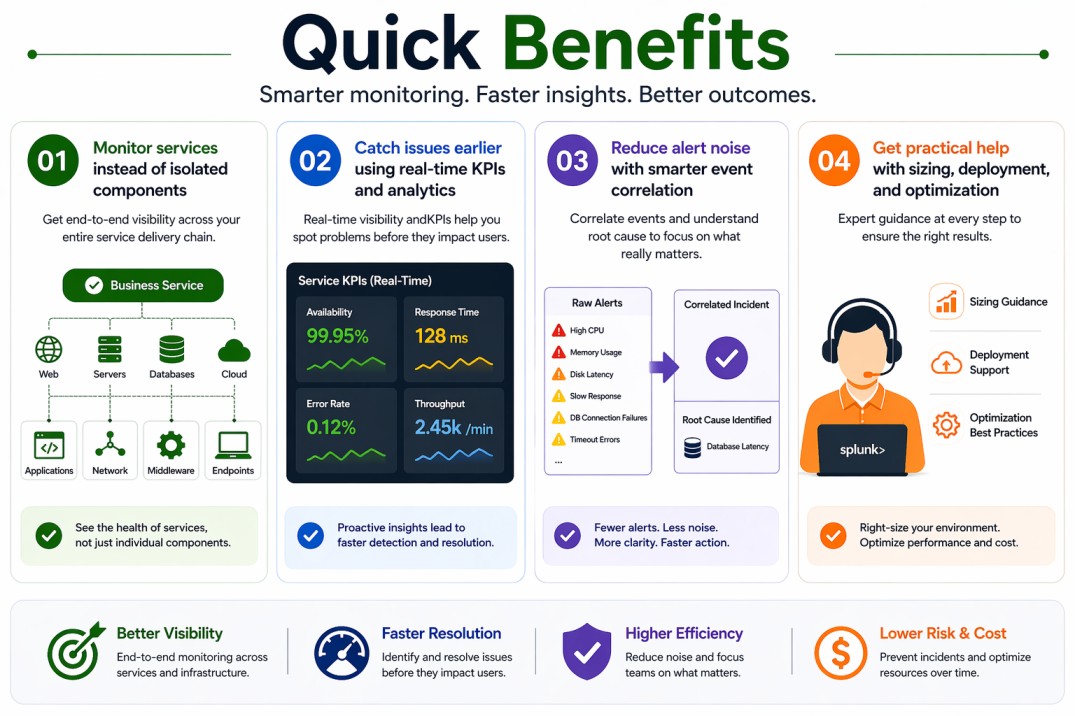
| Reduce alert noise from many monitoring tools | Splunk ITSI with Event iQ | Alert sources to integrate |
| Cloud-native infrastructure and application metrics | Infrastructure Monitoring and APM | Number of hosts |
| Security monitoring and threat detection | Splunk Enterprise Security | ITSI is for IT operations, not security |
| No Splunk platform yet | Splunk Enterprise or Splunk Cloud Platform plus ITSI | Daily data volume or compute |
What Is Splunk ITSI?
ITSI organizes your IT around services, such as “online checkout” or “email”, instead of individual servers. Each service gets KPIs built from searches on your Splunk data, and ITSI combines them into a health score.
- Service Analyzer and glass tables: show service health and dependencies in one view.
- Adaptive thresholds and predictive analytics: learn normal behavior for each KPI and warn before a service degrades.
- Event iQ: groups related alerts from Splunk and third-party tools into episodes, and in ITSI 5.0 explains each episode with AI-assisted diagnosis.
- Content packs: ready-made services and KPIs for common platforms such as VMware, Windows, Linux and Splunk Observability Cloud.
What’s New in ITSI 5.0
ITSI 5.0, released in mid-2026, adds a new installer and home page, AI-powered service and KPI discovery, broader alert integrations, Event iQ Detect that learns from analyst feedback, Event iQ Diagnose for AI-assisted troubleshooting, and simpler content pack management.
How Splunk ITSI Licensing Works
ITSI is a premium license added on top of your Splunk platform license; you need both. On Splunk Enterprise, premium licenses such as ITSI must use the same license type as the core license: ingest (GB/day) or workload (vCPU). On Splunk Cloud Platform, ITSI is added to your subscription.
With ingest licensing, ITSI is sized on the data that ITSI itself uses, not on everything you index. Identify the indexes and data sources behind your services and KPIs, then size the ITSI license on that volume. ITSI also installs an internal license for its own metadata, which does not count against your purchased volume.
ITSI vs IT Essentials Work
| IT Essentials Work | Splunk ITSI | |
|---|---|---|
| Price | Free with the Splunk platform | Paid premium license |
| Entity monitoring | Yes | Yes |
| Services, KPIs and health scores | No | Yes |
| Event iQ alert grouping and diagnosis | No | Yes |
| Predictive analytics | No | Yes |
Is ITSI a Security Product?
No. ITSI is for IT operations: availability, performance and incidents. For security monitoring, threat detection and investigations, use Splunk Enterprise Security. Many organizations run both on the same Splunk platform.
Main Splunk ITSI SKUs
Use these part numbers as a starting point. Choose the SKU family that matches your core Splunk license: term licenses by GB/day or vCPU for Splunk Enterprise, or subscriptions for Splunk Cloud Platform.
| License | Part Number | Term or Type |
|---|---|---|
| ITSI term license, Standard Success Plan, 1 GB/day | IT-T-LIC-ST-1GB | Term: 1 year |
| ITSI term license, Standard Success Plan, 10 GB/day | IT-T-LIC-ST-10GB | Term: 1 year |
| ITSI term license, Standard Success Plan, 10 GB/day | IT-T-LIC-ST-10GB-2YR | Term: 2 years |
| ITSI term license, Standard Success Plan, 10 GB/day | IT-T-LIC-ST-10GB-3YR | Term: 3 years |
| ITSI term license, Standard Success Plan, 50 GB/day | IT-T-LIC-ST-50GB | Term: 1 year |
| ITSI term license, Standard Success Plan, 100 GB/day | IT-T-LIC-ST-100GB | Term: 1 year |
| ITSI term license, Premium Success Plan, 500 GB/day | IT-T-LIC-PR-500GB | Term: 1 year |
| ITSI term license, Standard Success Plan, 25 vCPU increments | IT-T-LIC-V-ST | Workload (vCPU) |
| ITSI for DNS and Netflow data, Standard Success Plan, 100 GB/day | IT-T-LIC-DND-ST-100GB | Term: limited source types |
| ITSI for Splunk Cloud, Standard Success Plan, 50 GB/day | IT-S-CLD-ST-50GB | Cloud subscription |
| ITSI for Splunk Cloud, Standard Success Plan, 100 GB/day | IT-S-CLD-ST-100GB | Cloud subscription |
| ITSI for Splunk Cloud, Premium Success Plan, 200 SVCs | IT-S-CLD-SVC-PR-200 | Cloud workload: 1 year |
Other volume tiers (2, 5 and 20 GB/day), multi-year terms and Enterprise or Global Support options are listed with prices on our Splunk ITSI part numbers page.
Splunk ITSI Pricing & Quote
Splunk does not publish ITSI prices; each order is quoted. The price depends on your license type, the data volume or compute ITSI uses, and the term, and it comes on top of the Splunk platform license. Multi-year terms lower the yearly cost. For indicative Splunk platform prices, see our Splunk pricing guide.
Your quotation should state the confirmed SKUs, license type, quantity, term, price, validity period and delivery terms.
Buying, Delivery and Activation with Golicense
-
Confirm the Licensing Scope
Share your Splunk platform license, the data ITSI will use and the term. Your quotation confirms the price, delivery time (1–2 days) and activation assistance.
-
Receive the License
For Splunk Enterprise you receive an ITSI license file; for Splunk Cloud, ITSI is enabled on your stack. The ITSI app becomes available to download from Splunkbase once the entitlement is on your Splunk account.
-
Install and Activate
Install ITSI on your search heads, add the license file in Settings > Licensing, and restart. Then build your first services or start from a content pack.