

Cisco MDS 9500 Series is a Cisco modular SAN director family designed for large Fibre Channel storage fabrics, director-class SAN core switching, VSAN-based segmentation, high-availability storage networking, FICON environments, and enterprise data center storage operations. Unlike fixed MDS switches used for smaller SAN access layers, Cisco MDS 9500 platforms are usually found in mature or legacy storage networks where chassis model, supervisor modules, fabric modules, switching modules, software release, license packages, optics, support status, and migration planning must be reviewed carefully. This page helps buyers understand Cisco MDS 9500 ordering considerations, review licensing and part-number requirements, and move to the related Cisco MDS 9500 part numbers for accurate quote planning.
Series Highlights
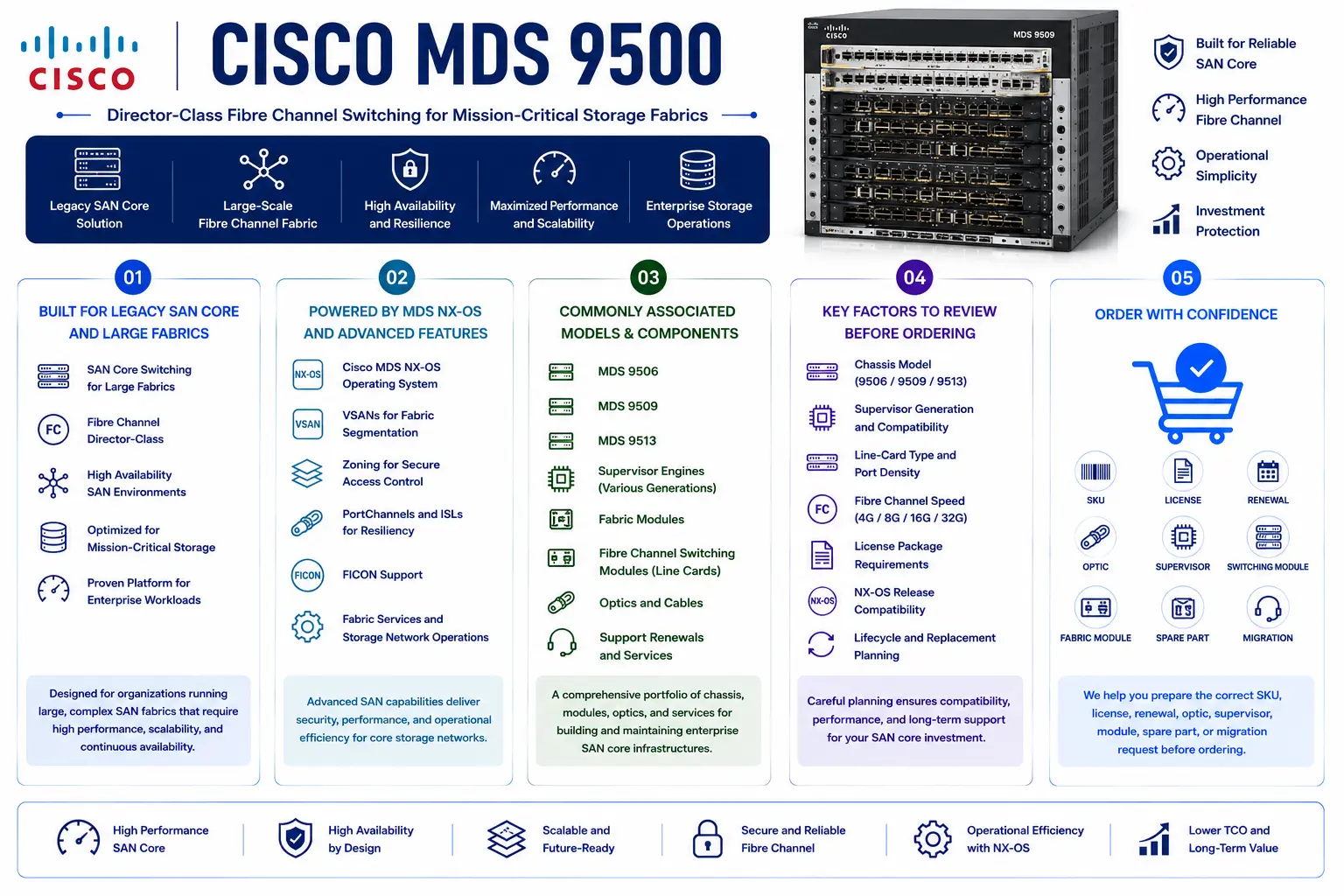
- Suitable for legacy SAN core, director-class Fibre Channel switching, large storage fabrics, and high-availability SAN environments
- Supports Cisco MDS NX-OS, VSANs, zoning, PortChannels, ISLs, FICON, fabric services, and storage network operations
- Commonly associated with MDS 9506, MDS 9509, MDS 9513, supervisors, fabric modules, Fibre Channel switching modules, optics, and support renewals
- Requires careful review of chassis model, supervisor generation, line-card type, fabric module, Fibre Channel speed, license package, NX-OS release, and lifecycle status
- Helps buyers prepare the correct SKU, license, renewal, optic, supervisor, switching module, fabric module, spare part, or migration request before ordering
Review Cisco MDS 9500 Price List and request a quote tailored to your licensing needs.
Cisco MDS 9500 At a glance
What it is : Cisco MDS 9500 Series is a modular Cisco MDS SAN director family for large Fibre Channel storage networks.
Product family : Cisco MDS License
Typical use : SAN core switching, director-class Fibre Channel fabrics, large storage environments, VSAN design, zoning, FICON, ISL connectivity, high-availability SAN architecture, and legacy SAN migration planning.
License or ordering scope : Chassis model, supervisor module, fabric module, switching module, Fibre Channel speed, Enterprise Package, FICON-related features, MDS NX-OS release, optics, support renewal, spare hardware, and activation workflow.
Who needs it : Storage, virtualization, backup, mainframe, database, and data center teams that need the correct Cisco MDS 9500 part number, license, supervisor, module, optic, support renewal, replacement item, or migration guidance.
Series Overview
Cisco MDS 9500 Series was built for storage environments that required director-class scale, modular expansion, and high availability. It is commonly found in large enterprise SANs, mainframe-connected storage environments, virtualization clusters, database platforms, backup infrastructures, and mature data centers that still rely on modular Fibre Channel switching.
In a typical deployment, Cisco MDS 9500 directors sit at the SAN core or aggregation layer. They connect storage arrays, host environments, inter-switch links, backup systems, and redundant SAN fabrics. Depending on the installed modules and license package, they may support advanced Fibre Channel fabric services, VSAN segmentation, FICON operations, zoning, security, PortChannels, and high-availability supervisor designs.
Many enterprise data centers manage Fibre Channel SAN switches alongside Ethernet switching platforms, so reviewing Cisco MDS 9500 renewals together with broader Cisco Switch License requirements can help keep support coverage, replacement planning, and licensing decisions aligned across the switching environment.
Today, Cisco MDS 9500 is mostly important for support renewal, license validation, spare-part sourcing, supervisor or module replacement, and migration planning. The final part number should be selected only after reviewing the installed chassis, active modules, NX-OS release, support status, and future SAN strategy.
Licensing and Part Number Guidance
Choosing the correct part number for Cisco MDS 9500 depends on the exact chassis model, supervisor generation, fabric module, Fibre Channel switching module, required SAN features, NX-OS release, optics, support term, and activation method.
Cisco MDS 9500 licensing may involve Enterprise Package features, FICON-related requirements, fabric services, security features, software entitlement, and support renewal. Some requests may be hardware-focused, such as a supervisor module, fabric module, switching module, power supply, fan tray, optic, or spare component. Other requests may involve license review, software support, or migration assessment.
Because Cisco MDS 9500 is a legacy director platform, lifecycle status matters. Buyers should confirm whether the goal is to maintain the existing director, renew support where possible, replace failed components, expand a legacy fabric, or plan migration to a newer MDS 9700 environment.
The quote should clearly separate chassis, modules, software licenses, optics, support items, and migration-related needs. For existing fabrics, inventory and license output should be checked before ordering.
Common Use Cases
| Use case | Why it matters |
|---|---|
| Director-class SAN core | Provides modular SAN switching for large Fibre Channel environments |
| Large fabric aggregation | Connects storage arrays, hosts, backup systems, ISLs, and redundant SAN fabrics |
| FICON and mainframe storage | Supports environments where mainframe storage connectivity and FICON-related features must be validated |
| Module or supervisor replacement | Helps match supervisors, switching modules, fabric modules, power supplies, and fans with the installed chassis |
| License and support validation | Confirms Enterprise Package, FICON, software entitlement, and support coverage before ordering |
| Migration planning | Supports transition from legacy MDS 9500 directors toward newer MDS director platforms |
Models, Licenses, and Ordering Scope
| Area to check | What to confirm |
|---|---|
| Chassis model | Exact Cisco MDS 9506, MDS 9509, MDS 9513, or related MDS 9500 requirement |
| Supervisor module | Supervisor generation, redundancy design, supported NX-OS release, and chassis compatibility |
| Fabric module | Fabric module generation, capacity, slot compatibility, and redundancy requirement |
| Switching module | Fibre Channel switching module type, port speed, port density, and supported fabric role |
| License type | Enterprise Package, FICON-related features, security features, fabric services, software entitlement, or support renewal |
| SAN features | VSANs, zoning, PortChannels, ISLs, FICON, security, traffic engineering, or advanced fabric services |
| Hardware scope | Chassis, supervisor, fabric module, switching module, optics, power supplies, fans, cables, or spare unit |
| Software version | Cisco MDS NX-OS release, feature support, upgrade path, and storage interoperability requirement |
| Activation method | License file, Smart License review, Cisco licensing portal workflow, or supported activation method |
| Part number | Correct Cisco MDS 9500 hardware SKU and related license, module, optic, renewal, support, or migration item |
What to Check Before Requesting a Quote
Before requesting a quote for Cisco MDS 9500, confirm the exact chassis model, supervisor module, fabric module, switching module, Fibre Channel speed, optics, NX-OS release, license status, support term, and SAN role.
You should also define whether the request is for support renewal, Enterprise Package, FICON feature validation, supervisor replacement, switching module replacement, fabric module, power supply, fan tray, optic bundle, spare chassis, or migration planning. Each case can change the final SKU and ordering path.
For existing environments, prepare the current inventory first. This should include chassis serial number, supervisor type, installed switching modules, fabric modules, optics, active license packages, NX-OS release, VSAN design, support coverage, and any planned SAN refresh timeline.
Activation and Delivery Notes
After the correct Cisco MDS 9500 part number is selected, activation depends on the chassis model, MDS NX-OS release, license type, and Cisco-supported licensing workflow. Some MDS 9500 deployments may use license files or product-specific feature licensing rather than modern subscription-first licensing. If Enterprise Package, FICON, or advanced fabric services are required, the current license status should be validated before delivery.
For hardware delivery, compatibility should be checked before shipment. Chassis model, supervisor generation, fabric modules, switching modules, optics, power supplies, fans, and NX-OS release must match the installed SAN director environment. For renewals, replacements, or migration projects, reviewing lifecycle, license, and support status first helps prevent ordering delays and keeps the selected SKU aligned with the real SAN core requirement.
Cisco Switch pricing depends on your switch series, license type, deployment model and support requirements.