

FortiGate Firewalls are Fortinet’s next-generation firewall platforms for securing branch networks, campuses, data centers, cloud workloads, internet edges, and distributed enterprise infrastructure. They combine traditional firewall enforcement with intrusion prevention, application control, malware protection, SSL inspection, IPsec VPN, SD-WAN, segmentation, and zero-trust access capabilities through the FortiOS operating system.
That range is why selecting a FortiGate Firewall license should begin with the actual network role. Internet bandwidth alone is not enough. Threat-protection throughput, SSL inspection, concurrent sessions, VPN traffic, interface density, FortiGuard services, HA design, and expected growth all influence the correct model and subscription. Fortinet’s current portfolio spans physical, virtual, cloud, ruggedized, and service-based deployments.
Quick Benefits
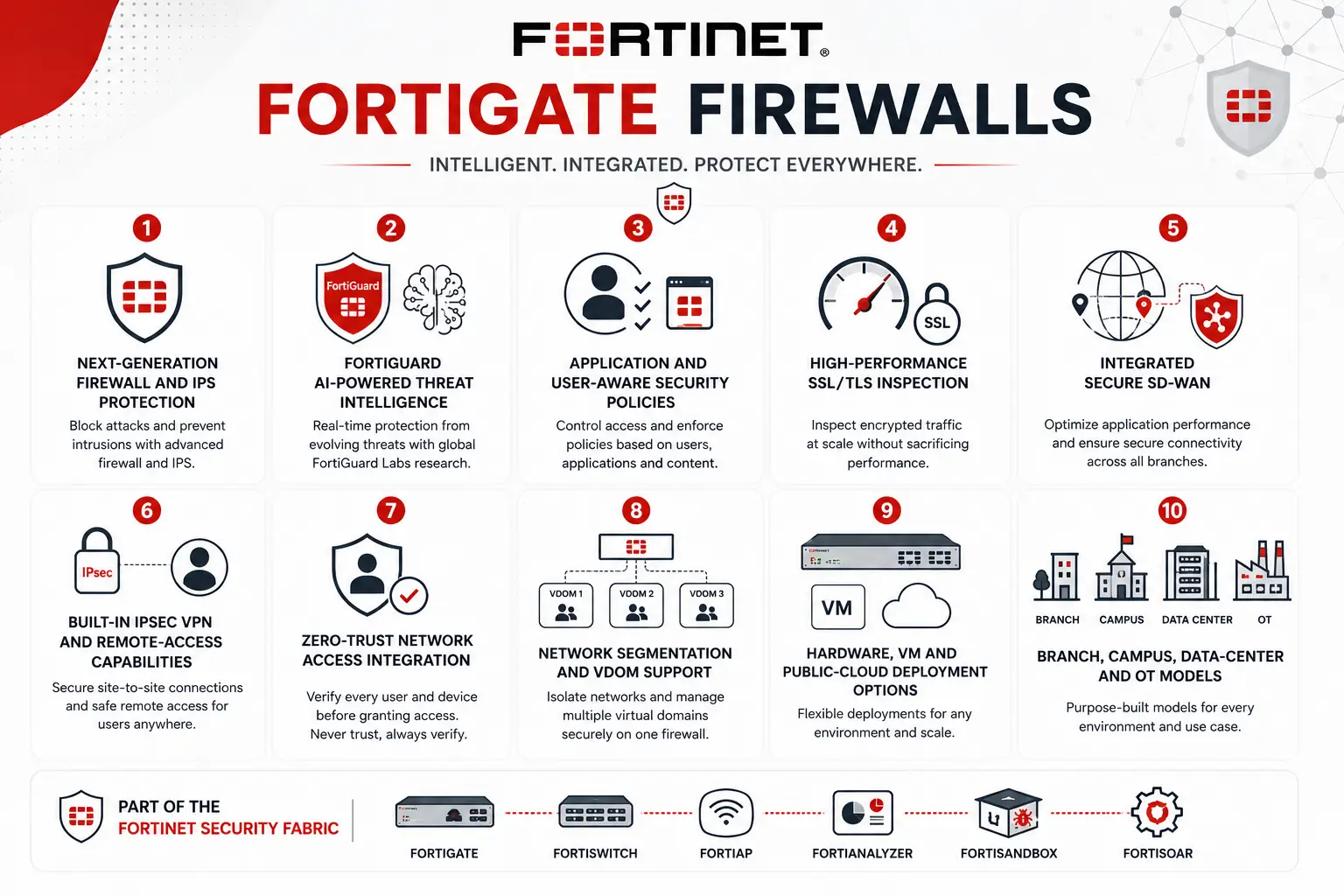
- Next-generation firewall and IPS protection
- FortiGuard AI-powered threat intelligence
- Application and user-aware security policies
- High-performance SSL/TLS inspection
- Integrated Secure SD-WAN
- Built-in IPsec VPN and remote-access capabilities
- Zero-Trust Network Access integration
- Network segmentation and VDOM support
- Hardware, VM and public-cloud deployment options
- Branch, campus, data-center and OT models
Review FortiGate Price List and request a quote tailored to your licensing needs.
FortiGate Firewalls At a Glance
What it is: Fortinet next-generation firewall family
Parent category: Fortinet License
Operating system: FortiOS
Primary role: Network firewall, NGFW, segmentation, VPN and secure WAN
Deployment options: Hardware, VM, cloud, ruggedized and FortiGate-as-a-Service
Common environments: Branch, campus, data center, cloud, OT and hybrid networks
Core security: Firewall, IPS, antivirus, application control, SSL inspection and threat prevention
Integrated networking: SD-WAN, routing, VPN and segmentation

License Overview
A FortiGate purchase normally combines two major elements: the FortiGate platform itself and the security/support services attached to it within the broader Fortinet License portfolio. The hardware or VM establishes available CPU capacity, interfaces, session scale, VPN performance and maximum security throughput, while FortiGuard subscriptions determine which continuously updated security services are available. The hardware or VM establishes available CPU capacity, interfaces, session scale, VPN performance and maximum security throughput. The FortiGuard subscription then determines which continuously updated security services are available. Fortinet currently organizes its main FortiGate security bundles into Advanced Threat Protection (ATP), Unified Threat Protection (UTP), and Enterprise Protection (ENT).
ATP provides the foundation for network and file protection, including services such as IPS, antivirus and malware protection. UTP builds on ATP by adding broader web and DNS protection. Enterprise Protection includes ATP and UTP capabilities while extending the security stack with services such as DLP, attack-surface monitoring, IoT visibility and vulnerability correlation, inline malware prevention and broader data/application controls. OT-specific protection remains separately available where industrial protocols and devices need inspection. This means two identical FortiGate appliances can deliver very different security capabilities depending on the subscription attached to them.
Product Overview
Network Firewall and NGFW Protection
At its core, FortiGate controls traffic between trust zones. Policies can evaluate source, destination, service, user, application and security profile before deciding whether traffic should be allowed. NGFW functions go beyond simple IP address and port filtering. FortiGate can inspect applications, identify intrusion attempts, scan files for malware, enforce web and DNS policy, and decrypt SSL/TLS traffic when configured to do so. Fortinet’s purpose-built security processors are a major part of the hardware architecture. Current FortiGate appliances use dedicated ASIC acceleration to offload networking and security workloads instead of sending every function through general-purpose CPU resources.
Secure SD-WAN and Branch Connectivity
FortiGate also acts as an SD-WAN edge platform. Organizations can combine MPLS, broadband, fiber, LTE/5G and other WAN connections while selecting paths according to latency, packet loss, jitter, application requirements and link availability. Because firewalling and SD-WAN operate on the same platform, branch traffic does not need to pass through a separate SD-WAN appliance before reaching the security layer. Fortinet positions Secure SD-WAN as an integrated FortiGate capability for branch and distributed enterprise environments. The result can be a simpler branch architecture, particularly where FortiGate also controls FortiSwitch and FortiAP infrastructure as part of a Secure SD-Branch design.
VPN, Segmentation and Zero-Trust Access
FortiGate supports site-to-site IPsec VPN for connecting branches, data centers and cloud environments. It can also participate in secure remote-access and ZTNA architectures. Segmentation is another common use case. Internal networks, servers, users, IoT systems and sensitive resources can be separated into different security zones or VDOMs, with FortiGate enforcing traffic between them. Fortinet also integrates ZTNA directly into the firewall architecture so access decisions can extend beyond conventional network location.
How FortiGate Firewalls Work
Traffic first arrives through a physical or virtual FortiGate interface and is associated with the relevant network zone, VLAN, VDOM or routing context. FortiOS evaluates routing and firewall policy to determine whether the session is permitted.
If security profiles are attached to the matching rule, traffic can then undergo application identification, IPS inspection, malware scanning, web/DNS filtering and other FortiGuard-driven controls. HTTPS traffic may also be decrypted for deeper inspection if the organization has configured SSL inspection and deployed the required certificate trust.
FortiGate then forwards permitted traffic toward its destination while maintaining session state. Events, threats and traffic information can be logged locally or sent to platforms such as FortiAnalyzer for longer-term analytics and investigation. For WAN traffic, FortiGate can simultaneously evaluate SD-WAN rules to choose the most appropriate path according to application policy and measured link quality.
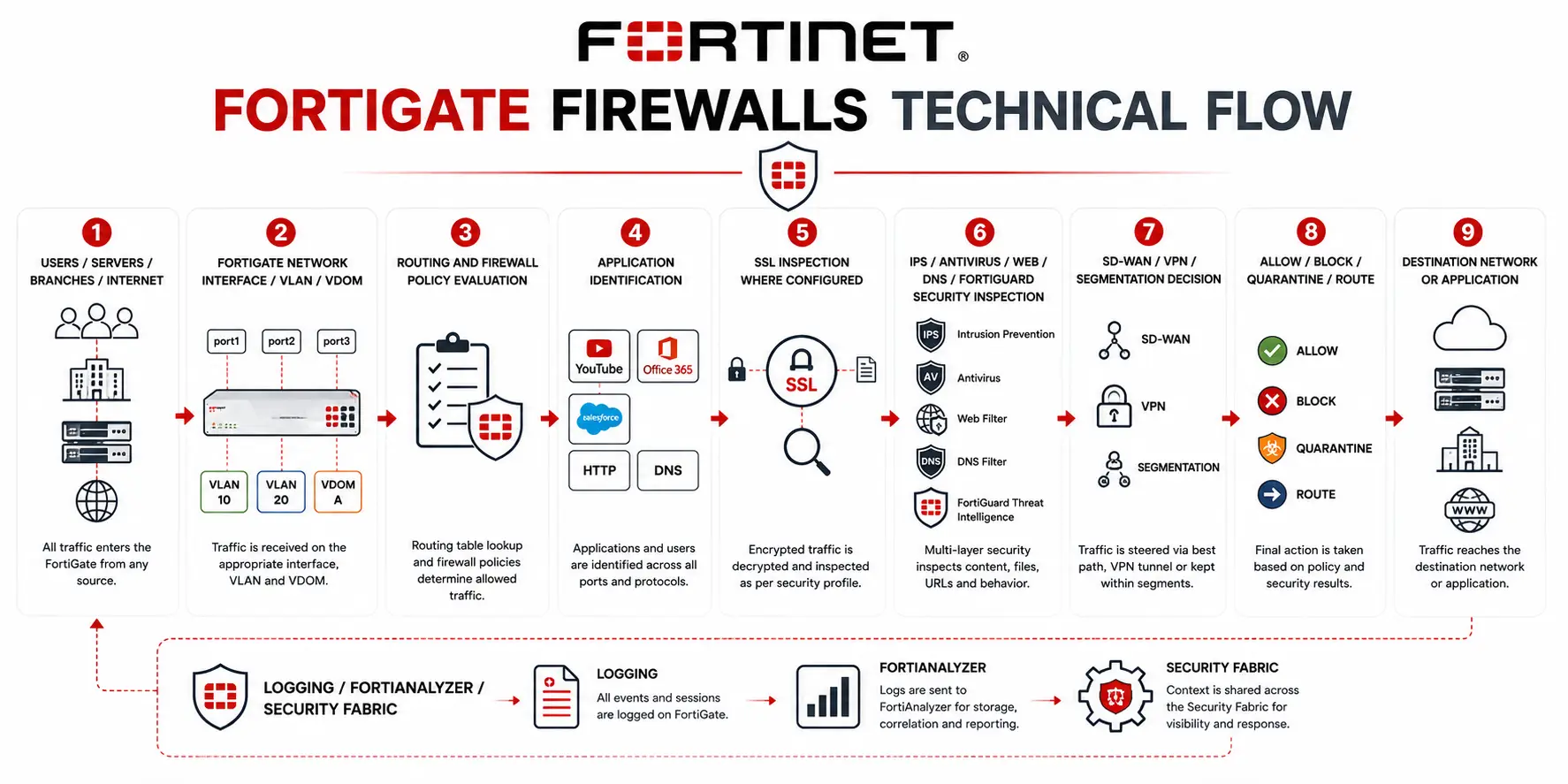
Core Technical Flow
Users / Servers / Branches / Internet
→ FortiGate Network Interface / VLAN / VDOM
→ Routing and Firewall Policy Evaluation
→ Application Identification
→ SSL Inspection where configured
→ IPS / Antivirus / Web / DNS / FortiGuard Security Inspection
→ SD-WAN / VPN / Segmentation Decision
→ Allow / Block / Quarantine / Route
→ Destination Network or Application
→ Logging / FortiAnalyzer / Security Fabric
Options and Licensing Models
Physical FortiGate appliances cover a very wide performance range. Current Fortinet listings include entry models such as the 30G, 40F, 50G, 60F, 70G and 90G, midrange systems such as the 120G, 200G, 400G, 700G and 900G, and high-end platforms such as the 1200G, 3000G, 3500G and 3800G, alongside additional F-Series models.
The published Threat Protection throughput is generally more useful for security sizing than raw firewall throughput. For example, Fortinet currently lists approximately 500 Mbps threat protection for the 30G, 2.2 Gbps for the 90G, 13 Gbps for the 400G, 30 Gbps for the 900G and considerably higher figures for large data-center systems. These figures are laboratory performance values rather than guarantees for every production policy set.
FortiGate-VM provides another path for private and public cloud environments. Current subscription VM editions range from VM01 through VM32 and VMUL, with the license defining available vCPU capacity. Fortinet supports FortiGate-VM across environments including VMware, KVM/OpenStack, Hyper-V, Nutanix, AWS, Azure, Google Cloud, OCI, IBM Cloud and Alibaba Cloud.
For changing cloud or hybrid environments, FortiFlex provides usage-based licensing. Fortinet allows organizations to provision FortiGate VM capacity and FortiCare/FortiGuard services through points, with consumption charged according to the active entitlement.
Features and Benefits
The main advantage of FortiGate is convergence. Network security, routing, SD-WAN, VPN, segmentation and several access-control functions can operate through one FortiOS platform rather than separate appliances for every role. This is particularly useful in branch networks. A FortiGate can terminate internet connections, build IPsec overlays to other locations, choose SD-WAN paths, inspect application traffic and enforce security policy from the same device. Central management through FortiManager can then apply common policy across many sites.
The same principle extends into larger environments. Data-center FortiGate platforms can enforce internal segmentation while inspecting high-volume encrypted traffic, while FortiGate VM can apply similar policy inside public and private clouds. The Fortinet Security Fabric also allows the firewall to exchange information with FortiAnalyzer, FortiManager, FortiClient, FortiNAC, FortiSandbox and other Fortinet technologies rather than operating as an isolated perimeter device.
Compatibility and Requirements
FortiGate sizing should begin with the traffic that will actually be inspected. A 5 Gbps internet connection does not automatically mean that a firewall with 5 Gbps raw firewall throughput is sufficient. If IPS, application control, antivirus and SSL inspection will all be enabled, Threat Protection and SSL inspection performance become much more relevant.
The number of concurrent sessions and new sessions per second should be checked for busy internet gateways, data centers and service-provider environments. VPN-heavy networks should also review IPsec throughput and tunnel scale, while SD-WAN deployments need enough physical interfaces for every WAN circuit and LAN connection.
Interface requirements can change the model even when performance is adequate. Before ordering, verify copper versus fiber connectivity, 1/10/25/40/100GbE requirements, SFP/SFP+/SFP28/QSFP optics, PoE requirements, LTE/5G integration, redundant power, local storage and HA ports. For FortiGate-VM, the hypervisor or cloud environment, vCPU allocation, virtual NIC architecture and expected traffic path should be confirmed before selecting the VM tier.
How Activation and Deployment Work
A physical FortiGate is first registered to the organization’s Fortinet account and associated with the relevant FortiCare and FortiGuard entitlements. Subscription status can then be viewed directly in FortiOS under the FortiGuard subscription information. The network configuration normally follows: interfaces and VLANs are created, routing is established, DNS/NTP and administrative access are configured, and firewall policies are introduced. Security profiles such as IPS, antivirus, application control, web filtering and SSL inspection are then applied according to policy requirements.
For production migrations, security services should not simply be enabled at maximum inspection on day one. Existing traffic patterns, certificate deployment and application compatibility should be checked first—especially when deep SSL inspection is introduced. High-availability deployments can use FortiGate Clustering Protocol (FGCP). Current FortiOS supports both active-passive and active-active cluster designs. Active-passive remains the conventional redundancy model, where the secondary appliance is ready to take over when the primary fails.
Pricing and Quote Process
The price of FortiGate Firewalls depends on much more than the appliance number. An accurate quote should begin with peak internet and inter-zone traffic, required threat-protection performance, SSL inspection requirements, user/session scale, VPN traffic, SD-WAN design, number and speed of interfaces, VDOM requirements and whether the firewall will be deployed standalone or as an HA pair.
The next decision is the security bundle. A basic network that primarily needs intrusion and malware protection may fit ATP. A general enterprise internet edge often benefits from UTP because web and DNS controls are added. Environments requiring stronger data, SaaS, IoT and attack-surface security should compare Enterprise Protection.
Support should also match the firewall’s importance. FortiCare Premium provides 24×7 support with a one-hour critical response target, while FortiCare Elite provides enhanced SLA targets, including a 15-minute critical response target and additional FortiGate-specific support capabilities.
For a quote, provide the preferred FortiGate model if already known, network throughput, security bundle, subscription term, HA requirement, interface/optic requirements, existing serial numbers for renewals, and any FortiManager or FortiAnalyzer requirements.
Fortinet pricing depends on your product edition, FortiGate model, security services, license term, deployment model, and support requirements.