

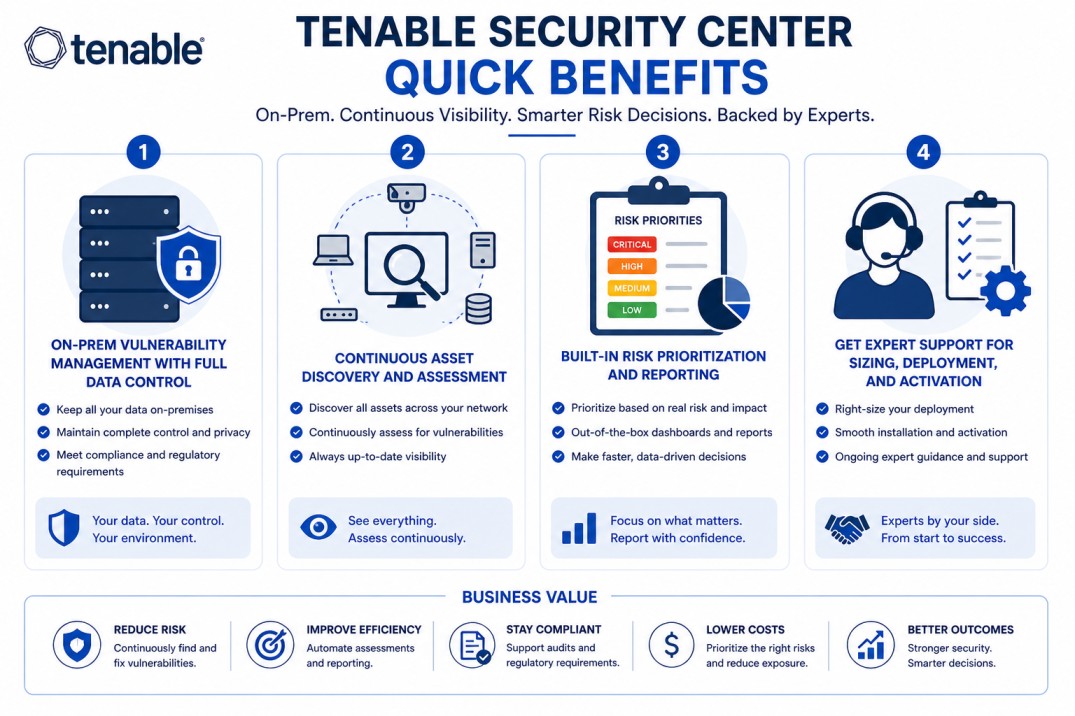
Tenable Security Center gives organizations full control over vulnerability management in on-prem and regulated environments, combining continuous assessment with centralized visibility.
Quick benefits
- On-prem vulnerability management with full data control
- Continuous asset discovery and assessment
- Built-in risk prioritization and reporting
- Get expert support for sizing, deployment, and activation
Tenable Security Center At a glance
What it does : Tenable Security Center is an on-prem vulnerability management platform that centralizes scanning, asset tracking, and risk analysis.
License type : Subscription-based (asset-based)
Typical term : 1 year · 3 years · 5 years
Activation method : On-prem activation via license file and Tenable account
Who needs it : Organizations that require local control over vulnerability data, especially in regulated or air-gapped environments

License Overview
The Tenable Security Center license is based on the number of assets you want to monitor and assess. Instead of counting IPs, Tenable focuses on unique systems, servers, endpoints, network devices, or virtual machines. In real environments, this means your license should match the number of active assets in your infrastructure. As systems are added or removed, asset usage changes, so it’s important to size the license correctly.
Tenable Security Center is typically deployed on-prem, which makes it suitable for environments where data must stay within internal networks. It works with Nessus scanners to perform vulnerability assessments across your infrastructure. A properly sized license ensures continuous coverage. Too few assets may leave blind spots, while too many may increase cost without added value.
Product Overview
Tenable Security Center is designed for organizations that want to keep vulnerability management fully under their control.
Instead of relying on a cloud platform, everything runs within your own environment. This gives you direct control over data, scanning schedules, and system integrations.
In practice, Tenable Security Center collects data from multiple scanners and consolidates it into a single interface. From there, security teams can track vulnerabilities, prioritize risks, and generate reports.
One of the strengths of the platform is its ability to scale across large infrastructures. Whether you’re managing a single site or multiple segments, it provides a consistent way to monitor and assess vulnerabilities.
Core technical flow
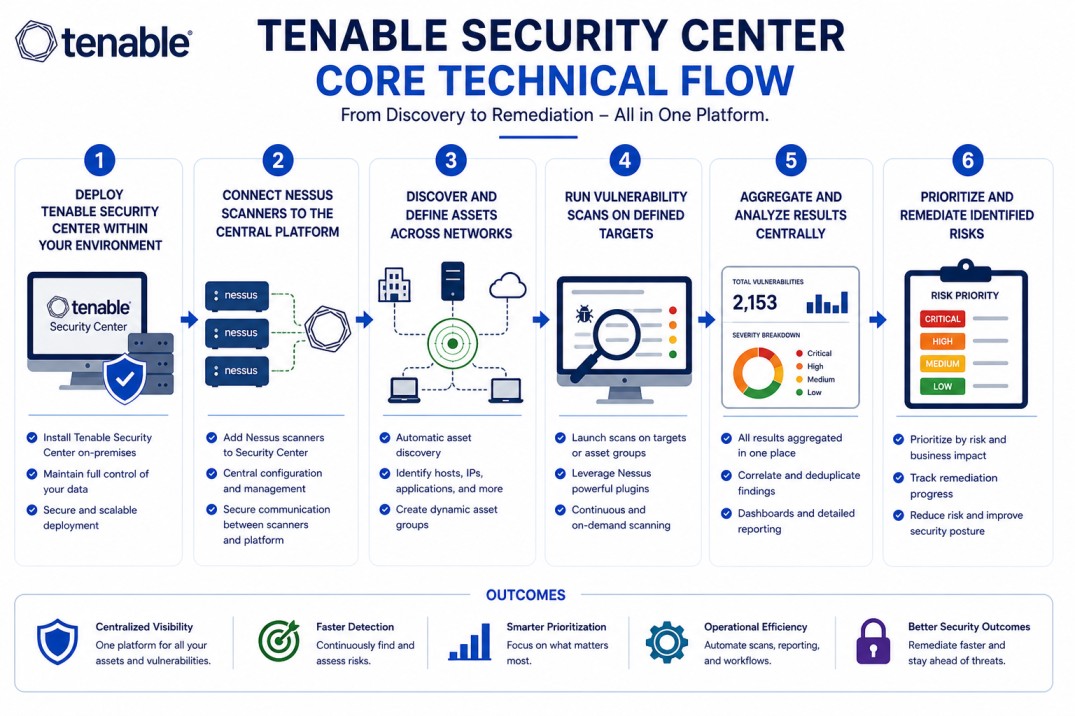
- Deploy Tenable Security Center within your environment
- Connect Nessus scanners to the central platform
- Discover and define assets across networks
- Run vulnerability scans on defined targets
- Aggregate and analyze results centrally
- Prioritize and remediate identified risks
Options & Tiers
| Plan / Model | Best for | Key inclusions | What affects price |
|---|---|---|---|
| Standard deployment | Most organizations | Centralized scanning + reporting | Asset count, term |
| Multi-scanner setup | Large environments | Distributed scanning | Infrastructure size |
| Regulated environment setup | Secure networks | On-prem control + compliance | Scope, deployment |
| Enterprise deployment | Complex infrastructures | Scalable vulnerability management | Architecture size |
Features & Benefits
Tenable Security Center helps organizations maintain continuous visibility into vulnerabilities while keeping everything under local control. This is especially useful in environments where data cannot leave the network. One of the main advantages is centralized management. Instead of handling scans separately, everything is coordinated from a single platform. It also improves prioritization. By analyzing vulnerability data in context, teams can focus on the most critical risks first. Over time, this leads to a more structured and consistent vulnerability management process.
Compatibility & Requirements
Environment Compatibility
- On-prem enterprise networks
- Regulated or air-gapped environments
- Multi-site infrastructures
Technical requirements
- Server infrastructure for deployment
- Nessus scanners
- Network access to target systems
How activation works
Activating Tenable Security Center starts with obtaining the appropriate license based on your asset count. Once the license is issued, it is applied to your on-prem installation. During setup, the platform is deployed within your environment and linked to your Tenable account. The license file is then uploaded to activate the system. After activation, you can begin connecting Nessus scanners to the platform.
These scanners handle vulnerability assessments and report results back to Security Center. In controlled or restricted environments, activation can be completed without direct internet access by transferring license files securely. Once everything is in place, asset discovery begins, and the platform starts collecting vulnerability data for analysis.
Pricing factors and Quote Workflow
Tenable Security Center pricing is mainly based on the number of assets being monitored. Larger environments with more systems will require broader licensing. Other factors, such as the number of scanners, network segmentation, and deployment complexity, can also influence pricing. Subscription length plays a role as well, with longer terms typically offering better value. The most accurate pricing comes from aligning the platform with your actual asset inventory and infrastructure.
After you request a quote
- We review your asset count and environment
- Recommend the most suitable deployment model
- Provide official pricing and delivery details
- Share activation and deployment guidance
Tenable Pricing depends on your license edition, quantity, term, and deployment needs.