

BitDefender EDR is an Endpoint Detection and Response solution built for organizations that need deeper visibility into suspicious endpoint activity, attack paths, and ongoing security incidents. Through the GravityZone platform, it helps security teams investigate threats that may bypass traditional prevention controls and respond before an attack spreads further.
Quick Benefits
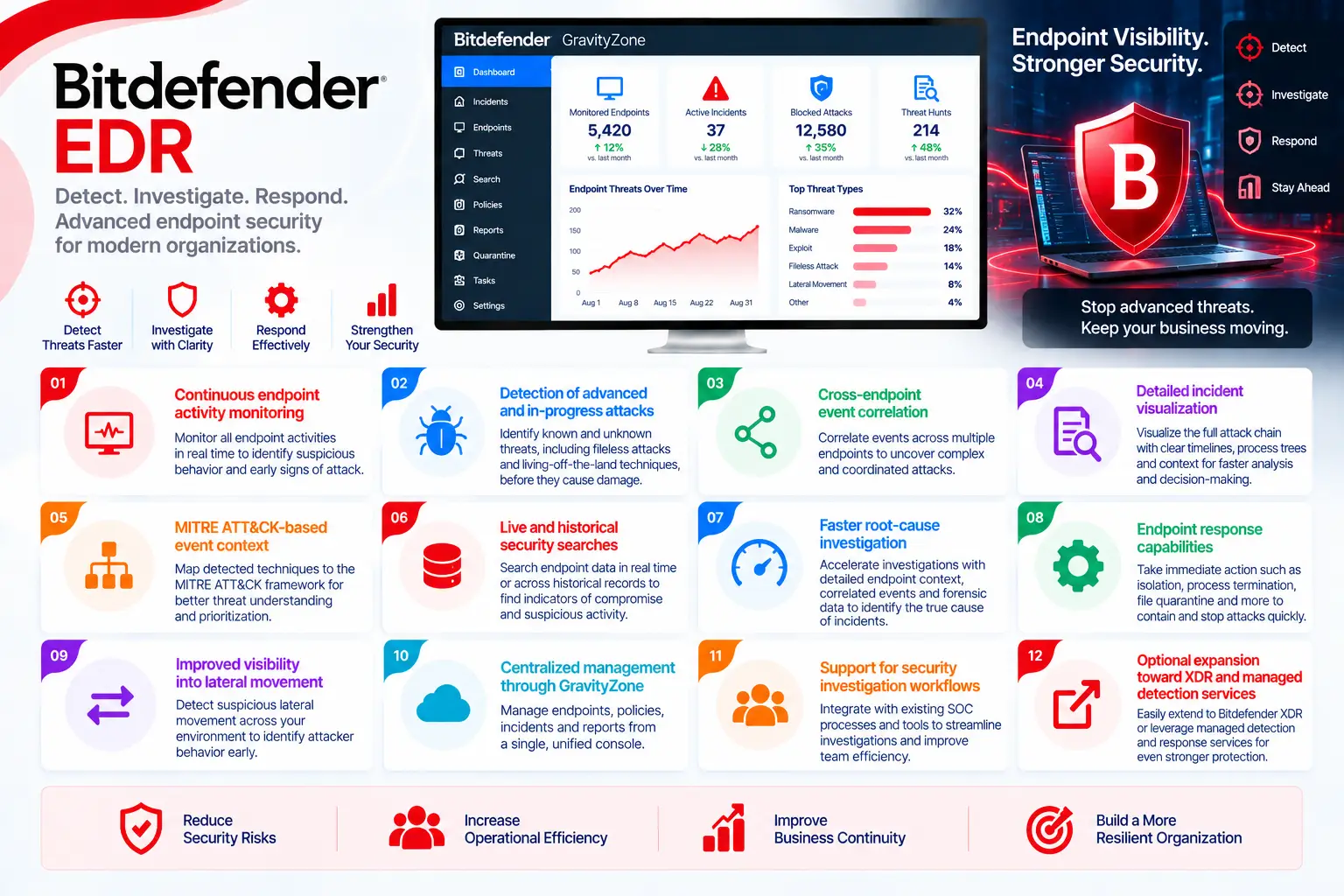
- Continuous endpoint activity monitoring
- Detection of advanced and in-progress attacks
- Cross-endpoint event correlation
- Detailed incident visualization
- MITRE ATT&CK-based event context
- Live and historical security searches
- Faster root-cause investigation
- Endpoint response capabilities
- Improved visibility into lateral movement
- Centralized management through GravityZone
- Support for security investigation workflows
- Optional expansion toward XDR and managed detection services
BitDefender EDR At a Glance
What it is: Endpoint Detection and Response solution
Vendor: Bitdefender
Platform: GravityZone
Parent category: Bitdefender License
Primary role: Detect, investigate, and respond to suspicious endpoint activity
Main users: SOC teams, security analysts, incident responders, IT security administrators, and enterprise security teams
Core capabilities: Event correlation, incident visualization, endpoint investigation, threat search, and response
Current product options: GravityZone EDR Cloud and EDR capabilities within eligible GravityZone security packages
License Overview
A BitDefender EDR License should be sized primarily around the endpoints or entities that require detection and response coverage. The exact commercial model depends on whether an organization chooses GravityZone EDR Cloud, uses EDR as part of Business Security Enterprise, or adds eligible capabilities to an existing GravityZone deployment.
This distinction matters. EDR is not simply another antivirus module. Its purpose is to collect endpoint telemetry, correlate suspicious events, expose relationships between affected devices, and provide investigators with enough context to understand an attack rather than only block a single malicious file.
Bitdefender’s current licensing documentation identifies Endpoint Detection and Response as an entity-based capability, while feature availability depends on the GravityZone product and license purchased. Some advanced capabilities, including longer EDR data retention or additional XDR sensors, may require separate licensing. For accurate sizing, organizations should therefore count the systems that genuinely need EDR coverage and then determine whether endpoint-only detection is sufficient or whether broader XDR visibility is required.
Product Overview
Detection Beyond Traditional Endpoint Prevention
Traditional endpoint protection is designed to stop known malware, exploits, ransomware, and other malicious activity before execution whenever possible. That prevention layer remains important, but sophisticated attacks do not always produce an obvious malicious file. Attackers may use legitimate administration tools, scripts, stolen credentials, PowerShell, WMI, or several low-severity actions that appear harmless when viewed separately. BitDefender EDR analyzes these activities together. Bitdefender describes its EDR capability as an event-correlation component that combines device intelligence across the enterprise network to identify advanced threats and attacks already in progress.
Incident Correlation and Attack Visualization
A security alert becomes much more useful when an analyst can see what happened before and after it. GravityZone EDR correlates endpoint events into incidents so analysts can understand relationships between processes, devices, users, and suspicious activity. This reduces the need to investigate hundreds of isolated alerts individually.
Current Bitdefender EDR capabilities include cross-endpoint correlation, endpoint incident visualization, MITRE ATT&CK technique tagging, live and historical search, response recommendations, and endpoint response functions. This is particularly useful when an attacker attempts lateral movement. Instead of viewing each compromised machine as an unrelated event, the investigation can follow the wider attack sequence.
EDR Versus XDR
EDR concentrates primarily on endpoint activity. XDR extends detection by correlating information from additional security domains. Bitdefender’s current XDR architecture can expand visibility beyond endpoints through sensors covering areas such as identity, productivity applications, network, cloud, and mobile environments. Business Security Enterprise already includes endpoint EDR, while organizations requiring wider telemetry can add appropriate XDR capabilities.
This distinction should be considered during licensing. A company that primarily needs endpoint investigation may not need the same configuration as an enterprise attempting to correlate identities, network activity, cloud resources, and endpoints within one investigation.
Core Technical Flow
Protected Endpoint Activity
→ GravityZone Endpoint Sensor
→ Telemetry and Security Event Collection
→ Cross-Endpoint Correlation
→ Incident Detection and Visualization
→ Analyst Investigation
→ Endpoint Response / Remediation
Bitdefender’s EDR workflow uses endpoint intelligence and event correlation to identify activities that may evade classic prevention mechanisms and then presents those incidents through GravityZone for investigation and response.
Options and Licensing Models
|
Licensing Option |
What It Provides |
Suitable For |
|
GravityZone EDR Cloud |
Cloud-managed endpoint detection, investigation, and response |
Organizations adding dedicated EDR visibility |
|
Business Security Enterprise |
Endpoint protection combined with integrated EDR capabilities |
Enterprises wanting prevention and EDR in one package |
|
EDR + XDR Expansion |
Adds telemetry beyond endpoints through eligible XDR sensors |
SOC teams requiring broader attack visibility |
|
EDR Data Retention |
Extended availability of security telemetry and investigation data |
Organizations requiring longer investigation windows |
|
EDR + MDR |
Combines security technology with managed monitoring and response services |
Organizations needing external SOC expertise |
|
Endpoint / Entity Capacity |
Licensing aligned with the number of protected systems |
Environments of different sizes |
Features and Benefits
The real value of BitDefender EDR appears during investigations where a traditional malware alert does not explain the entire incident. Security teams need to understand what process started the activity, which machines were affected, whether the attacker moved laterally, and what response should happen next.
EDR adds this investigative context. By correlating activity between endpoints and presenting incidents as connected security events, GravityZone helps analysts spend less time reconstructing an attack manually. It also gives organizations a practical path toward more mature security operations. A business may begin with endpoint prevention, add EDR when deeper investigation becomes necessary, and later expand toward XDR or MDR when broader visibility or 24/7 security operations are required. That scalability is important because not every organization needs a full SOC architecture from day one.
Compatibility and Requirements
Compatibility should be reviewed according to the exact GravityZone EDR product being purchased. Bitdefender’s current cloud product matrix lists a GravityZone web console and security agent for EDR Cloud, while support for individual components and integrations differs from other GravityZone editions. For example, some integrations available to Business Security Enterprise are not available to EDR Cloud.
Before ordering, check:
- Number and type of endpoints requiring EDR
- Operating systems used in the environment
- Existing GravityZone subscription
- Required cloud or on-premises management model
- Integration requirements
- Data retention requirements
- Need for XDR or MDR expansion
Activation and Deployment
Deployment normally begins through GravityZone Control Center by activating the appropriate license and enabling EDR functionality for the required endpoint policies.
Typical steps include:
- Activate the GravityZone subscription
- Deploy or reconfigure the endpoint security agent
- Enable the required Incident Sensor capabilities
- Apply EDR-enabled policies to protected endpoints
- Validate incoming incidents and telemetry
Bitdefender’s current documentation specifically instructs administrators to enable the Incident Sensors module within the relevant policy and ensure that policy is applied to the endpoints where EDR is required.
Pricing and Quote Process
Pricing for a BitDefender EDR License depends mainly on the number of protected endpoints or entities, selected GravityZone product, subscription duration, and any additional capabilities required around the core EDR deployment.
Before requesting a quote, organizations should define:
- Total endpoint count
- Workstation and server mix
- Existing Bitdefender licenses
- Need for EDR Cloud or Business Security Enterprise
- Required data-retention period
- XDR sensor requirements
- MDR or advanced support requirements
- Subscription duration
A BitDefender EDR License should be selected only after checking what the current GravityZone subscription already includes. This prevents paying twice for overlapping functionality and makes it easier to decide whether the next logical step is EDR, XDR, or a managed detection service.
Bitdefender EDR pricing depends on your product edition, endpoint count, security modules, deployment model, license term, and support requirements.