

The Bitdefender GravityZone ITDR license helps organizations detect and respond to threats targeting user identities, authentication systems, privileged accounts, and identity infrastructure. Identity Threat Detection and Response complements endpoint security by monitoring suspicious behavior associated with accounts, credentials, permissions, and access activity across on-premises and cloud environments.
GravityZone ITDR is generally deployed as part of the GravityZone XDR architecture through the Identity Sensor. Before ordering, organizations should review their Active Directory structure, number of domains and users, Microsoft Entra ID deployment, Hybrid Identity model, protected endpoints, subscription term, integration permissions, and required response actions.
Quick Benefits
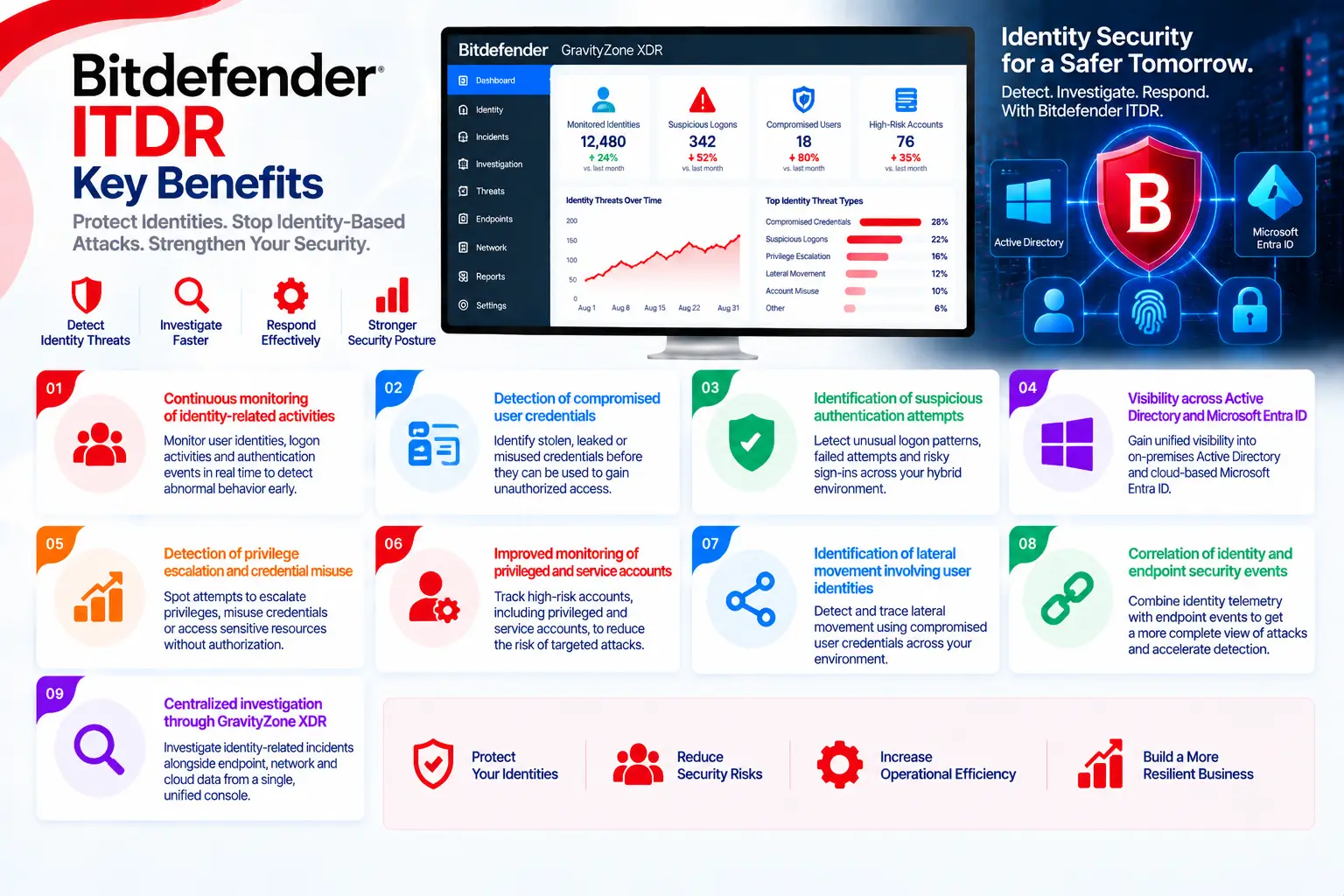
- Continuous monitoring of identity-related activities
- Detection of compromised user credentials
- Identification of suspicious authentication attempts
- Visibility across Active Directory and Microsoft Entra ID
- Detection of privilege escalation and credential misuse
- Improved monitoring of privileged and service accounts
- Identification of lateral movement involving user identities
- Correlation of identity and endpoint security events
- Centralized investigation through GravityZone XDR
- Faster response to compromised accounts
- Support for cloud and Hybrid Identity environments
- Reduced investigation time for security teams

Bitdefender GravityZone ITDR License Overview
Bitdefender GravityZone ITDR should not be treated as a standalone, identical license for every organization. Bitdefender provides identity visibility through its XDR architecture, and the required commercial scope depends on the main GravityZone subscription, Identity Sensor entitlement, monitored identity systems, endpoint count, and subscription term.
The official GravityZone XDR documentation identifies Bitdefender XDR Sensor – Identity as the license that enables integration with the Active Directory, Microsoft Entra ID—formerly Azure AD—and Microsoft Intune sensors. The Identity Sensor is therefore an important licensing component when ITDR capabilities are required.
Some organizations may purchase a broader GravityZone Defense XDR bundle, while others may start with GravityZone Business Security Enterprise and add the required XDR sensors. The exact configuration must be confirmed against the current Bitdefender offering and the organization’s technical architecture. Bitdefender describes GravityZone ITDR as an identity-focused layer integrated with its wider XDR platform.
What Is Bitdefender GravityZone ITDR?
GravityZone ITDR is designed to detect attacks in which identities become the primary target or attack path. These threats may include stolen credentials, abnormal sign-ins, privilege escalation, account takeover, suspicious administrative changes, and lateral movement performed through legitimate accounts.
Traditional Endpoint Protection and EDR primarily observe activity on devices. ITDR adds identity context by analyzing who authenticated, which resources were accessed, how permissions changed, and whether the behavior is consistent with the account’s normal activity.
This distinction is important because attackers may use valid credentials without immediately deploying malware. An authentication request can appear legitimate at the endpoint level while still representing a compromised account. ITDR helps expose these cases by correlating identity activity with endpoint and other XDR telemetry.
Active Directory Monitoring
For on-premises identity environments, the Active Directory Sensor collects relevant events from the identity infrastructure. It can help identify suspicious authentication behavior, changes involving sensitive accounts, and activities that may indicate lateral movement or privilege abuse.
Microsoft Entra ID Monitoring
The Microsoft Entra ID Sensor collects and preprocesses information concerning users, groups, sign-in activity, and configuration changes. Integration is performed through Microsoft Graph API, while Azure Event Hubs may also be configured to improve event delivery. Bitdefender recommends Event Hubs because relying only on Graph API may delay the retrieval of some security events.
How Does the Bitdefender GravityZone ITDR License Work?
The appropriate GravityZone subscription and XDR Identity Sensor license are activated first. Administrators then configure the required integrations from the Sensors Management section of GravityZone Control Center.
For Active Directory, the relevant domains, Domain Controllers, Certificate Authority roles, policies, and prerequisites must be reviewed. For Microsoft Entra ID, an application must be registered and granted the required Microsoft Graph permissions. Azure Event Hubs can also be configured depending on the deployment.
After integration, the Identity Sensors collect identity events and send relevant telemetry to GravityZone XDR. The platform correlates this information with endpoint and other available sensor data. When suspicious behavior is detected, GravityZone creates an alert or incident containing the affected identities, devices, events, and recommended actions.
Licensing and Deployment Options
| Option | Description |
| XDR Sensor – Identity | Enables Active Directory, Microsoft Entra ID and Microsoft Intune sensor integrations |
| Active Directory Sensor | Monitors supported on-premises identity infrastructure |
| Microsoft Entra ID Sensor | Collects cloud identity, sign-in and configuration events |
| Microsoft Intune Sensor | Adds supported device and identity context from Intune |
| GravityZone Defense XDR | Broader subscription bundle covering multiple attack surfaces |
| Additional XDR Sensors | Optional coverage for network, cloud and productivity applications |
| MDR Service | Managed monitoring and response for organizations requiring external SOC support |
The selected option should reflect the actual environment. A cloud-only organization may not require the same sensor configuration as a company operating several Active Directory forests and Entra ID tenants. Hybrid environments may require both Active Directory and Entra ID integrations for complete visibility.
Features and Capabilities
GravityZone ITDR focuses on detecting identity behaviors that may indicate account compromise. These include abnormal authentication patterns, credential misuse, privilege escalation, risky account activity, and suspicious access involving sensitive resources.
Identity events can be correlated with endpoint, network, cloud, and productivity application telemetry when the corresponding XDR sensors are licensed. This correlation helps security analysts reconstruct the attack path and understand whether an identity incident is isolated or part of a wider compromise.
Depending on the integration and permissions granted, response options may include disabling a user account, revoking active sessions, forcing a password reset, or applying endpoint response actions. Because these operations can disrupt legitimate users, response permissions and approval procedures should be defined before deployment.
Compatibility and Technical Requirements
Before ordering or implementing GravityZone ITDR, review the following:
- Current GravityZone and XDR license status
- Number of users, domains, forests and tenants
- Active Directory and Domain Controller architecture
- Microsoft Entra ID tenant configuration
- On-premises, cloud or Hybrid Identity model
- Microsoft Graph API permissions
- Optional Azure Event Hubs configuration
- Microsoft Intune integration requirements
- Privileged users and service accounts
- Endpoint coverage and EDR deployment
- Required account response actions
- MFA and Conditional Access policies
- Data retention and residency requirements
- SIEM, ticketing and SOC integrations
- Need for additional XDR Sensors or MDR
Permissions should follow the principle of least privilege. Read-only permissions may be sufficient for monitoring, while actions such as disabling accounts, revoking sessions, resetting passwords, or deleting malicious emails require additional permissions.
Activation and Deployment
Deployment begins by validating the GravityZone subscription and assigning the XDR Identity Sensor entitlement. Administrators then open GravityZone Control Center and configure integrations under Configuration > Sensors Management.
Each integration should be tested to verify sensor connectivity, event collection, incident creation, and response permissions. Hybrid organizations should validate both Active Directory and Microsoft Entra ID visibility. A phased deployment is recommended so that administrators can evaluate alerts, tune operational processes, and confirm response workflows before enabling broader actions.
Bitdefender GravityZone ITDR Pricing
Bitdefender GravityZone ITDR pricing depends on the selected GravityZone subscription, Identity Sensor entitlement, number of users or protected assets, subscription duration, identity architecture, and any additional XDR or MDR services.
For an accurate quotation, provide the number of users, endpoints, domains, forests and Entra ID tenants; the current GravityZone edition; required sensors; subscription term; and whether the environment is on-premises, cloud-based, or hybrid. Requirements for deployment assistance, integration, training, and managed response may also affect the final quote.
Bitdefender pricing depends on your product edition, endpoint count, security modules, deployment model, license term, and support requirements.