

The Bitdefender XDR license extends detection and response beyond managed endpoints by combining security telemetry from endpoints, networks, identities, cloud workloads, and productivity applications. GravityZone analyzes relationships between these sources to identify multistage attacks and present connected events as a unified security incident.
GravityZone XDR is commonly built on GravityZone Business Security Enterprise, with separate add-ons for the required sensor categories. Before ordering, organizations should define their endpoint count, data sources, identity services, cloud platforms, network architecture, productivity applications, subscription term, and required XDR sensors.
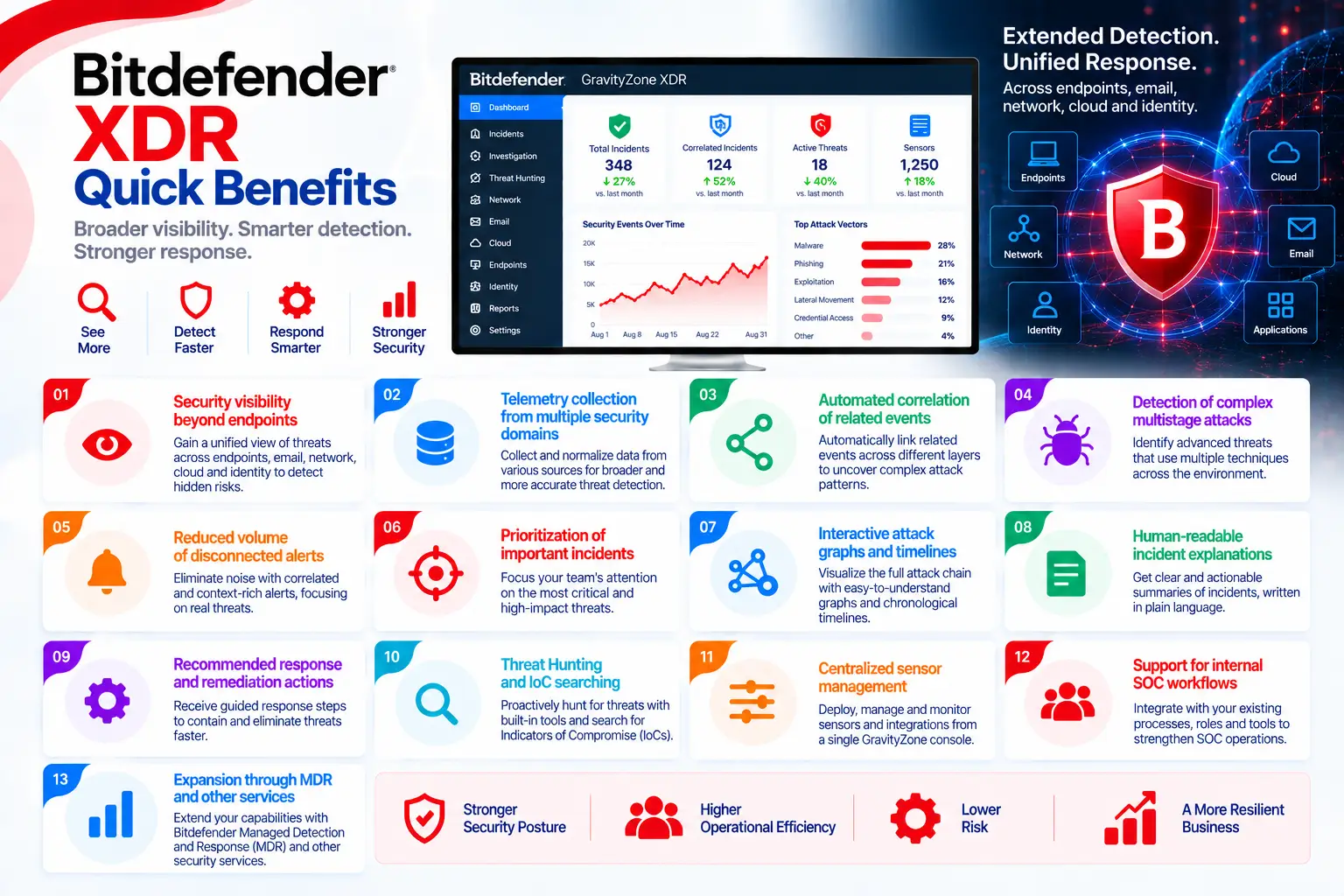
Bitdefender XDR Quick Benefits
- Security visibility beyond endpoints
- Telemetry collection from multiple security domains
- Automated correlation of related events
- Detection of complex multistage attacks
- Reduced volume of disconnected alerts
- Prioritization of important incidents
- Interactive attack graphs and timelines
- Human-readable incident explanations
- Recommended response and remediation actions
- Threat Hunting and IoC searching
- Centralized sensor management
- Support for internal SOC workflows
- Expansion through MDR and other services
GravityZone Enterprise At a Glance
What it is: Enterprise Endpoint Protection and EDR solution
Product name: GravityZone Business Security Enterprise
Parent category: Bitdefender License
Primary role: Threat prevention, detection, investigation, and endpoint response
Management platform: GravityZone Control Center
Security agent: Bitdefender Endpoint Security Tools (BEST)
Protected assets: Workstations, laptops, servers, and virtual systems
Supported platforms: Windows, macOS, and Linux, depending on the enabled modules and capabilities
License model: Subscription based on the number of protected endpoints or eligible entities
Bitdefender XDR License Overview
Bitdefender XDR should not be treated as a single, identical license for every organization. According to Bitdefender’s official XDR information, the common architecture combines GravityZone Business Security Enterprise with separately purchasable add-ons for the required sensor categories.
The base environment provides endpoint protection, EDR, and endpoint-to-endpoint correlation. Additional sensors are used to collect telemetry from networks, identity providers, cloud workloads, and productivity applications. Each sensor group may require a separate entitlement or license key.
Endpoint quantity is therefore only one pricing factor. The final quote may also depend on sensor categories, connected services, cloud architecture, identity scope, network monitoring design, data-retention requirements, support, and subscription duration.
Instead of reviewing many isolated alerts, analysts can examine the overall attack path, affected assets, suspected entry point, compromised identities, supporting evidence, and recommended response actions from one interface.
How Does Bitdefender XDR Work?
Within the typical Bitdefender security licensing architecture, GravityZone Business Security Enterprise is first activated for Endpoint Protection and EDR. The required XDR sensors are then connected to GravityZone according to the organization’s infrastructure.
Each sensor collects security telemetry from its assigned domain and sends it to the platform. GravityZone normalizes the incoming information and evaluates relationships between suspicious activities. When multiple events appear to belong to the same attack, the platform creates an Extended Incident instead of displaying only disconnected alerts.
Analysts can inspect the incident timeline, evidence, affected systems, user accounts, and recommended actions. Depending on the enabled integrations and permissions, the security team can isolate endpoints, block indicators, adjust policies, investigate identities, or begin additional remediation workflows.
XDR Sensors and Licensing Options
|
Option |
Purpose |
|
Business Security Enterprise |
Provides Endpoint Protection, EDR, and the common XDR base |
|
Network Sensor |
Collects and analyzes relevant network telemetry |
|
Identity Sensor |
Monitors supported identity providers and account activity |
|
Cloud Sensor |
Collects data from compatible cloud environments |
|
Productivity Apps Sensor |
Adds telemetry from supported productivity platforms |
|
Extended Data Retention |
Retains security telemetry for a longer period when available |
|
Bitdefender MDR |
Adds managed monitoring, investigation, and response |
|
Security Data Lake |
Supports broader storage and use of security data |
Bitdefender XDR Features and Benefits
The central capability of GravityZone XDR is cross-domain correlation. It helps identify attacks that move between endpoints, user identities, network resources, cloud platforms, and business applications but might appear unrelated in separate security tools.
Incident Graphs visualize relationships among users, devices, processes, connections, and events. Timelines show the sequence of activity so analysts can identify the possible initial access point, attack progression, and affected systems more quickly.
Threat Hunting enables analysts to search for Indicators of Compromise and suspicious activity across available telemetry. Human-readable incident explanations reduce the time required to understand complex events, while response recommendations guide containment and remediation.
XDR does not replace an internal SOC or security analyst. It improves their efficiency by reducing alert fragmentation, adding context, prioritizing incidents, and simplifying investigation.
Compatibility and Technical Requirements
Before ordering and deployment, review:
- Current GravityZone Business Security Enterprise entitlement
- Number of protected workstations and servers
- Endpoint operating systems
- Required Network, Identity, Cloud, and Productivity sensors
- AWS, Azure, or other supported cloud services
- Active Directory and identity-provider architecture
- Microsoft 365 or other supported productivity applications
- Network Sensor location and required capacity
- API permissions and integration credentials
- Telemetry volume and data-retention requirements
- Data residency, privacy, and compliance policies
- SIEM, ticketing, and SOC workflow integrations
- Number and skill level of security analysts
- Need for MDR or external Incident Response
Bitdefender XDR Activation and Deployment
The base entitlement and required sensor licenses are first activated in GravityZone. Administrators then configure integrations through Sensors Management and confirm that each sensor is active and successfully processing data.
A phased deployment is recommended. Organizations can begin with endpoint telemetry and one important data source, validate incidents and permissions, and then connect additional sensors. Testing should cover telemetry collection, system-time synchronization, API access, Incident Graphs, notifications, and available response actions.
Bitdefender XDR License Pricing
Bitdefender XDR pricing depends on the endpoint base license, protected endpoint count, selected sensor categories, connected data sources, subscription term, data retention, support, and additional services. For an accurate quote, provide workstation and server quantities, identity services, cloud platforms, productivity applications, network architecture, required sensors, contract duration, retention requirements, and any need for Bitdefender MDR.
Bitdefender pricing depends on your product edition, endpoint count, security modules, deployment model, license term, and support requirements.