

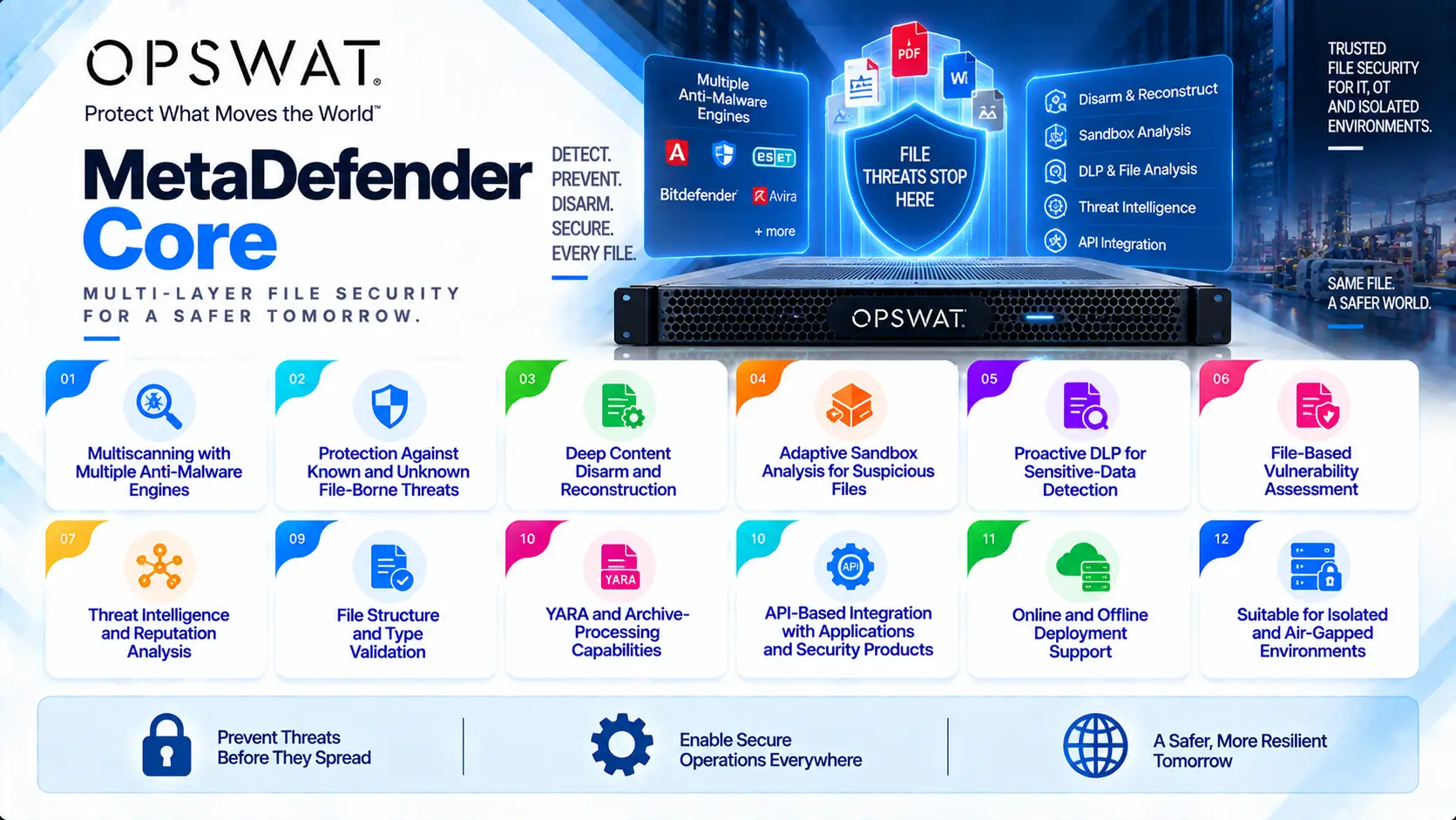
OPSWAT MD Core (MetaDefender Core) is an advanced file-security platform designed to detect, analyze, sanitize, and control files before they enter critical systems. It combines multiple anti-malware engines with technologies such as Deep CDR, Adaptive Sandbox, Proactive DLP, threat intelligence, and vulnerability assessment to build trusted file-processing workflows for enterprise IT and OT environments.
Quick Benefits
- Multiscanning with multiple anti-malware engines
- Protection against known and unknown file-borne threats
- Deep Content Disarm and Reconstruction
- Adaptive sandbox analysis for suspicious files
- Proactive DLP for sensitive-data detection
- File-based vulnerability assessment
- Threat intelligence and reputation analysis
- File structure and type validation
- YARA and archive-processing capabilities
- API-based integration with applications and security products
- Online and offline deployment support
- Suitable for isolated and air-gapped environments
OPSWAT MD Core At a Glance
What it is: Advanced file threat detection and prevention platform
Product name: MetaDefender Core
Parent category: OPSWAT License
Primary role: Inspect, analyze, sanitize, and validate files before they reach trusted environments
Core technology: Metascan Multiscanning
Additional security technologies: Deep CDR, Adaptive Sandbox, Proactive DLP, Threat Intelligence, Reputation, File-Based Vulnerability Assessment, and SBOM
Supported environments: Windows and Linux
Deployment models: On-premises, virtualized, cloud, containerized, clustered, offline, and air-gapped
Integration model: REST API and integration with other OPSWAT and third-party security products
License identification: Unique Deployment ID for each Core installation
License Overview
An OPSWAT MD Core License defines which threat-detection engines and file-security technologies can operate on a MetaDefender Core deployment. Each installed Core instance receives a unique Deployment ID, and the license is activated against that deployment. The most visible licensing choice is the Metascan engine package. On current Windows deployments, OPSWAT provides packages such as 8, 12, 16, 20, and MAX engines. Linux uses a different engine portfolio, including 5, 10, and MAX engine packages. The precise engine vendors available in each package can change as OPSWAT updates its scanning portfolio.
Multiscanning is only one part of the license. Organizations can also add technologies such as Deep CDR, Proactive DLP, Adaptive Sandbox, File-Based Vulnerability Assessment, Threat Intelligence, Reputation, SBOM analysis, Country of Origin checks, AI Content Inspector, and utility engines. For this reason, two Core deployments with the same number of anti-malware engines may have very different security capabilities and infrastructure requirements.
Product Overview
Multi-Engine Malware Detection
MetaDefender Core is best known for Metascan Multiscanning, which analyzes a file with multiple anti-malware engines rather than relying on a single vendor.
Each engine uses its own signatures, heuristics, machine-learning models, and detection logic. Combining several engines improves detection coverage and reduces dependence on one security vendor.
Current Windows packages range from smaller multi-engine configurations to MAX, while Linux has its own optimized engine combinations.
The appropriate package depends on detection requirements, available computing resources, and expected processing volume.
Deep Content Disarm and Reconstruction
Deep CDR approaches file security differently from traditional malware scanning.
Instead of only determining whether a file is malicious, Deep CDR processes supported documents and removes potentially dangerous active content while reconstructing a usable version of the file.
This is valuable for documents entering highly sensitive environments where unknown or zero-day threats cannot be accepted simply because conventional scanning returned a clean result.
Deep CDR can be combined with multiscanning so files are first evaluated for known threats and then sanitized before delivery.
Adaptive Sandbox
Some threats require behavioral analysis rather than static inspection.
Adaptive Sandbox executes suspicious files in a controlled analysis environment and evaluates their behavior to identify malicious or evasive actions.
Workflows can be configured so sandboxing is applied selectively. For example, an organization may send only suspicious files, unknown files, sanitization failures, or specific file types to the sandbox rather than processing every file dynamically.
This reduces unnecessary processing while preserving deeper analysis for higher-risk objects.
Options and Licensing Models
| Licensing Option | Description | Suitable For |
|---|---|---|
| Windows 8 Engines | Entry multi-engine package using eight anti-malware technologies | Moderate scanning requirements |
| Windows 12 Engines | Expands multiscanning with additional detection engines | Organizations seeking broader detection coverage |
| Windows 16 Engines | Higher multi-engine coverage for security-sensitive workflows | Enterprise and regulated environments |
| Windows 20 Engines | Broad multi-engine package for advanced threat detection | Critical file-transfer environments |
| Windows MAX | Maximum available Windows Metascan engine package | High-security and critical infrastructure deployments |
| Linux 5 / 10 / MAX | Linux-specific multi-engine packages | Linux-based Core deployments |
| Deep CDR | Sanitizes supported files by removing potentially dangerous active content | Zero Trust file-processing workflows |
| Adaptive Sandbox | Performs dynamic behavioral analysis of suspicious files | Advanced malware and zero-day investigation |
| Proactive DLP | Detects and controls sensitive information inside files | Compliance and data-security environments |
| Additional Security Modules | Adds vulnerability, reputation, threat intelligence, SBOM, YARA, archive, and other capabilities | Customized enterprise security workflows |
Features and Benefits
The major advantage of OPSWAT MD Core is that file trust does not depend on one detection method.
A conventional antivirus product may only ask whether a file matches known malicious indicators. Core can evaluate that same file with multiple anti-malware engines, verify its structure, check its reputation, sanitize active content, inspect sensitive data, and send suspicious objects for dynamic analysis.
The workflow is also highly adaptable. An organization does not have to run every technology against every file. Policies can determine which engines operate according to file type, previous scanning result, source, or security requirements.
This becomes especially valuable in high-volume environments, where processing every object with the most expensive analysis method would create unnecessary resource consumption.
API integration allows Core to operate behind web applications, file-transfer platforms, security gateways, storage systems, OPSWAT Kiosk, MFT, ICAP, and other file-processing workflows.
Compatibility and Requirements
Sizing an OPSWAT MD Core License requires both licensing and infrastructure planning.
Important considerations include:
- Windows or Linux deployment
- Required Metascan engine package
- Average and peak files processed
- Average and maximum file size
- Required throughput
- Deep CDR usage
- Proactive DLP usage
- Adaptive Sandbox volume
- File retention requirements
- API integration requirements
- High-availability or cluster architecture
- Online or offline deployment
- Database architecture
- Available CPU, memory, and storage
Resource requirements rise as additional engines and technologies are enabled. For example, Deep CDR and Proactive DLP require additional CPU and memory beyond the base Core package. Sandbox workloads also need additional resources according to the number of files analyzed. Production sizing should therefore be based on actual workload testing rather than engine count alone.
Activation and Deployment
Each MetaDefender Core installation generates a unique Deployment ID used during license activation. For internet-connected environments, the Activation Key and Deployment ID can be used for online activation. After successful activation, Core downloads the licensed engines and associated malware databases.
Offline deployments use a different workflow. The Deployment ID and Activation Key are taken to an internet-connected system, where an activation file is generated. The resulting license file is then transferred to the isolated Core server and uploaded through the management console.
A typical deployment includes:
- Install MetaDefender Core
- Record the Deployment ID
- Activate the OPSWAT MD Core License
- Install licensed Metascan engines
- Enable purchased security modules
- Configure update mechanisms
- Build file-processing workflows
- Connect APIs or integrated products
- Run performance and policy tests
Air-gapped installations also require a controlled method for transferring anti-malware engine and definition updates into the isolated environment.
Pricing and Quote Process
Pricing for OPSWAT MD Core depends on the combination of scanning engines, advanced security modules, deployments, and processing requirements.
Before requesting a quote, prepare:
- Number of Core deployments
- Windows or Linux platform
- Required Metascan engine package
- Deep CDR requirement
- Proactive DLP requirement
- Adaptive Sandbox requirement
- Threat Intelligence and Reputation needs
- Vulnerability or SBOM requirements
- Average and peak file-processing volume
- Maximum expected file size
- High-availability requirements
- Online or offline architecture
OPSWAT pricing depends on your product family, MetaDefender modules, deployment model, file security requirements, license term, and support needs.