

OPSWAT MD ICAP (MetaDefender ICAP Server) is a secure content inspection solution that enables organizations to integrate advanced file security capabilities into existing network security infrastructure. By using the ICAP protocol, MD ICAP connects with compatible proxies, web gateways, WAFs, storage systems, and security platforms to inspect files using MetaDefender Core technologies before users access or download them.
Quick Benefits
- ICAP-based file security integration
- Real-time malware inspection for network traffic
- Multi-engine file scanning
- Deep Content Disarm and Reconstruction
- Protection against file-borne threats
- Integration with proxies, WAFs, and gateways
- Secure web and file-download inspection
- Policy-based file handling
- Support for enterprise security architectures
- Detection of known and unknown threats
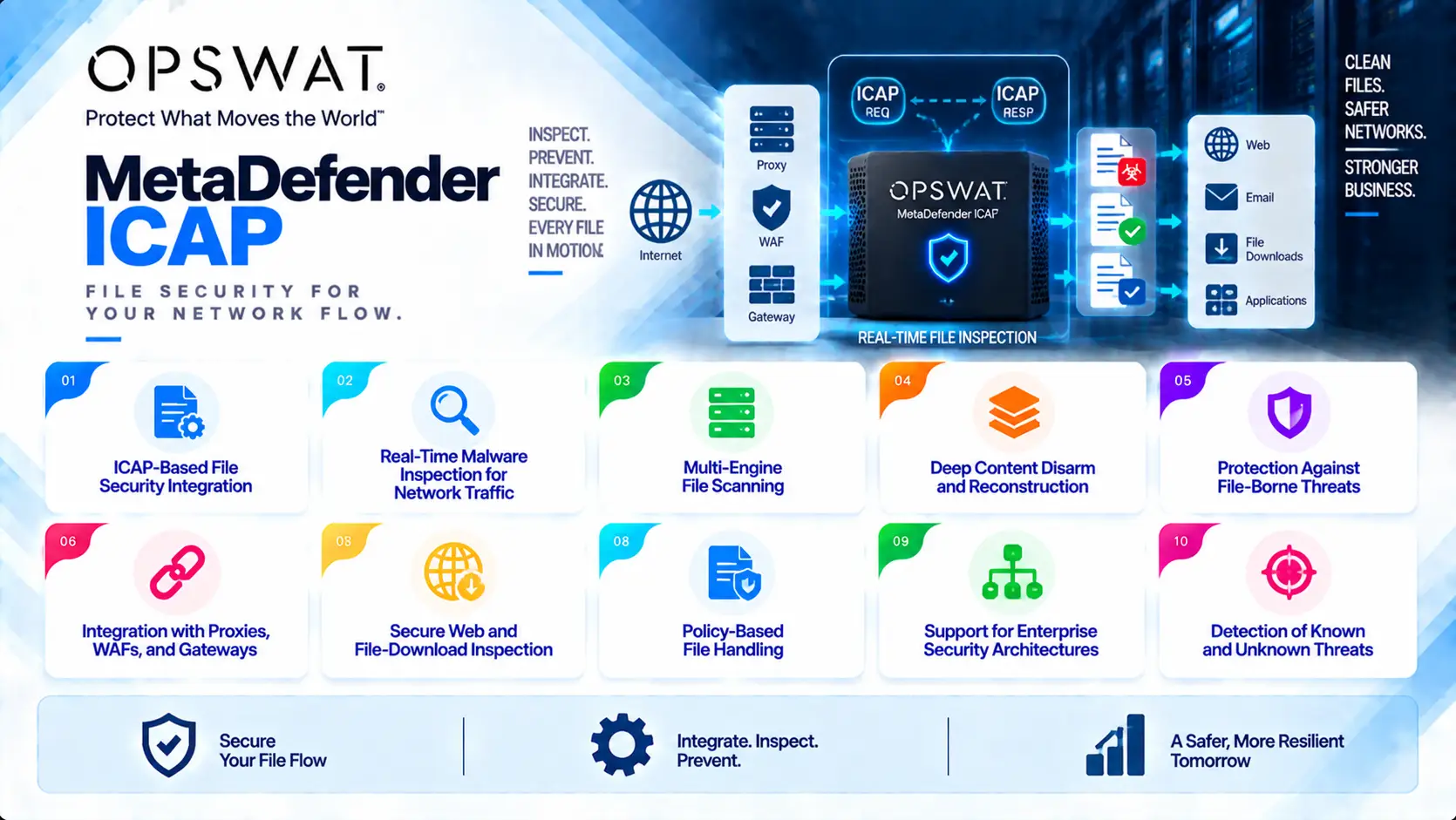
OPSWAT MD ICAP At a Glance
What it is: ICAP-based content security inspection server
Product name: MetaDefender ICAP Server
Parent category: OPSWAT License
Primary role: Inspect and sanitize files exchanged through ICAP-compatible security devices
Main protocol: ICAP
Core integration: MetaDefender Core
Security technologies: Multiscanning, Deep CDR, Adaptive Sandbox, Threat Intelligence, Reputation Analysis, and file validation
Deployment models: On-premises, virtualized, private cloud, hybrid, and restricted environments
Typical environments: Enterprise networks, government, financial services, healthcare, critical infrastructure, and security gateways
Integration points: Secure web gateways, proxies, WAFs, storage platforms, and network security devices
Management: Product administration interface and MetaDefender management components
License Overview
An OPSWAT MD ICAP License enables organizations to deploy MetaDefender ICAP Server as a security inspection layer between users and external or internal file sources.
The licensing model is primarily influenced by the deployment architecture and the security capabilities enabled through MetaDefender Core.
Unlike standalone endpoint security products, MD ICAP is usually deployed as part of a larger security workflow. The organization’s existing infrastructure determines how many inspection points are required and how much processing capacity is needed.
Important licensing factors include:
- Number of ICAP-enabled security devices
- Number of MD ICAP deployments
- File-processing volume
- Average and maximum file size
- Required MetaDefender Core configuration
- Number of scanning engines
- Deep CDR requirements
- Sandbox analysis requirements
- High-availability requirements
Product Overview
ICAP-Based Content Inspection
ICAP provides a standard method for security products to communicate with content-processing servers.
MetaDefender ICAP Server uses this protocol to connect security inspection capabilities with existing network infrastructure.
Common integration scenarios include:
- Secure web gateways
- Forward proxies
- Reverse proxies
- Web application firewalls
- File-sharing platforms
- Storage systems
- Data-transfer gateways
This allows organizations to add advanced file analysis without replacing their existing security architecture.
Multi-Engine Malware Scanning
MD ICAP integrates with MetaDefender Core to provide multi-engine file analysis.
Files passing through an ICAP-enabled system can be inspected using multiple malware detection engines before being delivered to users.
This improves protection against:
- Known malware
- Suspicious executables
- Malicious documents
- Archived threats
- File-based attacks
Using multiple detection engines reduces dependence on a single security vendor’s detection capability.
Deep Content Disarm and Reconstruction
Many threats are hidden inside legitimate business documents.
Deep CDR provides an additional security layer by rebuilding supported files and removing potentially dangerous components.
When integrated with MD ICAP, documents accessed through web gateways or other supported systems can be sanitized before reaching users.
This approach is especially useful for organizations that need to accept external documents while reducing the risk of malicious embedded content.
Options and Licensing Models
| Licensing Option | Description | Suitable For |
|---|---|---|
| Standard MD ICAP Deployment | Provides ICAP-based file inspection capability | Organizations integrating content inspection into existing infrastructure |
| MetaDefender Core Integration | Uses Core security technologies for advanced analysis | Security-focused deployments |
| Multi-Engine Scanning Package | Enables multiple malware detection engines | Environments requiring stronger threat detection |
| Deep CDR Module | Sanitizes supported documents before delivery | Organizations protecting against unknown document threats |
| Adaptive Sandbox Integration | Adds behavioral analysis for suspicious files | Advanced threat detection workflows |
| Proxy / Gateway Integration | Connects MD ICAP with existing security gateways | Enterprise web-security architectures |
| High-Availability Deployment | Supports redundant inspection architectures | Critical environments requiring continuous protection |
| Offline Deployment | Supports restricted environments without direct internet connectivity | Government, defense, and isolated networks |
Features and Benefits
The primary advantage of OPSWAT MD ICAP is that organizations can add advanced file-security capabilities without redesigning their existing security infrastructure.
Many enterprises already operate proxies, WAFs, gateways, and storage platforms. Replacing these systems to introduce file inspection is often unnecessary. MD ICAP provides an integration layer that allows existing security products to forward files for analysis.
The combination of ICAP flexibility and MetaDefender Core technologies provides multiple protection layers:
- Malware detection
- Content sanitization
- Behavioral analysis
- File validation
- Threat intelligence checks
This makes MD ICAP suitable for organizations that need centralized file inspection across multiple access points.
Another benefit is architectural flexibility. Security teams can place inspection where it provides the highest value, such as internet gateways, application portals, storage environments, or controlled file-transfer paths.
Compatibility and Requirements
Before purchasing an OPSWAT MD ICAP License, evaluate:
- ICAP-compatible devices
- Number of inspection points
- Expected traffic volume
- File-processing requirements
- Maximum file sizes
- MetaDefender Core configuration
- Required scanning engines
- Deep CDR requirements
- Sandbox requirements
- High-availability needs
- Network architecture
Activation and Deployment
A typical MD ICAP deployment includes:
- Install MetaDefender ICAP Server
- Configure ICAP communication
- Connect MetaDefender Core services
- Activate the OPSWAT license
- Configure scanning policies
- Integrate with proxy, WAF, or gateway systems
- Test file inspection workflows
- Enable reporting and monitoring
For restricted environments, offline activation and controlled update procedures can be used.
A production deployment should validate performance under expected traffic conditions before enabling full enforcement.
Pricing and Quote Process
Pricing for OPSWAT MD ICAP depends on deployment architecture, traffic volume, security modules, and MetaDefender Core requirements.
Before requesting a quote, prepare:
- Number of ICAP integrations
- Type of connected systems
- Expected file volume
- Peak traffic requirements
- File-size requirements
- Required scanning engines
- Deep CDR requirements
- Sandbox requirements
- High-availability design
- Offline deployment needs
- Support requirements
A single proxy integration has different requirements compared with a large enterprise deployment where multiple gateways, WAFs, and storage platforms send files through MD ICAP.
Correct sizing ensures enough inspection capacity without unnecessary licensing complexity.