

EventLog Analyzer MSSP is a multi-tenant log management and security monitoring solution designed for Managed Security Service Providers (MSSPs) and IT service providers that monitor multiple customer environments from a centralized platform.
As part of the ManageEngine IT Management for MSPs portfolio, EventLog Analyzer MSSP helps service providers collect, analyze, and monitor security events from different customers through centralized dashboards, alerts, reports, and compliance workflows. The platform supports organizations that provide managed security services, helping them improve threat visibility, reduce manual monitoring effort, and deliver measurable security value to customers.
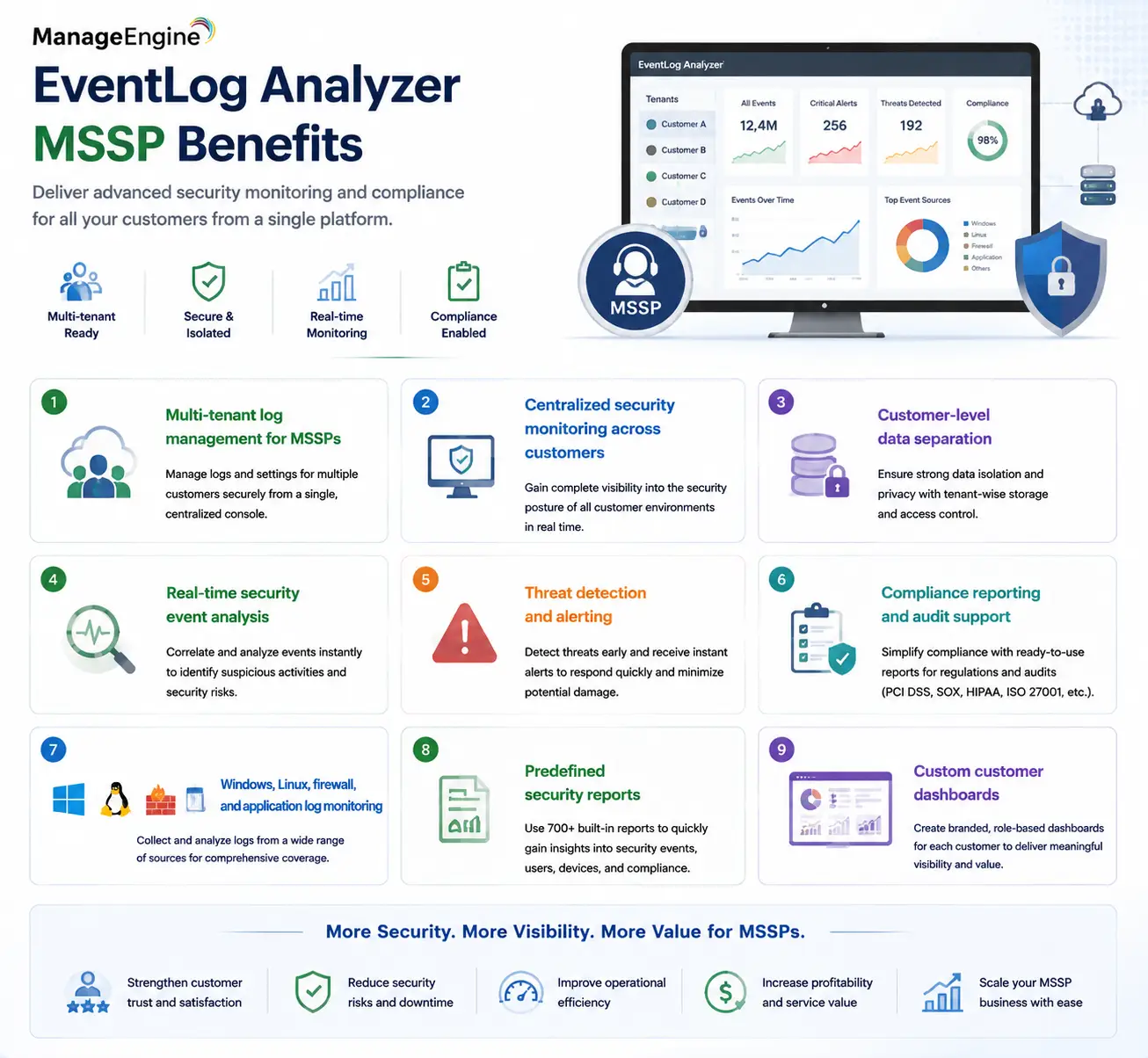
Quick Benefits
- Multi-tenant log management for MSSPs
- Centralized security monitoring across customers
- Customer-level data separation
- Real-time security event analysis
- Threat detection and alerting
- Compliance reporting and audit support
- Windows, Linux, firewall, and application log monitoring
- Predefined security reports
- Custom customer dashboards
EventLog Analyzer MSSP At a Glance
What it is: Multi-tenant log management and security monitoring platform
Parent category: ManageEngine IT Management for MSPs
Primary users: MSSPs, managed service providers, SOC service providers, and IT outsourcing companies
Primary role: Collect, analyze, and monitor customer security logs
Deployment model: On-premises, cloud, and managed service deployments depending on requirements
Core capabilities: Log collection, event correlation, alerting, reporting, compliance monitoring, and threat investigations

License Overview
An EventLog Analyzer MSSP license is designed around the operational requirements of service providers rather than a single company’s internal security monitoring needs. For MSSPs, the main licensing considerations are usually the number of customer environments being managed, the amount of log data generated, the number of devices sending events, and the required retention period.
A small MSSP managing a few customers with limited infrastructure may only need basic log collection and reporting. A larger security provider monitoring hundreds of firewalls, servers, endpoints, and applications requires higher event-processing capacity and stronger tenant-management capabilities. The licensing model should also consider how technicians access the platform. Security analysts may need full investigation capabilities, while customer representatives may only require access to their own dashboards and reports.
Product Overview
Multi-Tenant Security Monitoring for MSSPs
Traditional EventLog Analyzer deployments are typically designed for one organization where all logs belong to the same security team.
MSSP environments are different. A service provider may monitor dozens of customers, each with separate networks, compliance requirements, and security policies.
EventLog Analyzer MSSP introduces a multi-tenant approach where customer data can be isolated while allowing the MSSP security team to operate from a centralized management console.
This allows service providers to build repeatable security monitoring processes instead of creating separate deployments for every customer.
For example, an MSSP analyst can investigate firewall events from Customer A while maintaining complete separation from Customer B’s security data.
Centralized Log Collection and Analysis
Security visibility depends on collecting the right information.
EventLog Analyzer MSSP can collect logs from various infrastructure components, including Windows servers, Linux systems, network devices, firewalls, applications, databases, and security platforms.
These logs are normalized and analyzed so security teams can identify suspicious activity, investigate incidents, and generate reports without manually reviewing individual systems.
For MSSPs, centralized collection reduces operational overhead because technicians can monitor multiple customers through one security operations workflow.
Threat Detection and Incident Investigation
Log management becomes valuable when it helps identify abnormal behavior.
EventLog Analyzer MSSP provides security monitoring capabilities that help detect suspicious login attempts, privilege changes, configuration modifications, policy violations, and other security events.
When an incident occurs, analysts can search historical logs, review event timelines, and investigate the activities that led to the alert.
This capability is especially important for MSSPs because customers expect security providers to not only collect logs but also explain what happened and provide actionable recommendations.
How EventLog Analyzer MSSP Works
The platform begins by collecting security events from customer environments. Logs from servers, firewalls, applications, and other devices are forwarded to the EventLog Analyzer MSSP platform. These events are then processed, indexed, and categorized for analysis.
The MSSP administrator can organize customers into separate environments, assign technician permissions, configure alerts, and create customer-specific reports.
Security analysts can then monitor events, investigate suspicious activities, and provide security reports back to customers. The result is a centralized security monitoring operation where one MSSP team can support multiple organizations efficiently.
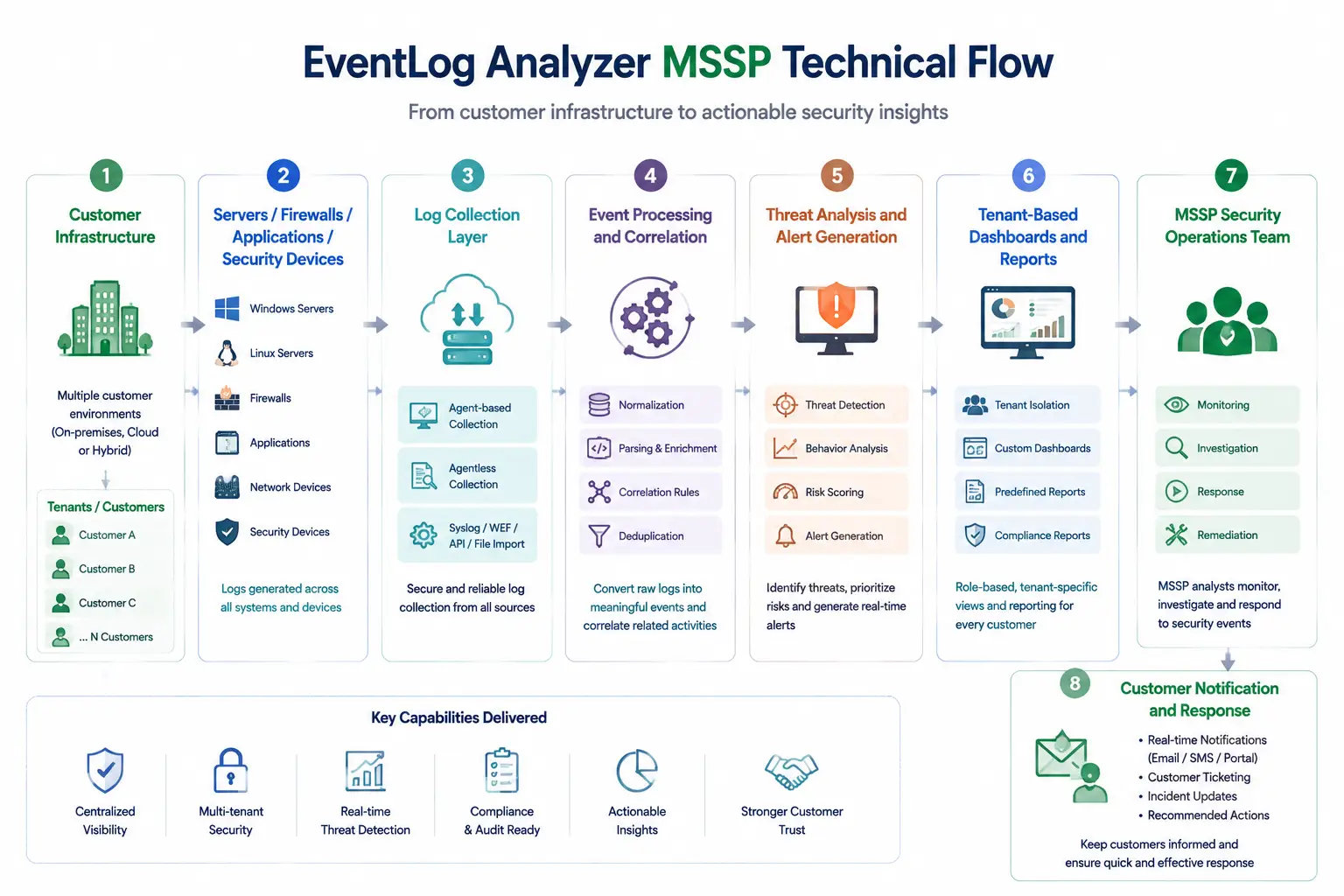
Core Technical Flow
Customer Infrastructure
→ Servers / Firewalls / Applications / Security Devices
→ Log Collection Layer
→ Event Processing and Correlation
→ Threat Analysis and Alert Generation
→ Tenant-Based Dashboards and Reports
→ MSSP Security Operations Team
→ Customer Notification and Response
The multi-tenant architecture allows the MSSP to maintain centralized operations while keeping each customer’s security data logically separated.
Options and Licensing Models
| Licensing Factor | Description | Suitable For |
|---|---|---|
| Managed Customers | Number of customer organizations monitored by the MSSP | Service providers managing multiple businesses |
| Log Sources / Devices | Servers, firewalls, endpoints, applications, and security devices sending logs | Organizations with different infrastructure sizes |
| Events Per Second (EPS) | Volume of incoming security events processed by the platform | High-volume SOC environments |
| Storage and Retention | Amount of historical logs maintained for investigation and compliance | Customers requiring long-term security visibility |
| Technician Access | Number of analysts and operators using the platform | MSSPs with multiple security engineers |
| Reporting Requirements | Customer dashboards, compliance reports, and scheduled reports | Providers offering managed security reporting |
Features and Benefits
The primary advantage of EventLog Analyzer MSSP is operational scalability.
Without an MSSP-focused architecture, service providers often need separate deployments, separate dashboards, and separate workflows for each customer. This increases management overhead and makes it harder to maintain consistent security processes.
Multi-tenancy allows providers to standardize monitoring while preserving customer isolation.
Customer reporting is another important benefit. Managed security customers often want evidence of service delivery, including security events reviewed, threats detected, compliance status, and operational activity.
EventLog Analyzer MSSP helps providers create structured reports that demonstrate security value rather than simply collecting logs in the background.
The platform can also improve technician efficiency. Instead of manually checking different customer environments, analysts can prioritize alerts and investigations from a centralized security operations view.
Compatibility and Requirements
Before deploying EventLog Analyzer MSSP, service providers should evaluate their managed service model.
Important considerations include:
- Number of customers supported
- Expected log volume per customer
- Customer infrastructure types
- Required compliance reports
- Security analyst workflow
- Data retention requirements
- Existing PSA or ticketing integrations
- Customer access requirements
MSSPs should also define tenant boundaries before onboarding customers. Clear separation policies help prevent accidental access between customer environments and simplify compliance management. Integration with existing security operations processes should also be reviewed. Many MSSPs combine log monitoring with ticketing, vulnerability management, endpoint management, and incident-response workflows.
How Activation and Deployment Work
Deployment begins by installing or activating EventLog Analyzer MSSP according to the selected architecture.
The MSSP then configures customer environments, connects required log sources, and defines tenant structures.
After initial deployment, service providers typically create standard monitoring policies that can be reused across customers. These may include suspicious login detection, firewall monitoring, privilege-change alerts, and compliance reporting.
As new customers are onboarded, predefined templates and workflows help reduce deployment time and maintain consistent service quality.
Pricing and Quote Process
Pricing for an EventLog Analyzer MSSP license depends on the scale of the managed security operation.
For an accurate quote, MSSPs should provide:
- Number of customer organizations
- Number of monitored devices per customer
- Expected events per second
- Required log retention period
- Number of security analysts
- Required reports and compliance frameworks
Providers should also consider future customer growth. An MSSP platform selected only for current customers may require redesign when the service expands. The right license should support both current monitoring requirements and the expected growth of the managed security service.
ManageEngine pricing depends on your license edition, users, devices, deployment model, term, and support needs.