

Fortinet Security Operations brings together security monitoring, threat detection, investigation, analytics, automation, and incident response technologies for organizations operating a security operations center or building centralized security visibility across their infrastructure. Instead of relying on one detection tool, Fortinet connects telemetry from endpoints, networks, identities, email, applications, cloud environments, and security infrastructure. Events can then be analyzed, correlated, prioritized, and passed into automated response workflows. Fortinet describes its SecOps architecture as unified, AI-powered protection across the enterprise attack surface, with integration across both Fortinet Security Fabric products and supported third-party technologies.
The correct Fortinet Security Operations license therefore depends on what the SOC actually needs. A smaller environment may use FortiAnalyzer for centralized logging and automated detection, while a larger organization may require FortiSIEM for broader multivendor telemetry, FortiSOAR for incident orchestration, FortiEDR for endpoint response, and FortiNDR for network-based detection. Organizations that want a more consolidated cloud SOC can also evaluate FortiSOC.
Quick Benefits
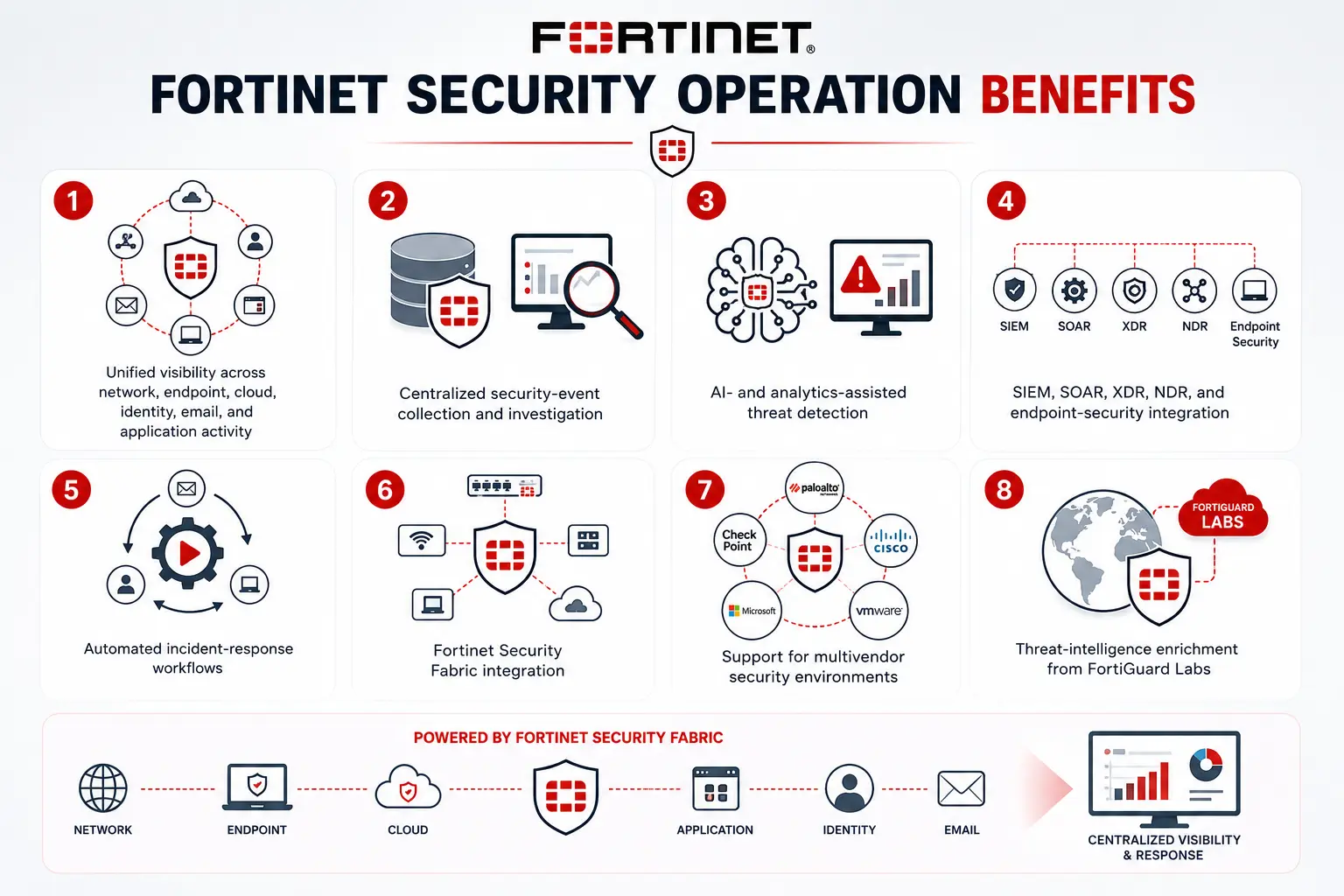
- Unified visibility across network, endpoint, cloud, identity, email, and application activity
- Centralized security-event collection and investigation
- AI- and analytics-assisted threat detection
- SIEM, SOAR, XDR, NDR, and endpoint-security integration
- Automated incident-response workflows
- Fortinet Security Fabric integration
- Support for multivendor security environments
- Threat-intelligence enrichment from FortiGuard Labs
Fortinet Security Operations At a Glance
What it is: Fortinet’s integrated security operations portfolio
Parent category: Fortinet License
Unified SOC platform: FortiSOC
Security analytics: FortiAnalyzer
Enterprise SIEM: FortiSIEM
Security orchestration: FortiSOAR
Endpoint detection: FortiEDR/XDR
Network detection: FortiNDR
Malware analysis: FortiSandbox
Exposure management: FortiRecon and related technologies
License Overview
There is no single entitlement that represents every Fortinet Security Operations deployment. Licensing is assembled according to the capabilities the security team needs and the amount of infrastructure or telemetry being protected. For example, a FortiAnalyzer deployment is usually sized around the amount of security telemetry being collected, storage and retention requirements, devices or VDOMs, and expected log rates. Fortinet currently positions FortiAnalyzer as more than simple log storage; it includes a unified data lake, automated detection and response, AI-assisted operations, and built-in SOC functionality.
FortiSIEM serves a different purpose. It is intended for enterprise-wide IT/OT event collection, correlation, asset visibility, analytics, threat detection, and incident response across Fortinet and third-party infrastructure. FortiSOAR then focuses on orchestrating the actions analysts take after alerts are generated, using integrations and automated playbooks to standardize investigations and response. For this reason, licensing should begin with the operational problem rather than a product name.
Product Overview
FortiSOC and Unified SOC Operations
FortiSOC is Fortinet’s newer unified SOC offering. It brings core functionality from FortiAnalyzer, FortiSIEM, FortiSOAR, and threat-intelligence management into a common cloud-delivered platform.
This option is particularly relevant where a security team wants to reduce the number of separate SOC systems it operates. Fortinet also confirms that FortiSOC does not replace the individual products; FortiAnalyzer, FortiSIEM, and FortiSOAR continue to be offered for organizations whose architecture is better suited to dedicated platforms. That gives buyers two broad approaches: build a modular SecOps architecture from individual Fortinet products or evaluate FortiSOC as a more consolidated foundation.
Security Analytics and SIEM
FortiAnalyzer provides centralized Fortinet-focused logging, analytics, detection, reporting, and response, while FortiSIEM extends the scope into broad multivendor IT and OT environments. The distinction matters when sizing a SOC. A company primarily operating FortiGate, FortiMail, FortiWeb, and other Security Fabric products may find FortiAnalyzer closely aligned with its environment. A heterogeneous enterprise collecting telemetry from servers, applications, network infrastructure, cloud services, and multiple security vendors may require the broader correlation model of FortiSIEM.
Automation and Incident Response
Detection is useful only if the organization can investigate and respond fast enough. FortiSOAR provides centralized incident management and automation across SOC and NOC workflows. It includes integrations with Fortinet technologies as well as third-party tools from vendors such as Microsoft, CrowdStrike, Cisco, Palo Alto Networks, Splunk, ServiceNow, Tenable, and many others. This allows an alert generated by one security product to trigger enrichment, ticket creation, endpoint isolation, firewall blocking, analyst approval, evidence gathering, and other response actions through a coordinated workflow.
How Fortinet Security Operations Works
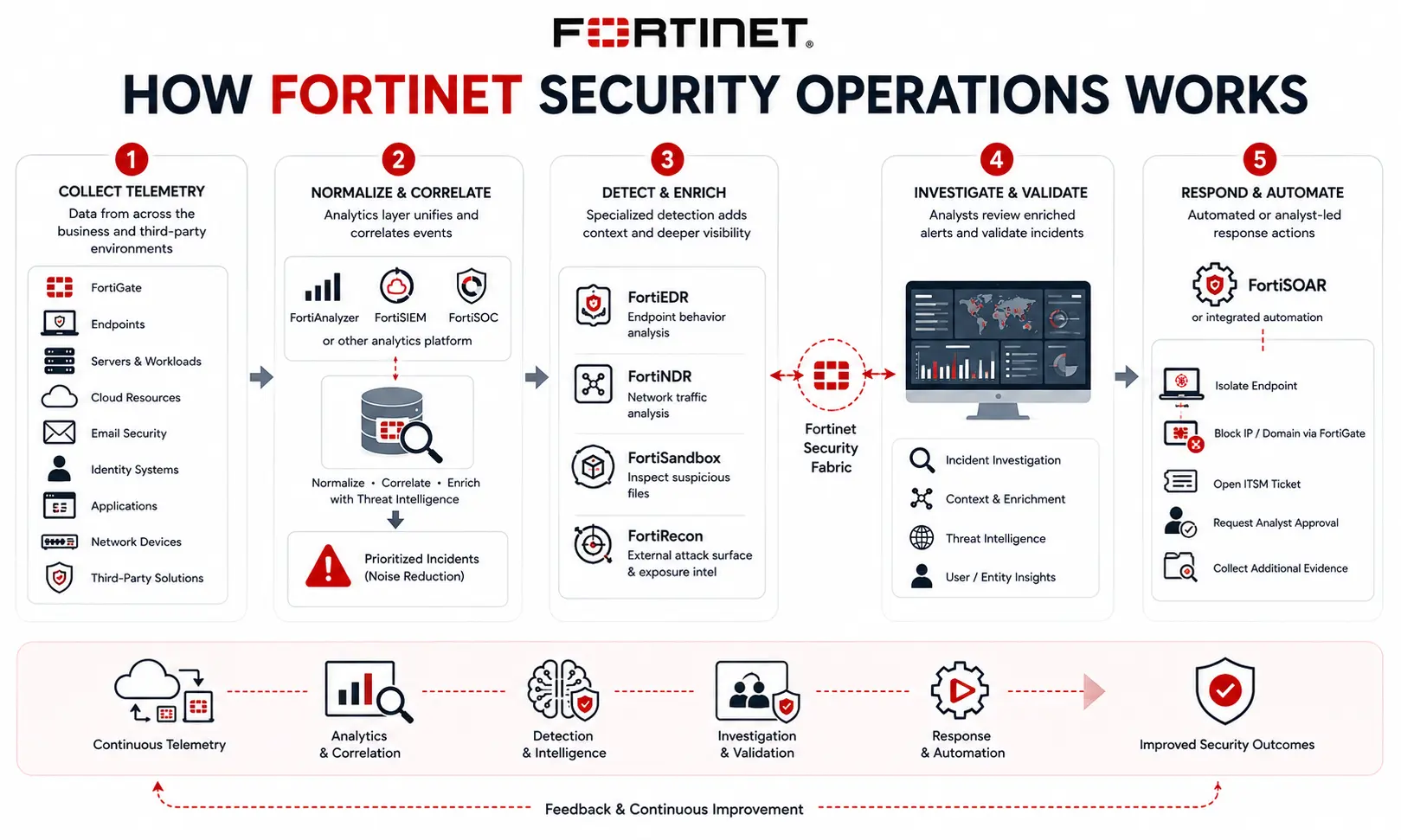
A typical SecOps architecture begins by collecting telemetry from the technologies already operating across the business. FortiGate firewalls, endpoints, servers, cloud resources, email security, identity systems, applications, network devices, and third-party security products can all contribute data. FortiAnalyzer, FortiSIEM, FortiSOC, or another selected analytics layer then normalizes and correlates these events. Rather than presenting every raw alert independently, analytics and threat intelligence help identify relationships between activity and prioritize incidents that warrant investigation.
Specialized detection products can add more context. FortiEDR can identify suspicious endpoint behavior, FortiNDR analyzes network activity, FortiSandbox examines suspicious files, and FortiRecon can provide exposure information outside the traditional perimeter. Fortinet’s Security Fabric allows these technologies to exchange context and response signals. Once an incident is validated, FortiSOAR or integrated automation can execute response workflows. Depending on policy, that may include isolating an endpoint, blocking an address through FortiGate, opening an ITSM ticket, requesting analyst approval, or collecting additional evidence.
Core Technical Flow
A practical Fortinet Security Operations workflow can be represented as:
Endpoints, Networks, Cloud, Identity, Email and Applications
→ Security Telemetry and Detection Sources
→ FortiSOC / FortiAnalyzer / FortiSIEM
→ Correlation, AI Analytics and Threat Intelligence
→ Investigation and Prioritization
→ FortiSOAR / Security Fabric Automation
→ Containment, Remediation and Reporting
This architecture allows the organization to improve detection without forcing every security function into one appliance. Different controls continue performing their specialized roles while the SOC gains a common operational view.
Options and Licensing Models
The right design depends heavily on SOC maturity. A smaller security team may begin with FortiAnalyzer because centralized logging, detection, reporting, and some built-in automation can cover many day-to-day requirements without deploying a full enterprise SIEM stack. Fortinet currently includes SIEM, SOAR, and XDR capabilities within FortiAnalyzer for turnkey security operations use cases.
Larger organizations with extensive multivendor infrastructure may instead use FortiSIEM as the central analytics layer and add FortiSOAR when incident-response processes require deeper orchestration. FortiSOC provides another path for organizations seeking a cloud-delivered unified platform rather than separate SOC components.
Endpoint count matters when FortiEDR is included. Network coverage matters when FortiNDR is part of the architecture. Telemetry volume and retention become critical for SIEM and analytics platforms. FortiGuard SOCaaS introduces a service-based model for organizations that need 24×7 monitoring and expert assistance without building the entire staffing model internally. Fortinet describes SOCaaS as multivendor security monitoring with remediation guidance and escalation support.
Features and Benefits
One of the strongest reasons to build Fortinet Security Operations around integrated products is context. A firewall alert means more when the SOC can correlate it with endpoint behavior, network anomalies, authentication events, sandbox results, and threat intelligence. That improves prioritization. Instead of asking analysts to investigate thousands of unrelated notifications, the security platform can group activity into incidents and identify the assets, users, behaviors, and threat indicators associated with them.
Automation also reduces repetitive work. Tasks such as querying threat intelligence, collecting endpoint information, creating tickets, blocking indicators, and notifying administrators can be incorporated into playbooks rather than performed manually for every incident. The approach is not restricted to Fortinet-only networks. FortiSOC, FortiSIEM, and FortiSOAR support multivendor environments, which is important because most mature SOCs already contain technologies from several security and infrastructure vendors.
Compatibility and Requirements
Before selecting Fortinet Security Operations licensing, the existing SOC architecture should be mapped first. Review the number and type of Fortinet devices, endpoints, servers, cloud environments, identity platforms, OT systems, and third-party security products that need visibility. Log volume and retention requirements should also be estimated because an environment producing large amounts of firewall, endpoint, authentication, and application telemetry may have very different analytics requirements from a similarly sized organization collecting only selected security events.
The design should also account for required integrations with SIEM, ticketing, vulnerability management, EDR, cloud platforms, firewalls, email security, and identity systems. For FortiSOAR deployments, the available connectors and the actions each integration supports are particularly important. Where 24×7 operations are required, determine whether the organization has its own analysts, uses an MSSP, or needs FortiGuard SOCaaS to supplement internal staffing.
Activation and Deployment
Deployment should normally begin with the telemetry architecture rather than immediately enabling every detection feature. The team first identifies data sources and determines which events need to be collected. The selected FortiAnalyzer, FortiSIEM, or FortiSOC environment can then be connected to the relevant infrastructure, after which parsing, normalization, retention, detection rules, and incident workflows are configured.
Automation should be introduced gradually. A playbook that enriches an alert or opens a ticket carries relatively low operational risk; automatically isolating production endpoints or changing firewall policies requires stronger validation and approval logic. For organizations migrating from an existing SIEM or SOAR, log-source coverage, retention requirements, custom rules, dashboards, integrations, playbooks, and incident-history requirements should be documented before cutover.
Pricing and Quote Process
There is no meaningful fixed price for a Fortinet Security Operations license because the required components vary considerably between environments. A useful quote starts with the current SOC scope: number of Fortinet and third-party devices, expected log volume, retention period, endpoint count, network coverage, cloud and OT requirements, required integrations, incident volume, automation requirements, and whether 24×7 managed monitoring is needed.
It is also important to identify whether the organization wants a unified FortiSOC approach or individual products such as FortiAnalyzer, FortiSIEM, and FortiSOAR. Existing Fortinet licenses and deployments should be included because expanding an established analytics platform may be more economical and operationally simpler than introducing another independent system.
Fortinet pricing depends on your product edition, FortiGate model, security services, license term, deployment model, and support requirements.