

FortiSandbox is Fortinet’s advanced malware analysis and sandboxing platform for detecting zero-day malware, ransomware, phishing, evasive files, and other threats that may pass through conventional antivirus or signature-based controls. Instead of judging a suspicious file only from its known signature, FortiSandbox can execute or analyze it in an isolated environment and observe what it actually does. File behavior, process activity, network communication, persistence attempts, command-and-control activity, and other indicators contribute to the final risk verdict.
A FortiSandbox license should therefore be selected around the organization’s security workflow. Some networks only need cloud-based analysis for suspicious files detected by FortiGate. Others need inline prevention, private analysis for sensitive data, large numbers of simultaneous sandbox VMs, or dedicated appliances inside an isolated SOC or OT environment.
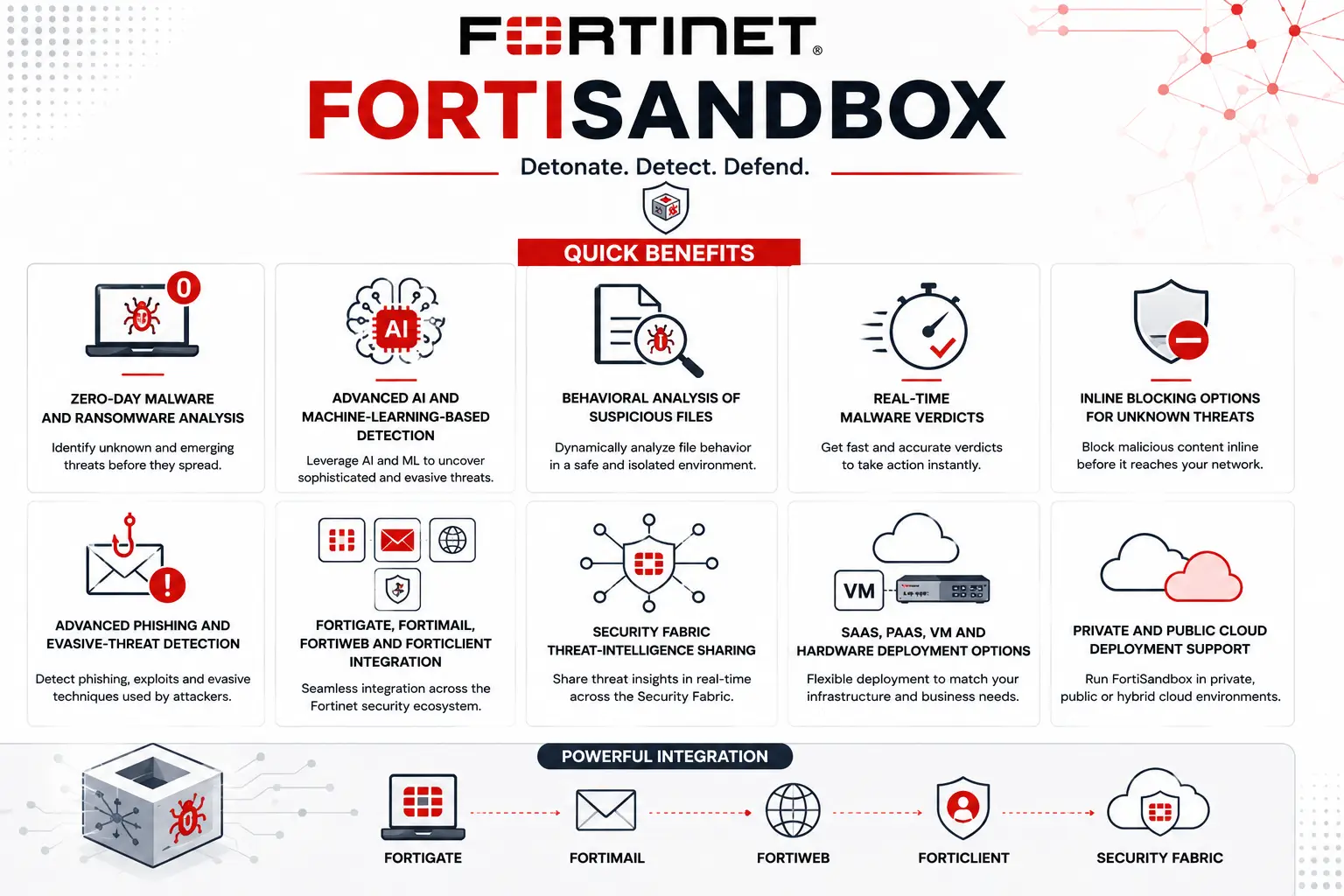
Quick Benefits
- Zero-day malware and ransomware analysis
- Advanced AI and machine-learning-based detection
- Behavioral analysis of suspicious files
- Real-time malware verdicts
- Inline blocking options for unknown threats
- Advanced phishing and evasive-threat detection
- FortiGate, FortiMail, FortiWeb and FortiClient integration
- Security Fabric threat-intelligence sharing
- SaaS, PaaS, VM and hardware deployment options
- Private and public cloud deployment support
Review FortiSandbox Price List and request a quote tailored to your licensing needs.
FortiSandbox At a Glance
What it is: Advanced malware sandbox and zero-day analysis platform
Parent category: Fortinet License
Current software generation: FortiSandbox 5.2
Primary role: Analyze suspicious files, URLs and malware behavior
Cloud service: FortiSandbox SaaS
Dedicated hosted option: FortiSandbox PaaS
Virtual option: FortiSandbox VM
Current hardware: FortiSandbox 500G, 1500G and 3000G
Detection options: Out-of-band detection and inline prevention

License Overview
FortiSandbox licensing starts with the deployment model. The simplest option is FortiSandbox SaaS, where sandbox analysis is delivered through FortiGuard services and integrated directly with supported Fortinet Security Fabric devices. For FortiGate environments, Fortinet currently distinguishes between Advanced Malware Protection for detection-oriented sandboxing and Inline Malware Prevention Service for active prevention. SaaS removes the need to operate a dedicated sandbox appliance or maintain guest operating systems locally.
Organizations that want dedicated resources without maintaining hardware can choose FortiSandbox PaaS. This provides a Fortinet-hosted sandbox environment with dedicated VM resources and scalable cloud VM capacity. FortiSandbox VM and physical appliances give the customer more direct control. Current hardware consists of the 500G, 1500G and 3000G, while FortiSandbox VM can run in private infrastructure or supported public-cloud environments. Fortinet’s current documentation includes deployment guidance for AWS, Azure, GCP, OCI, KVM and other platforms. The subscription tier is another part of the order. Fortinet currently provides a standard Sandbox Threat Intelligence subscription and an Advanced AI tier that extends protection with additional AI analysis, real-time anti-phishing and IOC-related capabilities.
Product Overview
Behavioral Malware Analysis
A sandbox becomes valuable when a file cannot be confidently classified through conventional inspection. FortiSandbox executes suspicious content in isolated virtual environments and observes its behavior. A file that appears harmless when scanned statically may reveal malicious activity after execution—for example, modifying system files, launching new processes, contacting suspicious infrastructure, downloading additional payloads, or attempting persistence.
Fortinet’s current platform assigns risk levels based on observed behavior and combines this information with antivirus, AI-driven analysis, threat intelligence and other inspection technologies. This approach makes FortiSandbox useful against zero-day malware and customized attacks that have not yet accumulated enough global indicators to be caught reliably by traditional signatures.
Advanced AI and Faster Verdicts
Sandboxing traditionally introduces a delay because suspicious files must execute long enough for malicious behavior to become visible. Fortinet has increasingly combined sandbox detonation with purpose-built AI to reduce that detection window. The current FortiSandbox product emphasizes real-time verdicts, AI-driven pattern analysis, anti-evasion detection and expanded visibility across multi-stage malware activity. Fortinet also highlights Advanced AI for identifying emerging and AI-generated threats before they become widely known. For buyers, Advanced AI becomes more relevant where unknown malware needs to be stopped quickly rather than simply investigated afterward.
Security Fabric Integration
FortiSandbox does not need to operate as an isolated malware laboratory. A FortiGate can submit suspicious content encountered in network traffic. FortiMail can send suspicious email attachments for behavioral analysis before delivery. FortiWeb can submit files associated with protected applications, while FortiClient can contribute endpoint-originated suspicious content.
The verdict can then flow back into the Fortinet Security Fabric, allowing other controls to block related malware or indicators. Fortinet currently lists integrations with FortiGate, FortiMail, FortiClient, FortiWeb, FortiADC, FortiProxy, FortiNDR, FortiEDR, FortiSIEM, FortiSOAR and FortiSASE.
How FortiSandbox Works
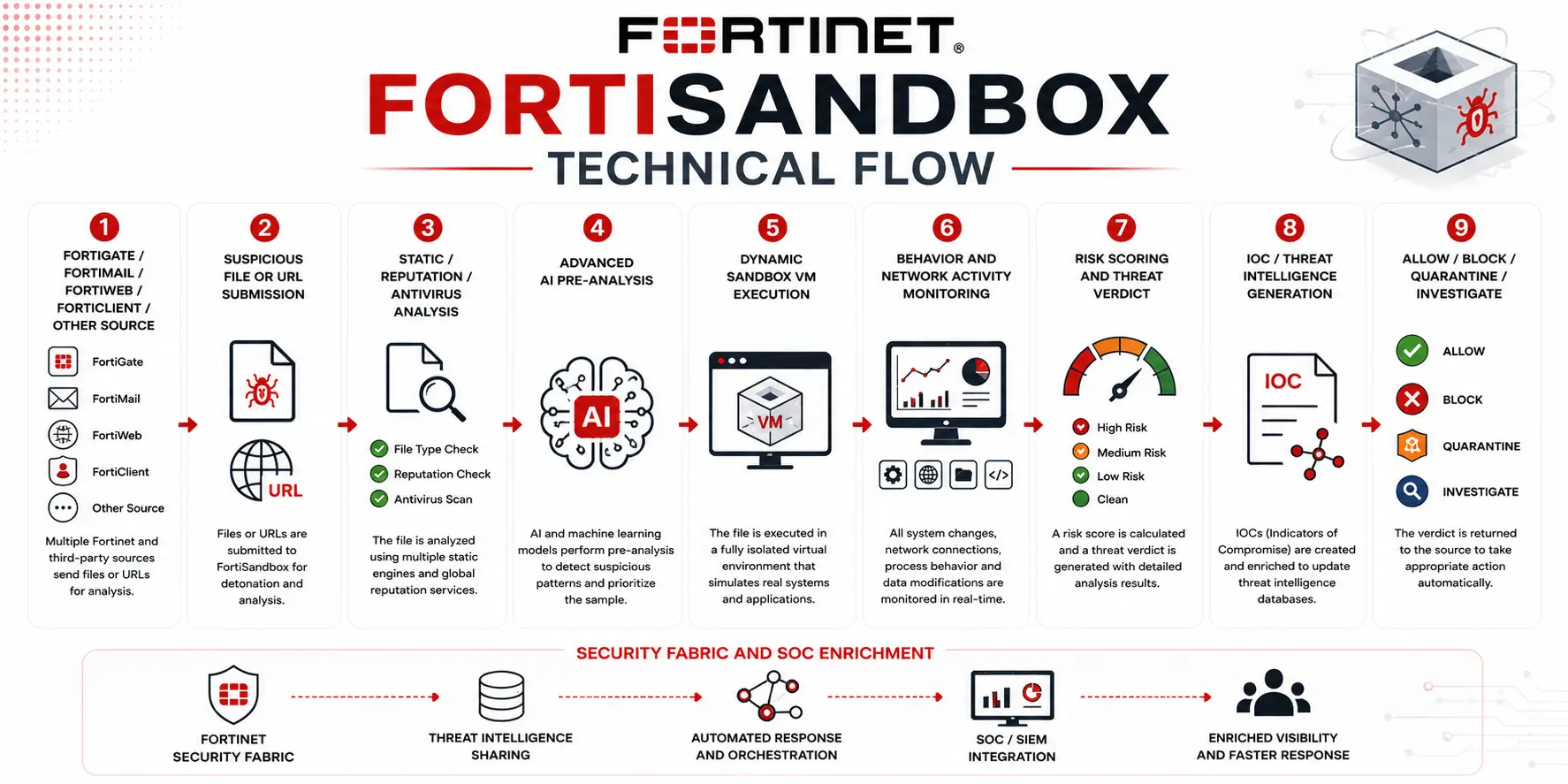
When an integrated Fortinet product encounters suspicious content, the file or related object can be submitted to FortiSandbox for deeper analysis. Initial inspection can include antivirus, static analysis, reputation checks and AI-based examination. If more evidence is required, the object can be detonated in an isolated virtual machine configured to resemble a real endpoint environment.
FortiSandbox then monitors what happens during execution. File-system changes, process creation, registry activity, command execution, external communication and other behaviors contribute to the verdict. If the file is classified as malicious, the result can be returned to the originating Fortinet product and used for enforcement. Depending on architecture and subscription, this may be an out-of-band detection workflow or part of an inline prevention process where suspicious content is held until a verdict is available. The same findings can also enrich SOC investigations, providing analysts with behavioral reports and indicators rather than only a basic malicious/clean classification.
Core Technical Flow
FortiGate / FortiMail / FortiWeb / FortiClient / Other Source
→ Suspicious File or URL Submission
→ Static / Reputation / Antivirus Analysis
→ Advanced AI Pre-Analysis
→ Dynamic Sandbox VM Execution
→ Behavior and Network Activity Monitoring
→ Risk Scoring and Threat Verdict
→ IOC / Threat Intelligence Generation
→ Allow / Block / Quarantine / Investigate
→ Security Fabric and SOC Enrichment
Options and Licensing Models
The current FortiSandbox portfolio provides several distinct ways to deploy the same core sandboxing capability. SaaS is the easiest starting point for organizations already using FortiGate or other Security Fabric products. Fortinet hosts the sandbox infrastructure, which removes the operational work associated with guest operating systems and analysis VMs. PaaS provides more isolation and dedicated capacity while remaining Fortinet-hosted. This can suit enterprises that want their own sandbox environment but do not want to maintain physical infrastructure.
A FortiSandbox VM gives the organization control over where the platform runs. Public-cloud BYOL deployments require the FortiSandbox VM entitlement, FortiGuard subscription and relevant VM licensing. Fortinet documents license transfer options when moving existing FortiSandbox VM deployments into supported public clouds. Physical appliances provide the most predictable on-premises capacity:
| Model | Typical position | Storage / connectivity |
|---|---|---|
| FortiSandbox 500G | Mid-size deployment | 960 GB, 4× GE |
| FortiSandbox 1500G | Enterprise SOC | Dual 960 GB RAID1, GE + 10GE |
| FortiSandbox 3000G | High-volume enterprise/SOC | 4×2 TB RAID10, 8×10GE |
The 500G is a 1RU appliance, the 1500G is also 1RU, while the 3000G is a larger 2RU platform intended for significantly greater analysis scale.
Sandbox VM Capacity and Microsoft Licensing
One part of FortiSandbox purchasing that deserves special attention is the analysis VM count.
Fortinet uses Universal VM capacity to scale dynamic malware detonation. Current ordering guidance lists up to 14 nested VMs on the 500G, 28 on the 1500G and 150 on the 3000G when appropriately licensed. Cloud VM capacity can scale further, with the larger models supporting substantial Fortinet-hosted analysis capacity.
More analysis VMs allow more files to be detonated simultaneously. This becomes important when a SOC receives large numbers of submissions or requires short verdict times.
There is also an ordering detail that can easily be missed: locally nested Windows sandbox VMs require appropriate Microsoft Windows and, where used, Office licenses. Fortinet-hosted Cloud VMs are already licensed, so those additional Microsoft licenses are not required for cloud VM analysis.
This distinction can materially change both deployment complexity and cost.
Features and Benefits
FortiSandbox adds value by giving security controls a second opinion when they encounter content that cannot be confidently classified.
For email environments, this can reduce the risk of a new ransomware attachment reaching users before antivirus signatures exist. For web traffic, FortiGate can submit unknown downloads rather than automatically trusting them. For web applications, FortiWeb can extend application protection with deeper file analysis.
The platform is also useful to SOC teams because the output is more detailed than a basic malware alert. FortiSandbox can expose the execution path and indicators associated with the sample, giving analysts better context for determining whether related systems may already have been compromised.
In regulated or sensitive environments, on-premises appliances provide another advantage: suspicious content can be analyzed locally instead of being submitted to a shared external cloud. That can be important for organizations handling confidential files, controlled research data or isolated OT infrastructure.
Compatibility and Requirements
Before selecting a FortiSandbox license, first identify where suspicious files originate. If nearly all submissions come from FortiGate firewalls and the organization simply wants cloud analysis, SaaS may be enough. A large SOC integrating FortiMail, FortiWeb, endpoints and third-party submission sources may need dedicated PaaS, VM or appliance capacity.
File volume is one of the main sizing inputs. Ask how many files are likely to require sandbox analysis during normal periods and during an outbreak. The required turnaround time also matters: a system that can tolerate several minutes for investigative analysis has different needs from inline security where users are waiting for a file verdict.
For on-premises dynamic analysis, determine which Windows and Office versions need to be represented. Malware often behaves differently depending on the operating system and installed software, so the sandbox environment should resemble the real endpoints being protected.
Current FortiSandbox 5.2 also has specific integration requirements. Fortinet documents support across current FortiOS, FortiMail, FortiClient, FortiADC, FortiProxy, FortiWeb, FortiEDR and FortiSOAR releases, along with VMware, KVM, Hyper-V and Nutanix virtualization environments. Compatibility should be checked against the exact software versions already deployed rather than assumed.
How Activation and Deployment Work
For a hardware deployment, the FortiSandbox appliance is registered to the organization’s Fortinet account and the selected FortiGuard subscription is applied. Universal VM and Microsoft guest licenses are then added according to the chosen dynamic-analysis architecture.
FortiSandbox VM uses a license file. For current public-cloud BYOL deployments, Fortinet sends a registration code after purchase; the entitlement is registered through Fortinet Customer Service & Support and the downloaded license file is uploaded to the FortiSandbox instance.
After activation, the sandbox VMs and analysis engines are prepared and the submitting security devices are connected. FortiGate, FortiMail, FortiWeb or other integrations are then configured to forward suspicious content and consume the resulting verdicts.
Production rollout should also define what happens while analysis is pending. Detection-only environments may allow the original transaction and use the result for later investigation, while prevention-focused deployments can hold suspicious content until the sandbox delivers a verdict.
Pricing and Quote Process
The cost of a FortiSandbox license is driven less by user count and more by analysis architecture. A useful quote starts with the preferred deployment model, SaaS, PaaS, VM or hardware. The next inputs are expected file-submission volume, number of Fortinet products submitting content, required verdict speed, inline versus detection-only operation and whether Advanced AI protection is required.
For on-premises environments, also provide the expected number of nested sandbox VMs and the Windows/Office combinations that need to be emulated. If Fortinet-hosted Cloud VMs will be used instead, estimate the additional analysis capacity required.
Hardware quotes should identify whether 500G, 1500G or 3000G capacity is appropriate, whether the solution will operate as a standalone appliance or larger cluster, and whether additional Universal VM subscriptions, Microsoft licenses, FortiCare support or accessories are required. Fortinet specifically warns that VM expansion licenses must be associated correctly with each individual FortiSandbox unit to avoid unintended license stacking.
Fortinet pricing depends on your product edition, FortiGate model, security services, license term, deployment model, and support requirements.