

Device42 APM helps organizations improve application visibility by adding infrastructure, dependency, and CMDB context around application performance monitoring workflows.
Key Outcomes
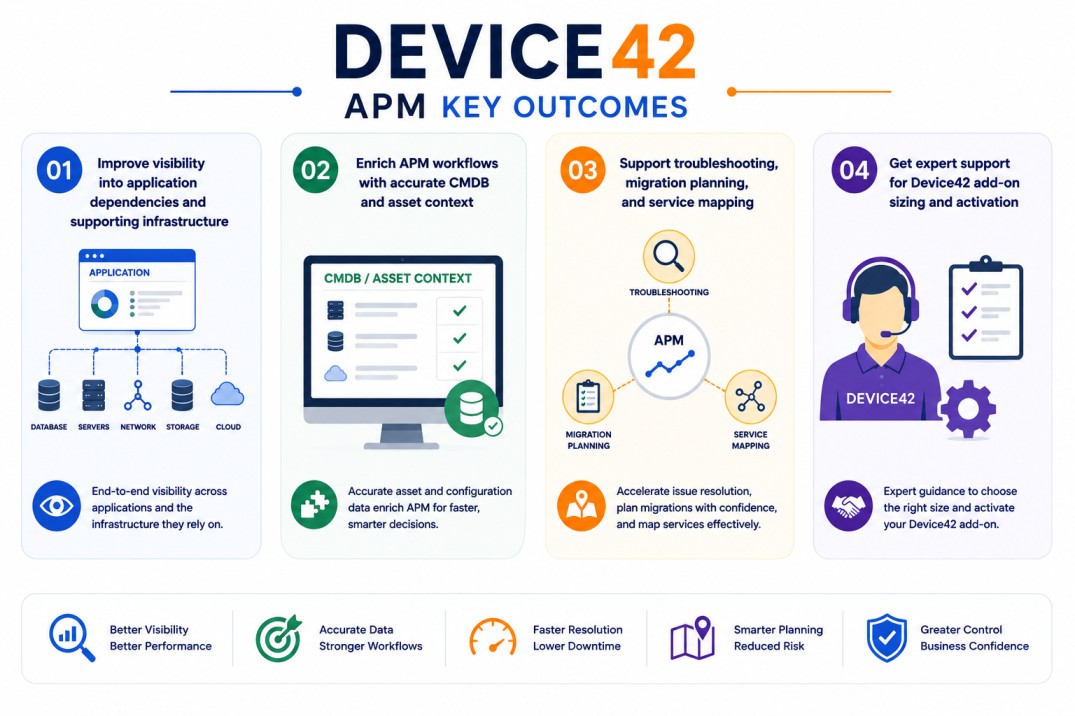
- Improve visibility into application dependencies and supporting infrastructure
- Enrich APM workflows with accurate CMDB and asset context
- Support troubleshooting, migration planning, and service mapping
- Get expert support for Device42 add-on sizing and activation
Device42 APM At a glance
| Item | Detail |
|---|---|
| Page type | Device42 add-on / capability extension |
| Main use | Adds infrastructure and dependency context to APM workflows |
| License model | Added to Device42 license scope |
| Best for | Teams using APM, CMDB, discovery, and application mapping together |
| Activation | Enabled through Device42 licensing and discovery configuration |
Add-on Overview
Application performance monitoring tools can show when an application is slow, unavailable, or behaving abnormally. The harder question is often why the issue is happening and which infrastructure components, services, or dependencies may be involved.
Device42 APM is best positioned as a Device42 capability that supports APM workflows by improving application dependency visibility. Device42 documentation explains that Application Dependency Mapping builds models of IT services and applications in the context of business services, using auto discovery jobs, communication patterns, Application Groups, and Logic Templates.
In practice, this helps teams connect application performance data with infrastructure context. Instead of only reviewing application metrics, administrators can better understand which servers, databases, services, network connections, or dependencies support a specific application.
This is especially useful during troubleshooting, migration planning, CMDB improvement, and service impact analysis. When application performance problems occur, dependency visibility helps teams investigate whether the issue may be related to supporting infrastructure, configuration changes, shared services, or connected systems.
Device42 has also discussed the value of combining APM and application dependency mapping, noting that dependency context can help administrators understand how dependent applications may contribute to infrastructure or performance problems.
Core Technical Flow
- Enable the Device42 APM-related add-on or dependency visibility capability
- Configure discovery jobs for applications, infrastructure, and services
- Collect communication patterns and application relationship data
- Build Application Groups and service dependency views
- Use dependency context to support APM, CMDB, and troubleshooting workflows
Features & Benefits
Device42 APM helps reduce the gap between application monitoring and infrastructure documentation. APM tools may detect performance degradation, but Device42 adds context around what the application depends on and how systems are connected.
One major benefit is better troubleshooting support. Teams can investigate application issues with a clearer view of servers, databases, network relationships, and service dependencies.
It also improves CMDB accuracy. Application and dependency data can be connected to asset records, helping organizations maintain a more reliable operational view of their environment.
For migration and modernization projects, this visibility is especially valuable. Teams can better understand application relationships before moving workloads, decommissioning systems, or changing infrastructure.
System Requirements
Common environments
- Application performance monitoring environments
- CMDB and IT asset management workflows
- Application dependency mapping projects
- Migration and service mapping initiatives
Technical requirements
- Active Device42 deployment
- Correct licensing/add-on entitlement
- Discovery access to application and infrastructure sources
- Proper credentials and network visibility for dependency mapping
Pricing factors + quote process
Pricing for Device42 APM usually depends on the main Device42 license scope, enabled add-ons, discovery requirements, and the size of the application environment.
Organizations with many applications, complex dependencies, hybrid infrastructure, or migration planning requirements may need broader discovery and dependency mapping coverage.
During the quote process, the existing Device42 deployment, application visibility goals, discovery scope, and required add-on capabilities are reviewed first so the licensing approach can match the organization’s operational requirements.
After you request a quote
- We review your Device42 environment and application visibility needs
- Recommend the right add-on and licensing scope
- Provide pricing and delivery details
- Share activation and discovery guidance
Device42 pricing depends on your infrastructure size, required modules, deployment model, and subscription requirements.