

Splunk Attack Analyzer (AA) helps security teams understand suspicious files and URLs by observing how they behave, so decisions can be made faster and with more confidence.
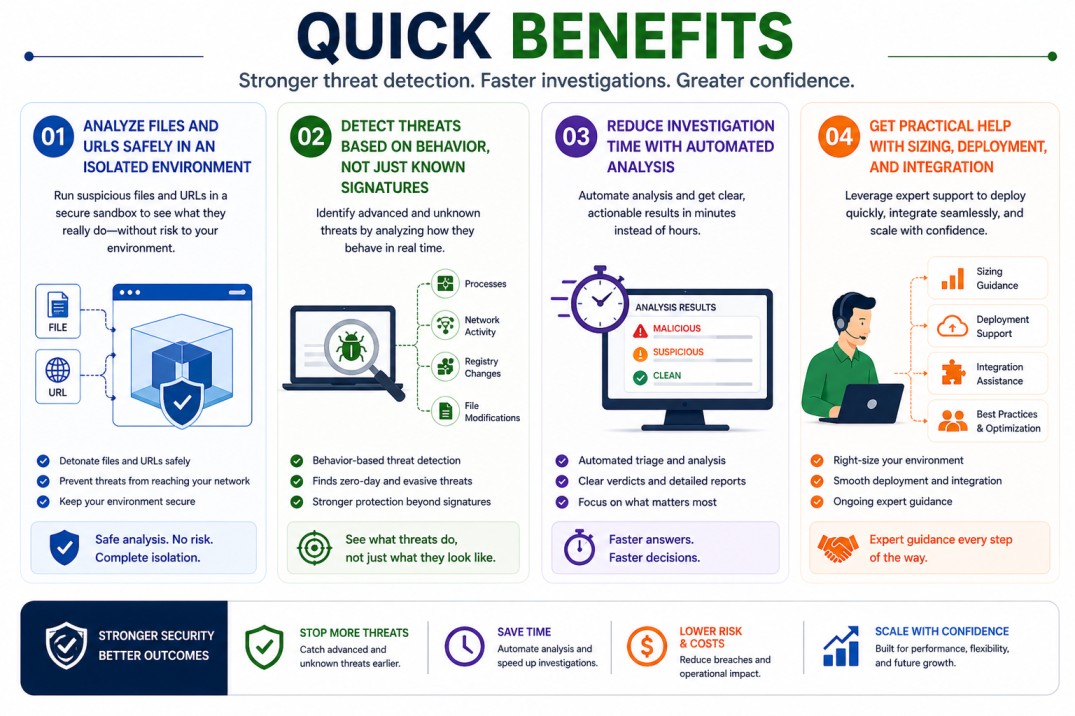
Quick benefits
- Analyze files and URLs safely in an isolated environment
- Detect threats based on behavior, not just known signatures
- Reduce investigation time with automated analysis
- Get practical help with sizing, deployment, and integration
Splunk Attack Analyzer (AA) At a glance
What it does : Splunk Attack Analyzer (AA) examines files, URLs, and payloads to identify malicious behavior using sandboxing and behavioral analysis.
License type : Subscription-based (usage-driven)
Typical term : 1 year · 3 years · 5 years
Activation method : Cloud-based platform activated via license entitlement
Who needs it : Security teams, SOC analysts, and incident response teams dealing with suspicious files, phishing attempts, and malware

License Overview
The Splunk Attack Analyzer license gives you access to a controlled environment where suspicious files and URLs can be analyzed safely as part of the broader Splunk License ecosystem. Instead of exposing production systems to potential threats, everything is handled in isolation, allowing teams to understand behavior without taking risks. Instead of exposing production systems to potential threats, everything is handled in isolation, allowing teams to understand behavior without taking risks. In practice, licensing is usually based on how much you use the platform, specifically the number of files and URLs submitted for analysis. Since Splunk Attack Analyzer performs detailed behavioral inspection, higher submission volumes require more capacity, which is why proper sizing matters.
Activation is straightforward. Once access is enabled and the license is applied, teams can start submitting files and links for analysis right away. The platform then processes each item and provides detailed reports based on what it observes. Because this tool is often used in fast-paced environments, having the right license size helps ensure that analysis is completed quickly and consistently. If the platform is undersized, delays may occur. If it’s oversized, you may be paying for more capacity than needed. A balanced setup keeps investigations efficient as workloads grow.
Product Overview
Splunk Attack Analyzer (AA) is built to help teams figure out what suspicious content actually does before making a decision. Instead of relying only on known threat signatures, it looks at behavior in a controlled environment.
In real situations, this means uploading a file or checking a URL and seeing how it behaves, what processes it runs, where it connects, and what changes it tries to make. This gives a clearer understanding of whether something is harmless or potentially dangerous.
One of the main advantages is speed. Instead of manually analyzing threats or using multiple tools, Splunk Attack Analyzer provides a consistent way to get answers quickly.
As the number of threats increases, having a reliable and repeatable analysis process becomes more important. Splunk AA helps teams keep up without adding complexity to their workflow.

Core technical flow
- Suspicious files or URLs are submitted for analysis
- They are executed in a secure, isolated sandbox
- Behavioral activity is monitored (file actions, network activity, system changes)
- The system analyzes and correlates results with threat intelligence
- A detailed report is generated with risk indicators
- Security teams review the findings and take action
Options & Tiers
| Plan / Model | Best for | Key inclusions | What affects price |
|---|---|---|---|
| Splunk AA standard | Most SOC teams | File and URL analysis | Submission volume, term |
| High-volume analysis | Larger environments | Increased processing capacity | Usage scale |
| AA + Splunk ES integration | Advanced SOC workflows | SIEM + threat analysis | Integration scope |
| Cloud-native deployment | Flexible environments | On-demand sandboxing | Usage, environment size |
Features & Benefits
Splunk Attack Analyzer helps teams move beyond basic detection by focusing on what a file or link actually does. This makes it easier to identify threats that might not be recognized by traditional signature-based tools. Another key benefit is faster decision-making. Instead of spending time investigating each case manually, analysts can review structured reports and quickly understand the risk. It also improves consistency. Every submission is analyzed in the same controlled way, which reduces guesswork and leads to more reliable outcomes across the team. Over time, this helps organizations handle higher volumes of threats without increasing workload.
Compatibility & Requirements
Common environments
- Security Operations Centers (SOC)
- Incident response teams
- Organizations dealing with phishing and malware analysis
Typical prerequisites
- Access to suspicious files or URLs
- Defined investigation workflows
- Connectivity to the platform
How activation works
- Activate access to Splunk Attack Analyzer
- Apply the license entitlement
- Integrate with existing security tools if needed
- Start submitting files and URLs
- Review results and refine workflows
Pricing factors + quote process
Splunk Attack Analyzer pricing mainly depends on how frequently the platform is used. The number of files and URLs submitted for analysis, along with the overall processing workload, are the main factors that influence cost. The size of your security operations also plays a role. Environments that handle more threats will naturally require more capacity. Integration with other tools, such as SIEM or SOAR platforms, can also affect the overall setup.
Subscription term length can influence pricing as well, with longer commitments often providing better value. The most accurate pricing comes from aligning the platform with your actual analysis needs rather than estimating broadly.
After you request a quote
- We review your analysis volume and use case
- Recommend the most suitable setup
- Provide official pricing and delivery details
- Share clear activation and integration guidance
Splunk Pricing depends on your license edition, quantity, term, and deployment needs.