

Splunk IT Service Intelligence (ITSI) helps IT teams see how their services are actually performing, not just individual systems, so they can spot issues earlier and understand real business impact.
Quick benefits
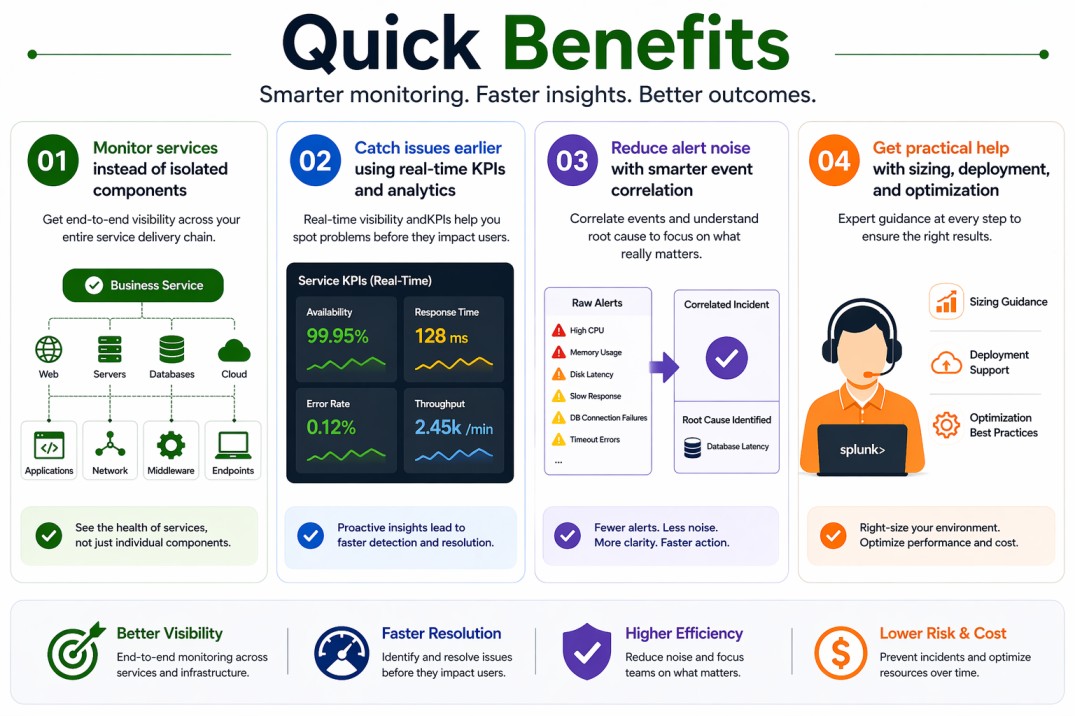
- Monitor services instead of isolated components
- Catch issues earlier using real-time KPIs and analytics
- Reduce alert noise with smarter event correlation
- Get practical help with sizing, deployment, and optimization
Splunk IT Service Intelligence (ITSI) At a glance
What it does: Splunk IT Service Intelligence (ITSI) provides service-level monitoring by correlating data across systems and mapping it to business services.
License type: Add-on to Splunk Enterprise (subscription-based)
Typical term: 1 year · 3 years · 5 years
Activation method: Installed as an app on Splunk and activated via license entitlement
Who needs it: IT operations and NOC teams that need a clearer, service-focused view of their environment

License Overview
The Splunk IT Service Intelligence license allows you to use ITSI as a service monitoring and analytics layer within your Splunk environment. Instead of working only with raw metrics or individual system alerts, ITSI gives you a way to understand how everything fits together as part of a service.
In real-world setups, this means your licensing needs to reflect both the data being processed and how widely ITSI is used across your environment. Since Splunk IT Service Intelligence depends on data already ingested into Splunk Enterprise, the more systems and services you include, the more important proper sizing becomes.
Activation is fairly straightforward. Once ITSI is installed and the license is applied, it starts using your existing data to build service models and define KPIs. From there, it continuously evaluates service health and highlights anything that needs attention.
Because ITSI is often used to monitor critical services, having the right license size helps maintain consistent visibility. If coverage is too limited, you may miss important signals. If it’s oversized, you may be paying for more capacity than you actually use. Finding the right balance makes day-to-day operations much smoother.
Product Overview
Splunk IT Service Intelligence (ITSI) is designed to shift monitoring away from individual systems and toward the services those systems support. Instead of checking servers, applications, and databases separately, it helps you understand how they all work together.
In practice, this usually involves mapping different infrastructure components into service models. ITSI then tracks key performance indicators (KPIs) for each service and calculates a health score based on real-time data. This makes it much easier to see what’s actually impacting users or business operations.
Another area where ITSI stands out is alert handling. Instead of showing every alert as a separate issue, it groups related events together and highlights the ones that matter most. This reduces noise and helps teams focus on resolving the root cause rather than chasing multiple symptoms.
As environments grow more complex, this kind of visibility becomes more important. ITSI helps keep things understandable, even when there are many moving parts.
Core technical flow
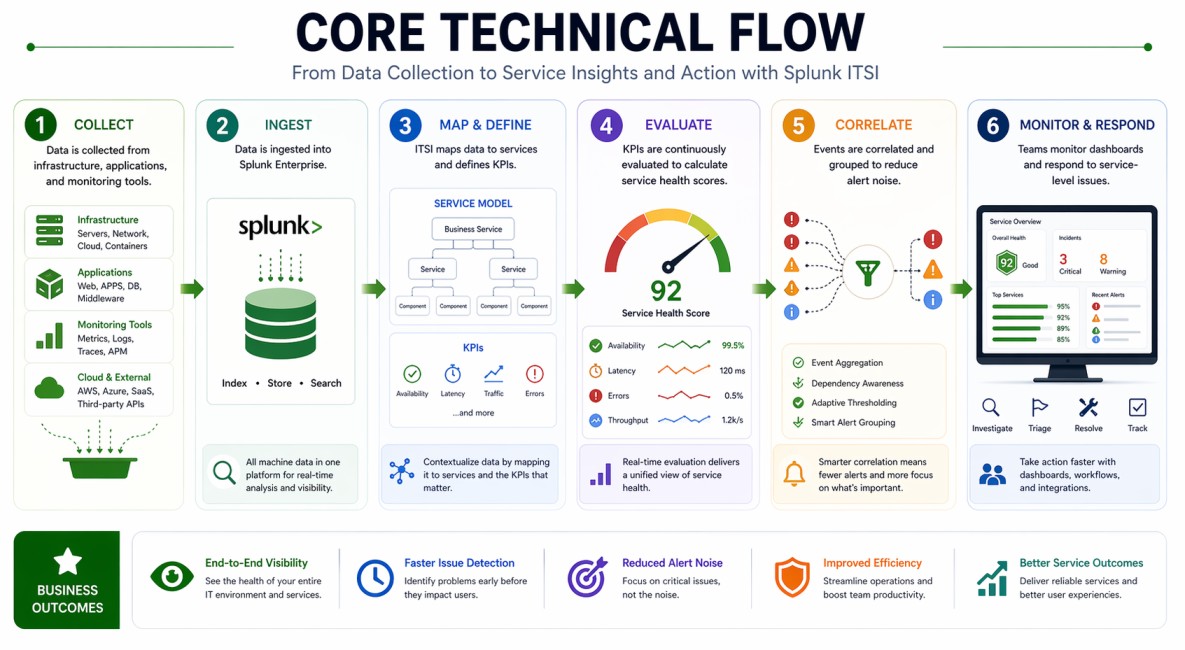
- Data is collected from infrastructure, applications, and monitoring tools
- Data is ingested into Splunk Enterprise
- ITSI maps data to services and defines KPIs
- KPIs are continuously evaluated to calculate service health scores
- Events are correlated and grouped to reduce alert noise
- Teams monitor dashboards and respond to service-level issues
Options & Tiers
| Plan / Model | Best for | Key inclusions | What affects price |
|---|---|---|---|
| ITSI standard deployment | Most IT operations teams | Service monitoring + KPI tracking | Data volume, term |
| ITSI with advanced analytics | Mature environments | Enhanced correlation and insights | Data scope, complexity |
| Distributed deployment | Large environments | Scalable service monitoring | Architecture size |
| Hybrid deployment | Mixed environments | Flexible integration across systems | Deployment scope |
Features & Benefits
Splunk IT Service Intelligence helps teams move beyond basic monitoring by focusing on services instead of individual components. This makes it easier to understand what’s actually affected when something goes wrong, instead of just seeing a list of disconnected alerts.
One of the biggest advantages is how it cuts down on noise. By correlating events and grouping related alerts, ITSI helps teams avoid alert fatigue and focus on the issues that really matter.
Over time, it also improves visibility. As more data is collected and analyzed, the service models become more accurate, which helps teams detect problems earlier and respond more effectively. For larger environments, this can make a noticeable difference in uptime and overall performance.
Compatibility & Requirements
Common environments
- IT operations and NOC teams
- Hybrid and multi-cloud infrastructures
- Enterprise environments with multiple services
Typical prerequisites
- Splunk Enterprise deployment
- Defined services and infrastructure mapping
- Access to relevant monitoring data
How activation works
- Set up or confirm your Splunk Enterprise environment
- Install Splunk IT Service Intelligence (ITSI)
- Apply the license entitlement
- Define services and KPIs
- Monitor dashboards and adjust as needed
Pricing factors + quote process
Splunk IT Service Intelligence pricing is mostly influenced by how much data is being processed and how broadly ITSI is used across your services. Since it builds on top of existing Splunk data, the more systems and services you include, the more capacity you’ll need.
The overall structure of your environment also plays a role. Larger or more complex setups with many services and integrations will naturally require more resources. Subscription length can affect pricing as well, with longer terms often offering better value.
The most accurate pricing comes from aligning ITSI with your actual environment rather than estimating broadly.
After you request a quote
- We review your data volume and service scope
- Recommend the most suitable deployment approach
- Provide official pricing and delivery details
- Share clear activation and rollout guidance
Splunk Pricing depends on your license edition, quantity, term, and deployment needs.