

Fortinet FortiManager is a centralized management platform designed to simplify the administration of Fortinet security and networking infrastructure. It provides a single management layer for configuring, monitoring, automating, and maintaining FortiGate firewalls and other Fortinet devices across on-premises, cloud, and hybrid environments.
FortiManager is particularly useful when organizations operate multiple FortiGate devices across branches, data centers, cloud environments, or geographically distributed locations. Instead of maintaining policies and configurations independently on every device, administrators can use centralized templates, policy packages, provisioning workflows, and automation.
Quick Benefits
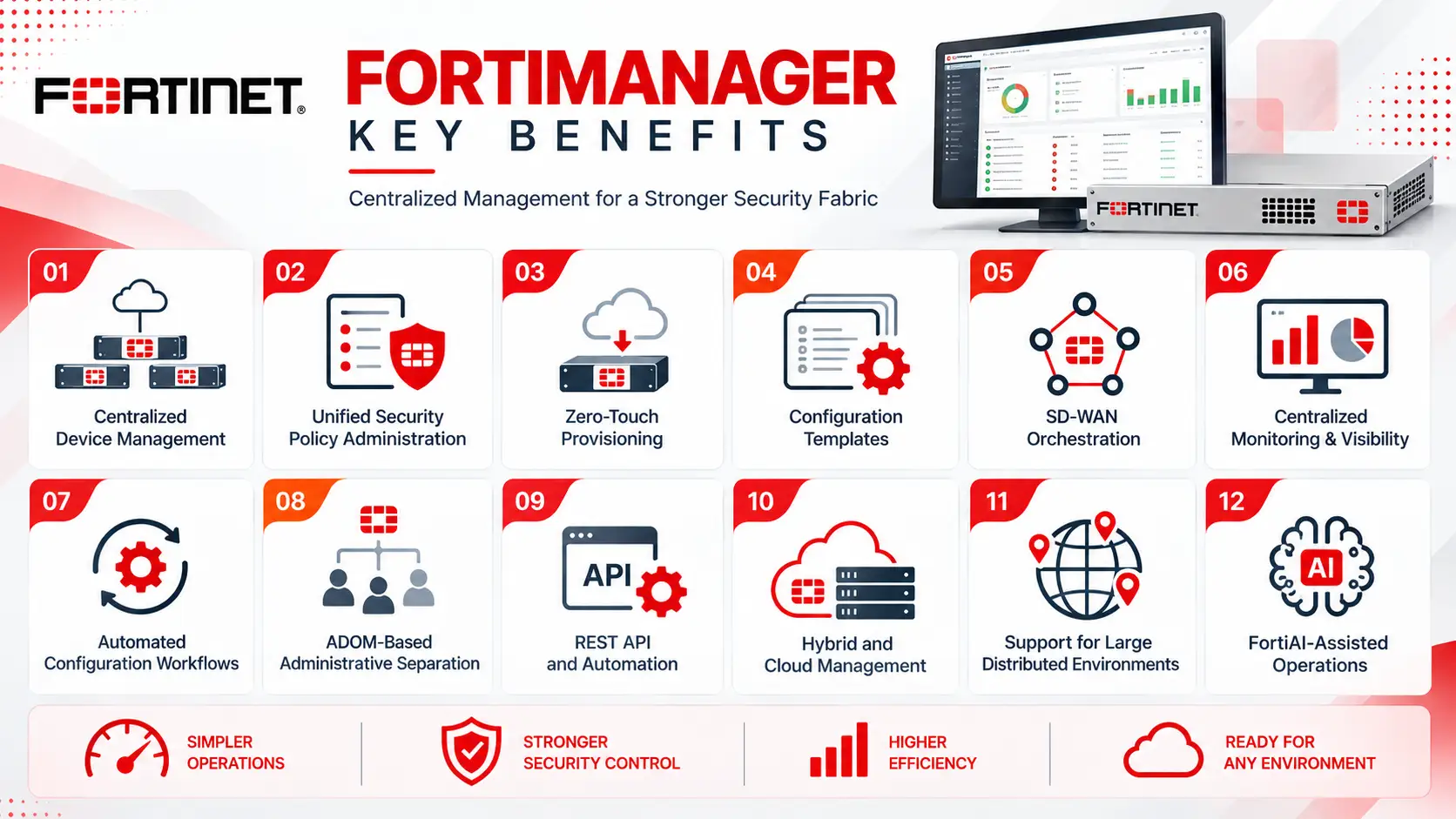
- Centralized Fortinet device management
- Unified security-policy administration
- Zero-touch provisioning
- Configuration templates
- SD-WAN orchestration
- Centralized monitoring and visibility
- Automated configuration workflows
- ADOM-based administrative separation
- REST API and automation capabilities
- Hybrid and cloud management
- Support for large distributed environments
- FortiAI-assisted operations
Fortinet FortiManager At a Glance
What it is: Centralized management and orchestration platform for Fortinet security and networking devices.
Vendor: Fortinet
Primary role: Device, configuration, policy, provisioning, and security-management operations
Managed devices: FortiGate, FortiSwitch, FortiAP, FortiExtender, and supported Fortinet networking and security solutions
Deployment models: Hardware appliance, virtual machine, and FortiManager Cloud
Management architecture: Centralized console with Administrative Domains (ADOMs)
Key capabilities: Policy management, configuration templates, provisioning, monitoring, automation, SD-WAN orchestration, and workflow management
Management scale: Depending on the model and deployment, FortiManager can scale from smaller environments to very large deployments. Fortinet currently lists appliance configurations ranging from 30 managed devices on the FortiManager 200G to high-end systems designed for thousands of devices.
Typical users: Network administrators, security teams, NOC teams, MSSPs, and enterprise IT departments
License Overview
A FortiManager License provides the entitlement required to deploy and use FortiManager according to the selected deployment model and management capacity.
FortiManager is available in several forms, including hardware appliances, virtual machines, and cloud-based management. Fortinet’s current VM offering includes subscription and perpetual options, while FortiManager-VM-S provides stackable subscription capacity for managing 10, 100, or 1,000 devices/VDOMs.
For hardware appliances, the licensing and support scope is associated with the selected FortiManager model and its management capacity. Fortinet currently lists models such as FortiManager 200G, 400G, 1000G, 3100G, and 3750G, with capacities ranging from dozens to thousands of managed devices.
The appropriate license therefore depends on:
- Number of Fortinet devices
- Number of VDOMs
- Hardware, VM, or Cloud deployment
- Required ADOM structure
- Subscription or perpetual model
- Support requirements
- Expected future device growth
Product Overview
FortiManager acts as the centralized management layer between administrators and the Fortinet infrastructure.
Instead of connecting individually to every FortiGate, administrators can create policies and configuration objects centrally and distribute them to selected devices. This approach is especially useful for organizations where many branches need similar security policies but still require site-specific configuration.
FortiManager also provides centralized workflows for device onboarding and provisioning. Fortinet supports best-practice templates and zero-touch provisioning capabilities that can reduce the time required to bring new FortiGate and SD-WAN deployments into production.
Core Technical Flow
A typical FortiManager workflow is:
Device Discovery
→ FortiManager identifies and establishes management relationships with Fortinet devices.
Central Configuration
→ Administrators create objects, policies, templates, and configuration changes.
Policy Assignment
→ Policies are associated with the appropriate devices or groups.
Deployment
→ FortiManager validates and pushes approved changes.
Monitoring
→ Administrators review device status, policy state, configuration information, and alerts.
Automation
→ APIs, scripts, connectors, and automation workflows can be used to reduce repetitive administrative tasks.
Options & Licensing Models
| Option | Description | Suitable For |
|---|---|---|
| FortiManager Hardware | Dedicated appliance for centralized management | Enterprise and large-scale environments |
| FortiManager-VM | Virtual version of FortiManager for supported virtualization platforms | Virtualized data centers and flexible deployments |
| FortiManager-VM-S | Stackable subscription model based on managed devices/VDOMs | Organizations requiring scalable virtual capacity |
| FortiManager Cloud | Cloud-based centralized management | Organizations preferring SaaS management |
| Perpetual VM | Long-term VM software entitlement | Existing virtual infrastructure |
| Subscription | Time-based FortiManager entitlement | Flexible and recurring licensing environments |
The exact device capacity, ADOM support, support services, and available features depend on the selected model and licensing configuration.
Features & Benefits
Centralized Policy Management
FortiManager allows administrators to manage FortiGate policies from a centralized interface. Common objects and policy packages can be created once and distributed to multiple devices.
This is particularly useful for branch environments where security rules need to remain consistent while individual locations still require local configuration.
Configuration Templates
Templates allow administrators to standardize recurring configurations across multiple Fortinet devices.
Instead of manually reproducing the same configuration on every firewall, teams can maintain reusable configuration components and apply them to appropriate devices.
This can reduce configuration drift and simplify large-scale deployments.
Administrative Domains
Administrative Domains, or ADOMs, provide logical separation within FortiManager.
They can be used to separate devices and policies according to:
- Business units
- Geographic regions
- Customers
- Security environments
- Organizational responsibilities
Compatibility & Requirements
Before deploying FortiManager, organizations should evaluate the size and architecture of the Fortinet environment.
Important requirements include:
- Number of FortiGate devices
- Number of VDOMs
- FortiSwitch and FortiAP requirements
- SD-WAN deployment size
- ADOM structure
- Hardware, VM, or Cloud deployment
- Required FortiOS and FortiManager versions
- Network connectivity between FortiManager and managed devices
- High-availability requirements
- Backup and recovery requirements
- Administrative roles and permissions
- Integration requirements
Version compatibility between FortiManager and managed Fortinet devices should be verified before deployment or upgrade.
How Activation Works
Activation depends on the selected deployment model.
For a hardware or VM deployment, the organization first selects the appropriate FortiManager model or virtual license and then registers the entitlement with Fortinet. Managed Fortinet devices can subsequently be added to FortiManager and organized into the appropriate ADOMs.
A typical deployment sequence is:
FortiManager Deployment
→ Install the hardware appliance, VM, or cloud service.
Registration
→ Register the FortiManager entitlement.
ADOM Configuration
→ Create the required administrative domains.
Device Onboarding
→ Add FortiGate and other supported Fortinet devices.
Policy Preparation
→ Build objects, templates, and policy packages.
Deployment
→ Validate and distribute configurations.
Monitoring
→ Review device status, configuration changes, and operational information.
Pricing + Quote
FortiManager pricing depends on the deployment model, management capacity, number of devices or VDOMs, subscription term, and support requirements.
For an accurate quotation, prepare:
- Number of FortiGate devices
- Number of VDOMs
- FortiSwitch and FortiAP requirements
- SD-WAN device count
- Hardware or VM preference
- FortiManager Cloud requirement
- Required management capacity
- ADOM requirements
- Subscription duration
- Support requirements
For example, an organization managing a few FortiGate devices may use a smaller FortiManager deployment, while a geographically distributed enterprise or MSSP may require a high-capacity appliance or scalable VM architecture. Fortinet currently lists hardware models from the FortiManager 200G through the 3750G, while VM and cloud options provide alternative deployment models.
Fortinet pricing depends on your product edition, FortiGate model, security services, license term, deployment model, and support requirements.