

The Bitdefender GravityZone Premium license, officially known as GravityZone Business Security Premium, provides multilayered endpoint protection for organizations that need more than conventional business antivirus. It combines malware prevention, behavioral analysis, cloud sandboxing, endpoint risk management, and attack visualization within a centrally managed security platform.
This edition is designed for businesses that require advanced prevention, suspicious-file analysis, and endpoint hardening but do not yet need the complete EDR and Cross-Endpoint Correlation capabilities of GravityZone Enterprise. Before ordering, organizations should define the number of endpoints and servers, operating systems, subscription term, management model, and required add-ons.
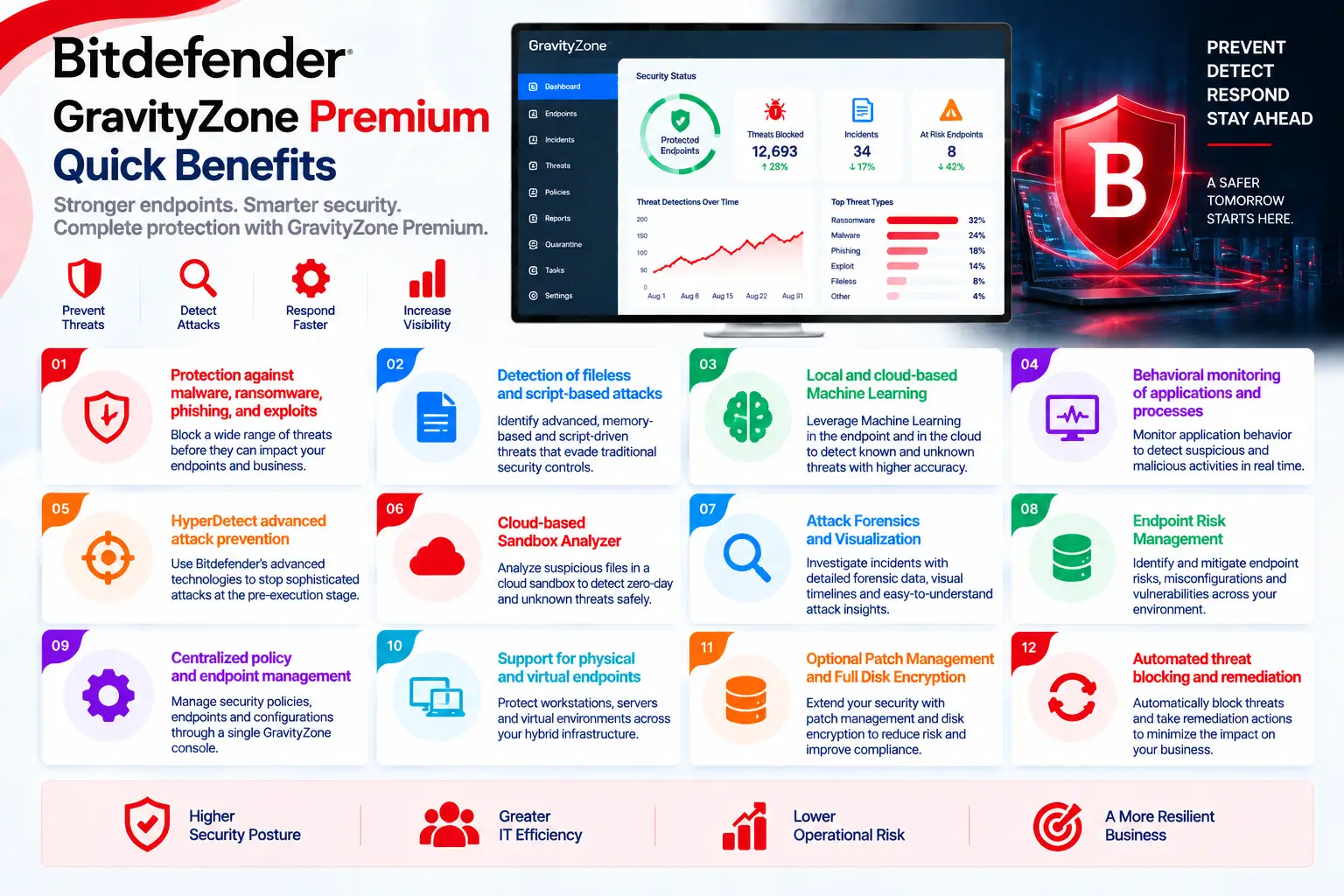
GravityZone Premium Quick Benefits
- Protection against malware, ransomware, phishing, and exploits
- Detection of fileless and script-based attacks
- Local and cloud-based Machine Learning
- Behavioral monitoring of applications and processes
- HyperDetect advanced attack prevention
- Cloud-based Sandbox Analyzer
- Attack Forensics and Visualization
- Endpoint Risk Management
- Centralized policy and endpoint management
- Support for physical and virtual endpoints
- Optional Patch Management and Full Disk Encryption
- Automated threat blocking and remediation
GravityZone Premium At a Glance
What it is: Endpoint Protection Platform with advanced prevention and endpoint hardening capabilities
Product name: GravityZone Business Security Premium
Parent category: Bitdefender License
Primary role: Advanced threat prevention, endpoint protection, and security risk reduction
Management platform: GravityZone Control Center
Security agent: Bitdefender Endpoint Security Tools (BEST)
Protected assets: Workstations, laptops, servers, and virtual systems
Supported platforms: Windows, macOS, and Linux (depending on selected modules and capabilities)
License model: Endpoint-based subscription
GravityZone Premium License Overview
GravityZone Business Security Premium is normally licensed according to the number of protected endpoints and the selected subscription term. Each active workstation, laptop, or server may consume a seat from the licensed capacity. However, the exact metric for physical servers, virtual machines, VDI systems, and cloud workloads should be confirmed in the official quote.
The license is subscription-based rather than a permanent software entitlement. Access to security updates, cloud services, management functions, and licensed modules depends on an active subscription. Additional seats can generally be purchased when the organization expands, but their expiration date and commercial alignment with the existing subscription should be checked.
How Does GravityZone Premium Work?
After the subscription is activated, the administrator configures the GravityZone company account, endpoint groups, installation packages, policies, exclusions, notifications, and administrator roles. BEST is then deployed locally, remotely, or through compatible software-distribution tools.
Files, scripts, processes, memory activity, network connections, and websites are evaluated by several security layers. Known threats can be detected through signatures and reputation services, while suspicious behavior is examined through Machine Learning, HyperDetect, process monitoring, and fileless attack defenses. Suspicious files or scripts may be submitted automatically to Sandbox Analyzer. The sample is executed inside an isolated cloud environment, and its behavior is evaluated before a malicious or non-malicious verdict is returned.
GravityZone Premium Licensing Options
|
Option |
Description |
|
Business Security Premium |
Base advanced endpoint protection subscription |
|
Additional Seats |
Extra capacity for additional protected endpoints |
|
Multi-Year Subscription |
Coverage for the selected multi-year term |
|
Patch Management |
Optional operating-system and application patching |
|
Full Disk Encryption |
Optional centralized disk-encryption management |
|
Email Security |
Optional protection for supported email platforms |
|
Enterprise Upgrade |
Upgrade path for complete EDR requirements |
GravityZone Premium Features and Benefits
GravityZone Premium combines signatures, cloud reputation, Machine Learning, behavioral analysis, exploit prevention, and network protection. HyperDetect adds specialized models for detecting zero-day attacks, obfuscated malware, credential theft, malicious scripts, hacking tools, and suspicious network activity.
Fileless Attack Defense monitors commands, running processes, connections, and code-injection behavior. This helps identify attacks that misuse PowerShell, Windows Management Instrumentation, memory, or trusted system tools instead of conventional malware files.
Sandbox Analyzer executes suspicious content in an isolated cloud environment. Attack Forensics and Visualization then provides additional context about the attack chain and affected endpoint activity. Endpoint Risk Management complements these controls by identifying vulnerable applications, risky configurations, and user behavior that could increase the attack surface.
Compatibility and Requirements
Before ordering and deployment, review the following:
- Number of workstations, laptops, and servers
- Number of virtual machines and cloud workloads
- Operating system and version of each endpoint
- Compatibility with existing security software
- Available CPU, RAM, and disk resources
- GravityZone cloud connectivity
- Proxy, firewall, and port requirements
- Policies required for servers and workstations
- Sandbox submission and privacy requirements
- Required Patch, Encryption, or Email add-ons
- Subscription term and support requirements
- Future EDR, XDR, or MDR requirements
Activation and Deployment
After purchase, the license is associated with the customer’s GravityZone account. The administrator creates installation packages, selects the required modules, defines policies, and deploys BEST on target systems.
A pilot deployment is recommended before organization-wide installation. The pilot should test application compatibility, exclusions, resource consumption, communication with GravityZone, and false-positive behavior. Existing antivirus products may need to be removed to prevent software conflicts.
After installation, administrators should confirm that all endpoints appear in Control Center, policies are applied, modules are active, updates succeed, and security events are reported correctly.
GravityZone Premium License Pricing
GravityZone Premium pricing depends on the number and type of protected endpoints, server quantity, subscription duration, add-ons, support level, and commercial terms. Environments containing physical servers, virtual machines, VDI systems, or cloud workloads may require a different quote from workstation-only deployments. For an accurate quote, provide the number of endpoints and servers, operating systems, subscription term, virtualization requirements, management model, required add-ons, and expected growth.
Bitdefender pricing depends on your product edition, endpoint count, security modules, deployment model, license term, and support requirements.