

Lansweeper License provides access to a Technology Asset Intelligence platform designed to discover, inventory, analyze, and manage IT, OT, cloud, IoT, and software assets across an organization. Lansweeper creates a centralized view of the technology environment, helping IT and security teams understand what assets exist, how they are configured, which users are associated with them, and where vulnerabilities or lifecycle risks may exist.
Quick Benefits
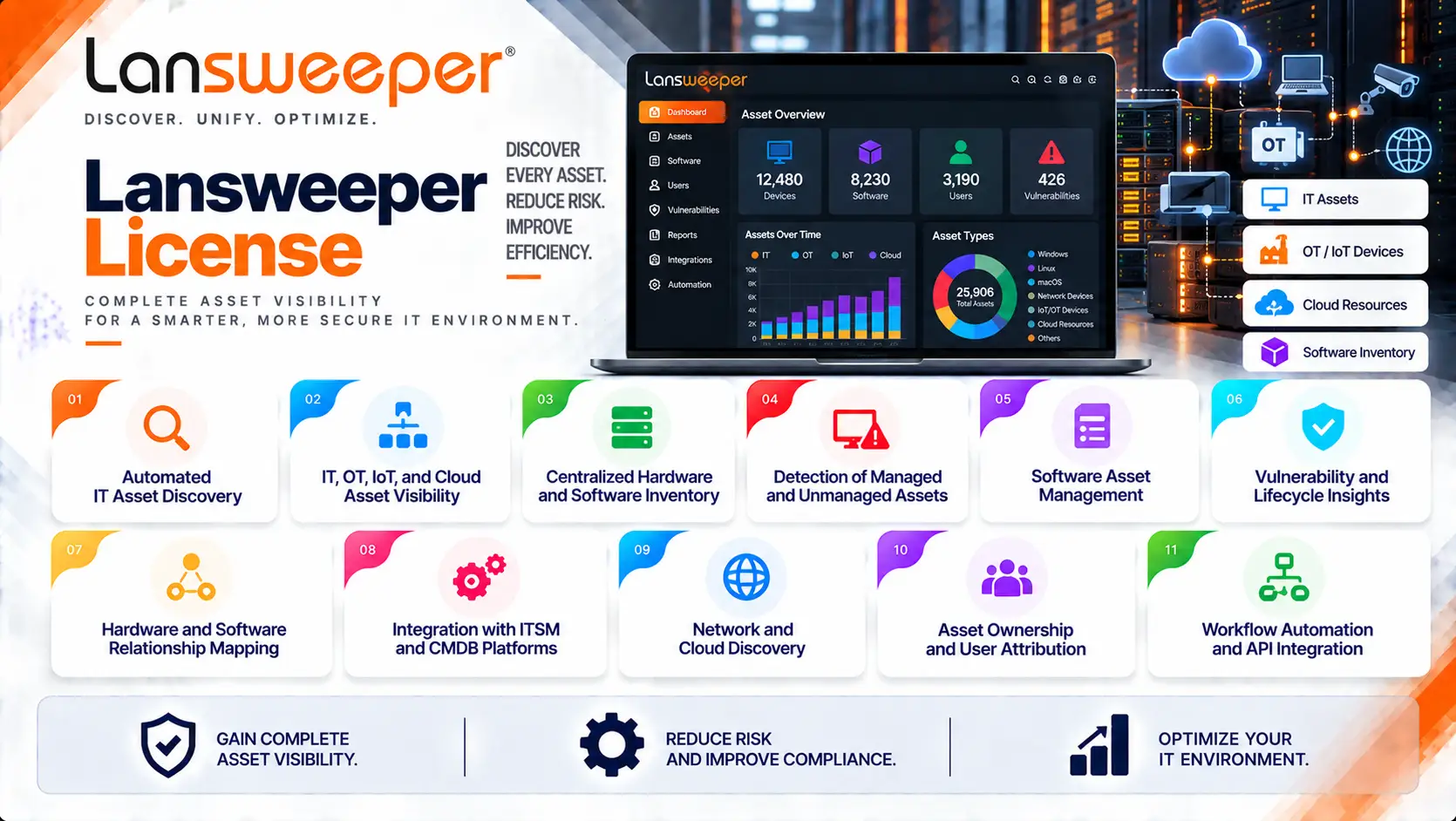
- Automated IT asset discovery
- IT, OT, IoT, and cloud asset visibility
- Centralized hardware and software inventory
- Detection of managed and unmanaged assets
- Software Asset Management
- Vulnerability and lifecycle insights
- Hardware and software relationship mapping
- Integration with ITSM and CMDB platforms
- Network and cloud discovery
- Asset ownership and user attribution
- Workflow automation and API integration
Lansweeper License At a Glance
What it is: Technology Asset Intelligence and IT Asset Management platform
Primary role: Discover, inventory, analyze, and manage technology assets
Security areas: Asset visibility, vulnerability insights, lifecycle management, software compliance, and attack-surface visibility
Asset types: IT, OT, IoT, cloud, virtual, hardware, software, and network assets
Deployment models: Cloud and Lansweeper Classic/self-managed environments
Discovery methods: Network discovery, IT Agent, cloud connectors, discovery connectors, and traffic-based discovery
Management: Lansweeper Platform and Lansweeper Site
License model: Subscription based primarily on the number of assets
License Overview
A Lansweeper License determines the scale and capabilities available for discovering and managing an organization’s technology estate. Unlike software products that are primarily licensed per user, Lansweeper’s current cloud pricing is centered on the number of assets in the environment. Current plans include Starter, Pro, and Enterprise, with Starter and Pro beginning at 2,000 assets while Enterprise starts at 10,000 assets and can scale beyond that level. User seats are unlimited across these plans.
The number of assets is therefore one of the most important figures to establish before requesting a quote.
An asset can represent technology such as:
- Workstations
- Servers
- Network devices
- Virtual machines
- Cloud resources
- Software installations
- OT equipment
- IoT devices
How Lansweeper Licensing Works
Lansweeper licensing is closely connected to the organization’s technology inventory.
A typical workflow is:
Asset Discovery
→ Find devices and technology across the environment
Inventory Collection
→ Collect hardware, software, operating system, user, and configuration information
Data Normalization
→ Consolidate and standardize asset information
Asset Intelligence
→ Identify vulnerabilities, lifecycle status, ownership, and other risks
Integration and Automation
→ Send trusted asset data to ITSM, CMDB, security, and other systems
This approach turns asset inventory into an operational data source rather than a static list of devices.
Lansweeper Platform Capabilities
| Capability | Primary Purpose |
|---|---|
| IT Discovery | Discover servers, workstations, network devices, and other IT assets |
| OT Discovery | Extend asset visibility into operational technology environments |
| Cloud Discovery | Discover cloud and virtual infrastructure |
| Asset Inventory | Maintain detailed hardware, software, and ownership information |
| Software Asset Management | Track software installations and support license optimization |
| Vulnerability Insights | Associate vulnerability information with discovered assets |
| Lifecycle Insights | Identify end-of-life and end-of-support technology |
| Dashboards & Reports | Analyze technology estate data |
| Data Federation | Consolidate information from multiple Lansweeper installations |
| Workflow Automation | Automate processes based on asset information |
| API & Integrations | Connect Lansweeper with ITSM, security, CMDB, and other platforms |
Licensing Options and Models
| Licensing Option | Description | Suitable For |
|---|---|---|
| Starter Plan | Entry-level Lansweeper Platform subscription including 2,000 assets | Smaller IT environments |
| Pro Plan | Subscription starting at 2,000 assets and expandable to 9,000 assets | Medium-sized organizations |
| Enterprise Plan | Starts at 10,000 assets and can scale to larger environments | Large and distributed enterprises |
| Cloud Subscription | Cloud-managed Lansweeper Platform with centralized asset intelligence | Organizations preferring SaaS deployment |
| Lansweeper Classic Digital License | Digital licensing for supported Classic installations connected to a Lansweeper Site | Existing Classic environments |
| Asset-Based Expansion | Increase the licensed asset capacity as the technology estate grows | Organizations adding devices over time |
| Enterprise-Scale Licensing | Expanded asset capacity and capabilities for large environments | Large IT, OT, and hybrid infrastructures |
Features and Benefits
Automated Asset Discovery
The foundation of Lansweeper is automated discovery.
Lansweeper can identify assets across:
- On-premises networks
- Remote environments
- Cloud platforms
- Virtual infrastructure
- OT environments
- IoT environments
Network discovery can identify connected devices, while agents can provide additional visibility for remote or transient endpoints.
This reduces reliance on manually maintained spreadsheets and disconnected inventories.
Hardware and Software Inventory
Once assets are discovered, Lansweeper builds detailed records containing information such as:
- Hardware specifications
- Operating systems
- Installed software
- Firmware
- IP and network information
- Users
- Ownership
- Lifecycle information
The resulting inventory provides IT teams with a centralized source of information for technology management.
Software Asset Management
Software Asset Management helps organizations understand where software is installed and how it is being used.
This can support:
- License optimization
- Software compliance
- Installation tracking
- Unused software identification
- Procurement decisions
The inventory can therefore contribute to both security and cost-management processes.
Compatibility and Requirements
Before selecting a Lansweeper License, organizations should evaluate:
- Total asset count
- IT asset quantity
- OT asset quantity
- Cloud resources
- IoT devices
- Network infrastructure
- Number of Lansweeper installations
- Remote endpoint requirements
- Discovery methods
- IT Agent requirements
- Existing discovery connectors
- ITSM and CMDB integrations
- Software Asset Management requirements
Activation and Deployment
For the current Lansweeper Platform, licensing is managed through the organization’s Lansweeper Site and subscription.
A typical deployment includes:
- Create or configure the Lansweeper environment
- Select the required subscription plan
- Define the expected asset capacity
- Configure discovery methods
- Deploy network discovery where required
- Deploy IT Agent for suitable endpoints
- Connect cloud discovery sources
- Import data through supported connectors
- Validate the resulting inventory
Pricing and Quote Process
Pricing for Lansweeper License is primarily influenced by the number of assets and the selected subscription plan.
Before requesting a quote, prepare:
- Total IT assets
- Total OT assets
- Cloud assets
- IoT assets
- Network devices
- Servers and workstations
- Virtual machines
- Required asset capacity
- Required plan
- Software Asset Management requirements
- Vulnerability insight requirements
For current cloud plans, the asset scale is particularly important. Starter and Pro begin at 2,000 assets, while Enterprise starts at 10,000 assets and is designed to scale to larger environments.
Lansweeper pricing depends on your environment, number of assets, product edition, deployment model, license term, and support requirements.