

Advanced IT Analytics helps IT teams combine operational, service-management, security, cloud, endpoint, and infrastructure data so that decisions are based on connected information instead of isolated dashboards. Within the ManageEngine portfolio, this capability is primarily delivered through Analytics Plus, an AI-powered analytics platform built to correlate data from IT and business applications and turn it into reports, forecasts, alerts, and actionable insights.
For organizations already using tools such as ServiceDesk Plus, OpManager, Endpoint Central, Applications Manager, PAM360, ADManager Plus, or third-party platforms, ManageEngine Advanced IT Analytics can provide a common analytics layer above those systems. Instead of checking separate consoles to understand ticket growth, infrastructure performance, endpoint health, SLA trends, or technician efficiency, data can be brought together and analyzed from one platform.
Quick Benefits
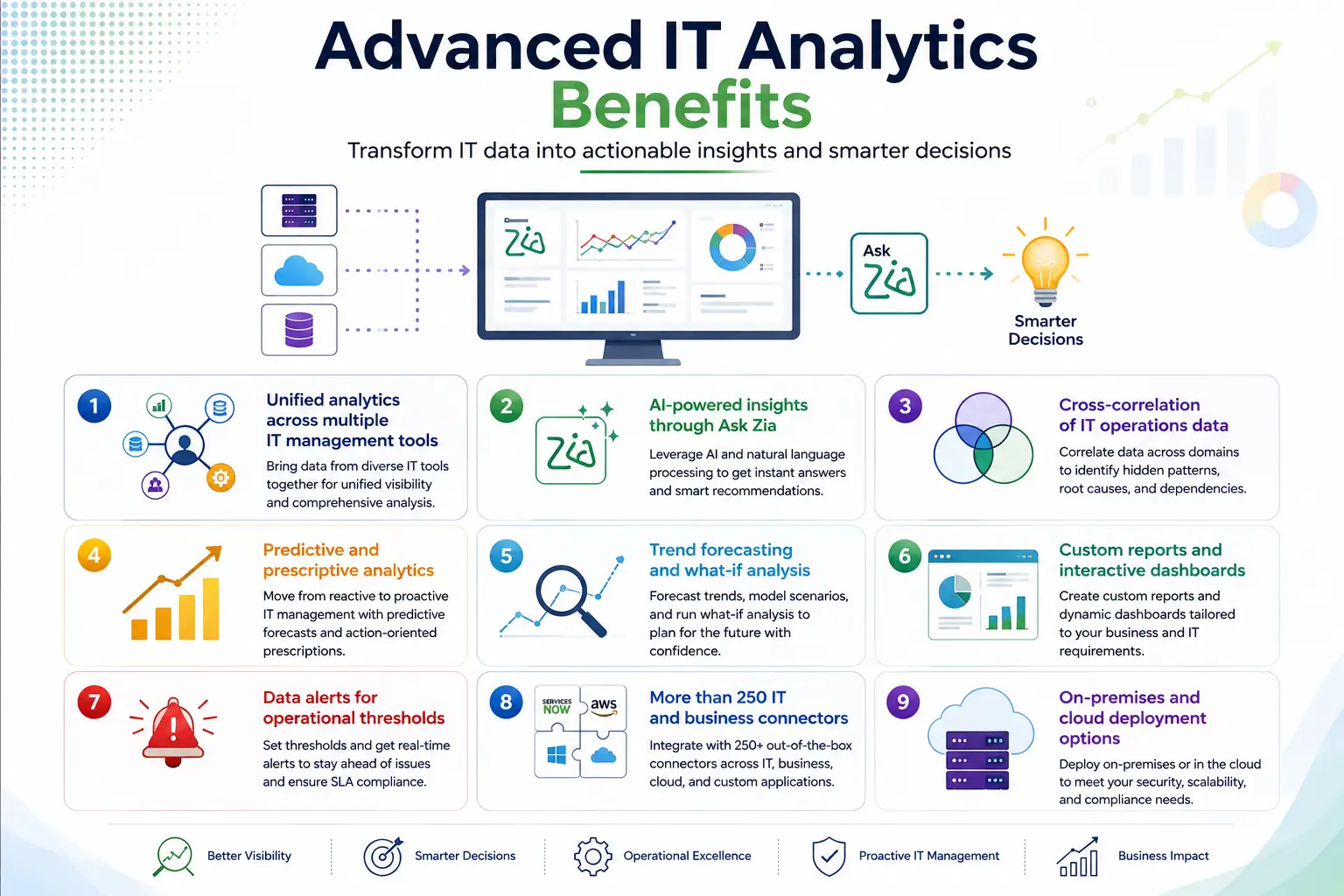
- Unified analytics across multiple IT management tools
- AI-powered insights through Ask Zia
- Cross-correlation of IT operations data
- Predictive and prescriptive analytics
- Trend forecasting and what-if analysis
- Custom reports and interactive dashboards
- Data alerts for operational thresholds
- More than 250 IT and business connectors
- On-premises and cloud deployment options
Advanced IT Analytics At a Glance
Primary ManageEngine product: Analytics Plus
Parent Category: ManageEngine License
Primary role: Unified IT data analytics and decision support
Deployment: Cloud or self-hosted/on-premises
Self-hosted options: Windows, Linux, Docker and supported cloud infrastructure
Key analytics: Dashboards, forecasting, correlation, AI insights and alerts
Data sources: ManageEngine tools, databases, cloud platforms and third-party applications

License Overview
An Advanced IT Analytics license should be based primarily on how people interact with the analytics platform rather than on the number of monitored network devices. As part of the broader ManageEngine License portfolio, Analytics Plus licensing is designed around users, viewers, concurrent guests, and data capacity requirements rather than traditional device-count licensing.. ManageEngine currently describes Analytics Plus licensing using several broad components. Users are people who can import data, create reports and build or share views. Viewers are read-only users who consume dashboards and reports. Concurrent guests cover users accessing published analytics simultaneously, while cloud deployments also consider the number of rows of data imported for analysis.
This distinction is useful in larger organizations. Ten IT analysts may need full report-building rights, while hundreds of managers only need read-only access to selected dashboards. Purchasing the same access level for both groups would usually be unnecessary. For cloud deployment, storage and imported data volume also become part of capacity planning. Self-hosted Analytics Plus gives the organization greater control over where its analytics data is stored and how the underlying infrastructure is sized.
Product Overview
Unified IT Analytics
The biggest value of Analytics Plus is its ability to connect data that normally lives in separate tools.
A service desk may show an increase in incidents, but that alone does not explain why. When incident data is correlated with network alarms, application performance, endpoint changes, or infrastructure capacity, the IT team gains a clearer picture of the underlying problem.
ManageEngine positions Analytics Plus specifically around this type of cross-functional analysis. The platform can combine information about compliance, costs, tickets, technician performance, security events, SLA performance, infrastructure and other IT metrics rather than treating each area as an independent reporting problem.
AI-Assisted Analysis
Analytics Plus includes Ask Zia, allowing users to interact with IT data using natural-language questions instead of manually building every report.
The platform also supports intelligent insights, forecasting, anomaly detection, what-if analysis and prescriptive recommendations. This can help operations teams move from simply reporting what happened last month toward understanding what may happen next and which factors are driving the trend.
Current Analytics Plus releases continue to expand these capabilities. In 2026, ManageEngine introduced further GenAI configuration enhancements, custom visualizations, additional database connectivity, dashboard improvements and expanded data-management functions.
How Advanced IT Analytics Works
Analytics Plus first connects to the selected data sources. These may include ManageEngine products, external IT platforms, databases, cloud applications, CSV files, APIs or other supported connectors.
The imported data is organized into workspaces where relationships, formulas, calculated fields and reporting models can be defined. Dashboards then combine relevant metrics so different teams can view the same operational issue from several perspectives.
For example, a network operations dashboard might combine OpManager alarms with ServiceDesk Plus incidents. If a recurring network device failure causes ticket volume to rise each Monday morning, the correlation becomes easier to identify when both data sets are analyzed together.
That is the practical purpose of ManageEngine Advanced IT Analytics: turning separate operational records into connected information that supports faster troubleshooting and planning.
Core Technical Flow
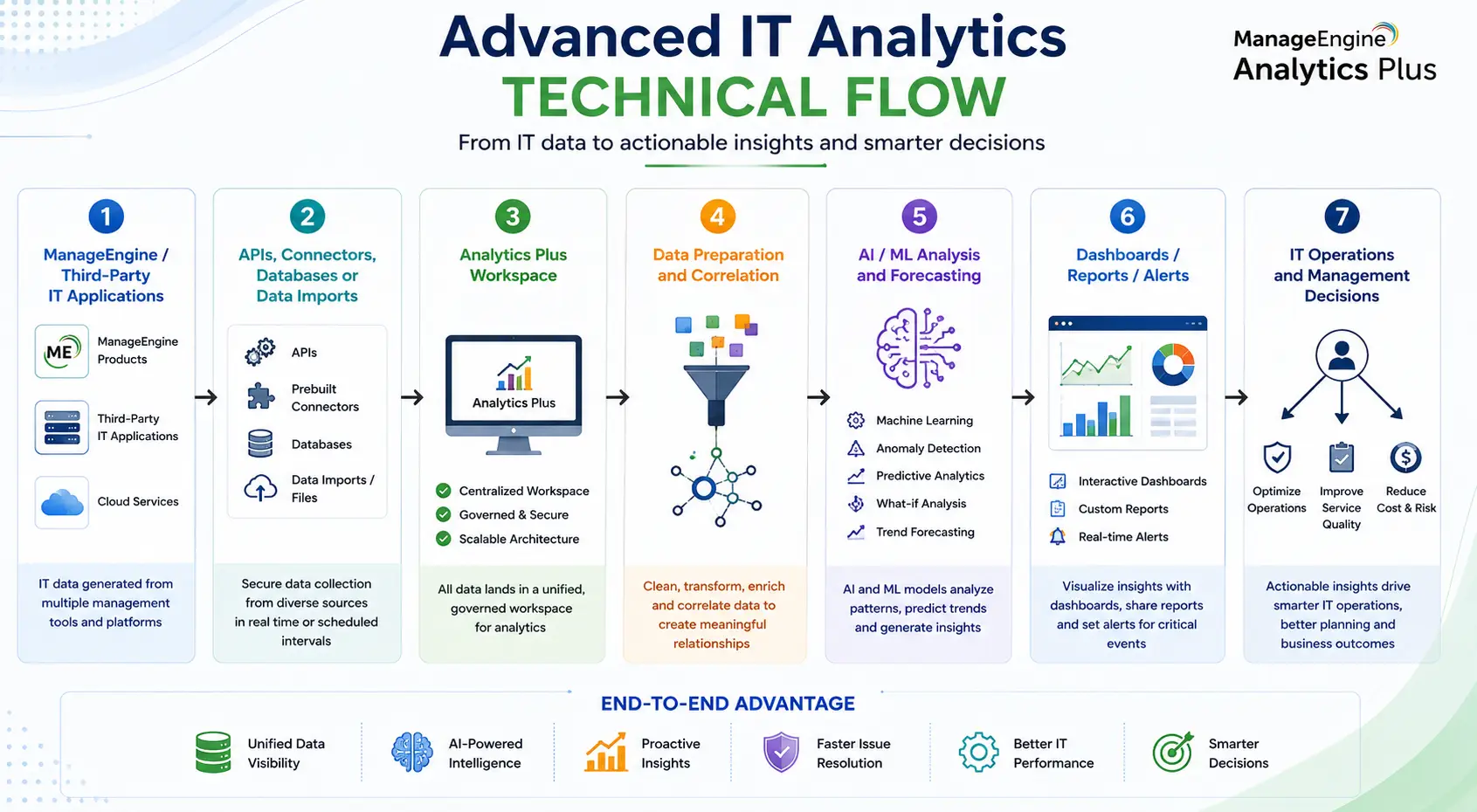
ManageEngine / Third-Party IT Applications
→ APIs, Connectors, Databases or Data Imports
→ Analytics Plus Workspace
→ Data Preparation and Correlation
→ AI / ML Analysis and Forecasting
→ Dashboards / Reports / Alerts
→ IT Operations and Management Decisions
Analytics Plus currently supports more than 250 IT and business connectors, including ManageEngine products and third-party technologies such as ServiceNow, Splunk, Datadog, Microsoft Intune, SolarWinds, AWS, Azure and others.
Options and Licensing Models
Organizations can deploy Analytics Plus in the cloud or as a self-hosted platform. ManageEngine currently supports self-hosted deployment on Windows, Linux, Docker and public/private cloud infrastructure. Cloud deployment reduces infrastructure administration and can be convenient for distributed teams. Self-hosted deployment gives the organization more control over data location, storage architecture, backups and integration with systems that may not be externally accessible.
Licensing should distinguish between report creators and report consumers. Full users need broader permissions to import and model data, while viewers may only need access to predefined dashboards. Concurrent guest licensing can also be useful when analytics are published to a larger audience that does not require named full-user accounts.
Features and Benefits
Advanced IT analytics can reduce the time teams spend manually combining information from spreadsheets and multiple management consoles. For service-management teams, Analytics Plus can highlight ticket backlogs, SLA breaches, technician workload and recurring request patterns. Network teams can correlate availability and performance trends with incidents. Endpoint administrators can review patching, software and device information alongside service-desk activity.
The platform is also useful for capacity planning. Historical infrastructure trends can reveal whether CPU, storage, application usage, network utilization or service volume is approaching a point where additional resources will be needed. Because reports can be shared or embedded with controlled access, technical teams can also provide senior management with operational KPIs without giving those users administrative access to the underlying IT tools.
Compatibility and Requirements
Before selecting an Advanced IT Analytics license, identify the systems that will supply data and the users who will consume the results. For self-hosted deployment, server resources should be sized according to imported data volume, refresh frequency, number of users and report complexity. ManageEngine’s current best-practices documentation lists Windows deployment requirements and notes that Analytics Plus can coexist with other ManageEngine software when sufficient server resources are available.
Connector compatibility should also be checked. If the environment depends heavily on ServiceDesk Plus, OpManager, Endpoint Central, cloud databases or third-party platforms, confirm that the required data can be imported with the necessary refresh frequency. Organizations running older Analytics Plus builds should also review support status before renewal or expansion. ManageEngine ended technical support for build 5500 and below in September 2025 and recommends upgrading to current builds.
How Activation and Deployment Work
Deployment starts by choosing the cloud or self-hosted edition and assigning the required license capacity. In a self-hosted environment, Analytics Plus is installed on the selected server and the license is applied through the product’s license-management interface. Administrators can then connect the relevant ManageEngine products, databases and external applications before building workspaces and dashboards.
It is usually better to begin with a limited set of operational questions rather than importing every available data source immediately. For example, a team may first correlate service-desk incidents with network alarms, validate the usefulness of that data model, and then add endpoint, application and security information. This staged approach keeps the analytics environment understandable and prevents the platform from becoming another large data repository with little operational purpose.
ManageEngine pricing depends on your license edition, users, devices, deployment model, term, and support needs.