

Fortinet FortiMail is an enterprise email security platform designed to protect users and mail infrastructure against phishing, malicious attachments, ransomware, spam, zero-day threats, business email compromise (BEC), and other email-borne attacks. It can protect traditional on-premises mail servers as well as cloud email platforms such as Microsoft 365 and Google Workspace.
Unlike a basic spam gateway, FortiMail combines multiple layers of message inspection with FortiGuard threat intelligence, content analysis, sender and domain validation, antivirus scanning, and policy enforcement. The platform can be deployed as a physical appliance, virtual machine, Fortinet-hosted service, or cloud-native SaaS service depending on how much infrastructure the organization wants to operate itself.
A Fortinet FortiMail license should therefore be selected around the email architecture rather than only the number of users. Mail volume, protected domains, deployment mode, mailbox count, retention requirements, cloud platform, security services, and availability requirements can all influence the correct configuration.
Quick Benefits
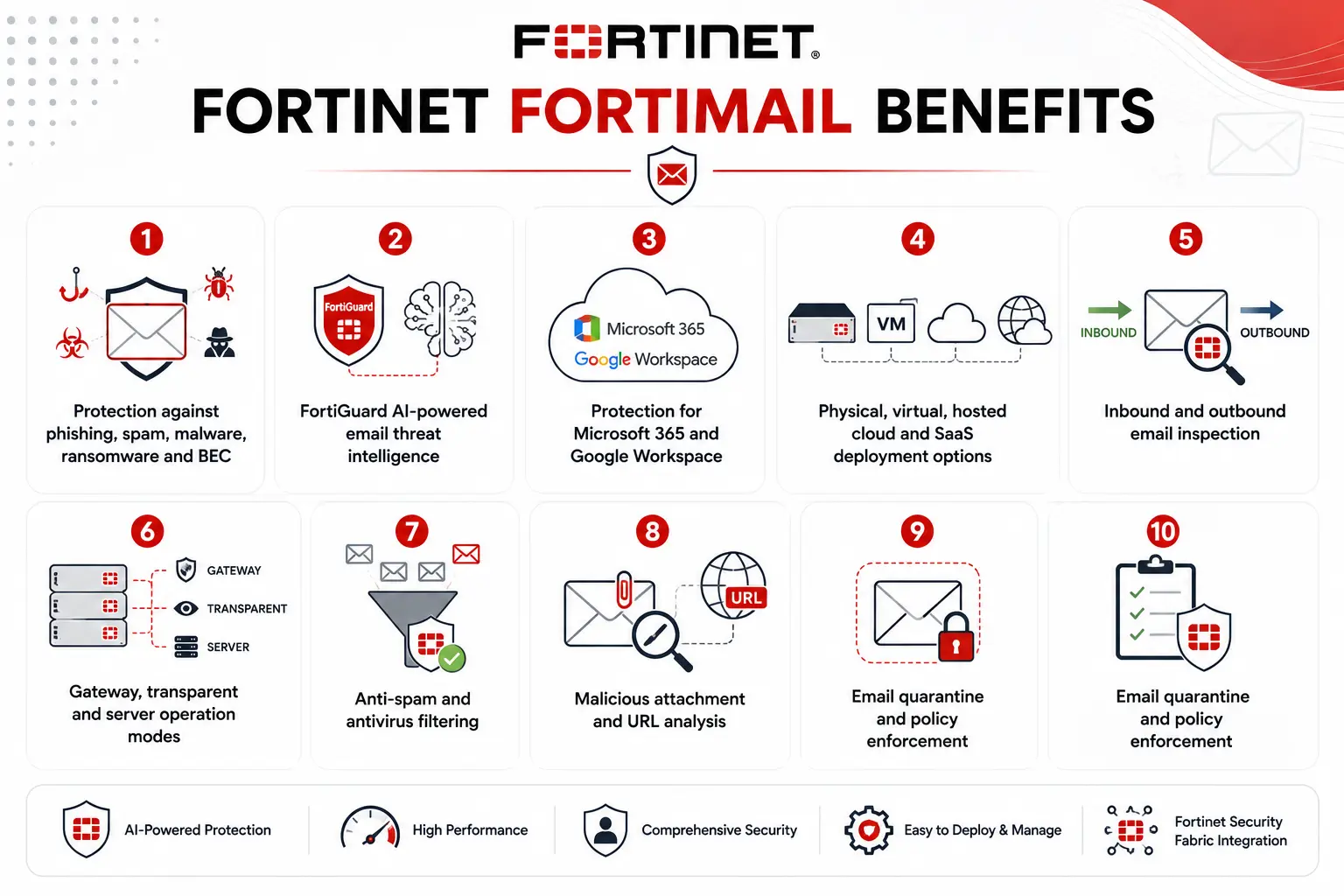
- Protection against phishing, spam, malware, ransomware and BEC
- FortiGuard AI-powered email threat intelligence
- Protection for Microsoft 365 and Google Workspace
- Physical, virtual, hosted cloud and SaaS deployment options
- Inbound and outbound email inspection
- Gateway, transparent and server operation modes
- Anti-spam and antivirus filtering
- Malicious attachment and URL analysis
- Email quarantine and policy enforcement
Review FortiMail Price List and request a quote tailored to your licensing needs.
Fortinet FortiMail At a Glance
What it is: Enterprise secure email gateway and email security platform
Parent category: Fortinet License
Primary protection: Phishing, malware, spam, ransomware, BEC and malicious email content
Current hardware models: FortiMail 200F, 400F, 900G, 2000F and 3000F
Virtual editions: VM01, VM02, VM04, VM08, VM16 and VM32
Hosted option: FortiMail Cloud Hosted
SaaS option: FortiMail Cloud SaaS
Supported email environments: On-premises, Microsoft 365, Google Workspace and hybrid email
License Overview
FortiMail has several licensing paths, and choosing between them is one of the most important purchasing decisions when evaluating a Fortinet License deployment. Physical appliances, virtual editions, and cloud services each follow different sizing and subscription models. Physical FortiMail appliances are currently offered in five models ranging from FortiMail 200F through FortiMail 3000F. Fortinet describes this option as perpetual appliance licensing with an annual security subscription. Published filtering performance across the current hardware family ranges from smaller deployments through systems capable of processing millions of messages per hour.
FortiMail VM follows a similar self-managed approach but replaces the physical appliance with virtual resources. The current portfolio includes VM01, VM02, VM04, VM08, VM16 and VM32, supporting progressively larger CPU, memory and storage allocations. Fortinet lists these editions as CPU- and domain-based, with perpetual licensing plus annual subscriptions and full OPEX subscription options available.
Cloud services use a different model. FortiMail Cloud Hosted is generally licensed per mailbox per year, while FortiMail Cloud SaaS is licensed per user per year and is specifically positioned for cloud-based email environments such as Microsoft 365 and Google Workspace.
Product Overview
Email Threat Protection
Email remains one of the most effective paths into an organization because attackers can target people rather than infrastructure. A message may contain malware, redirect the recipient to a credential-harvesting page, impersonate an executive, or attempt to trigger a fraudulent financial transaction without containing a traditional malicious attachment.
FortiMail addresses these scenarios through layered inspection. Fortinet currently positions the platform against phishing, ransomware, zero-day attacks and BEC while using FortiGuard AI-powered Security Services to update threat detection continuously. This makes FortiMail relevant beyond spam reduction. Its role is to inspect the message, sender, attachments, URLs and surrounding context before the email reaches the user or leaves the organization.
On-Premises and Cloud Email Protection
FortiMail can sit in front of an existing mail environment or integrate with cloud services. That flexibility matters for organizations in transition. A business may still operate Microsoft Exchange internally, another may already use Microsoft 365, and a third may have both while completing a migration. Fortinet explicitly supports on-premises, cloud and hybrid email environments rather than requiring one architecture. This also affects licensing. A company that wants complete control over SMTP routing and security policies may prefer an appliance or VM. An organization that does not want to operate additional infrastructure may prefer FortiMail Cloud Hosted or Cloud SaaS.
How Fortinet FortiMail Works
In a typical Gateway Mode deployment, external mail servers deliver messages to FortiMail instead of directly to the protected email server. FortiMail acts as an SMTP relay or Mail Transfer Agent, scans the message for threats and policy violations, and then forwards accepted mail toward its final destination. Public MX and related DNS records normally need to direct traffic toward FortiMail in this design.
Transparent Mode works differently. FortiMail operates as a transparent SMTP proxy between external systems and the protected mail server. This option can be useful when changing existing DNS or mail-server configuration is difficult, such as certain carrier or ISP environments. FortiMail can even operate in Server Mode, where the system itself hosts mailboxes rather than protecting a separate mail server. Gateway Mode remains Fortinet’s recommended choice for most conventional environments.
Core Technical Flow
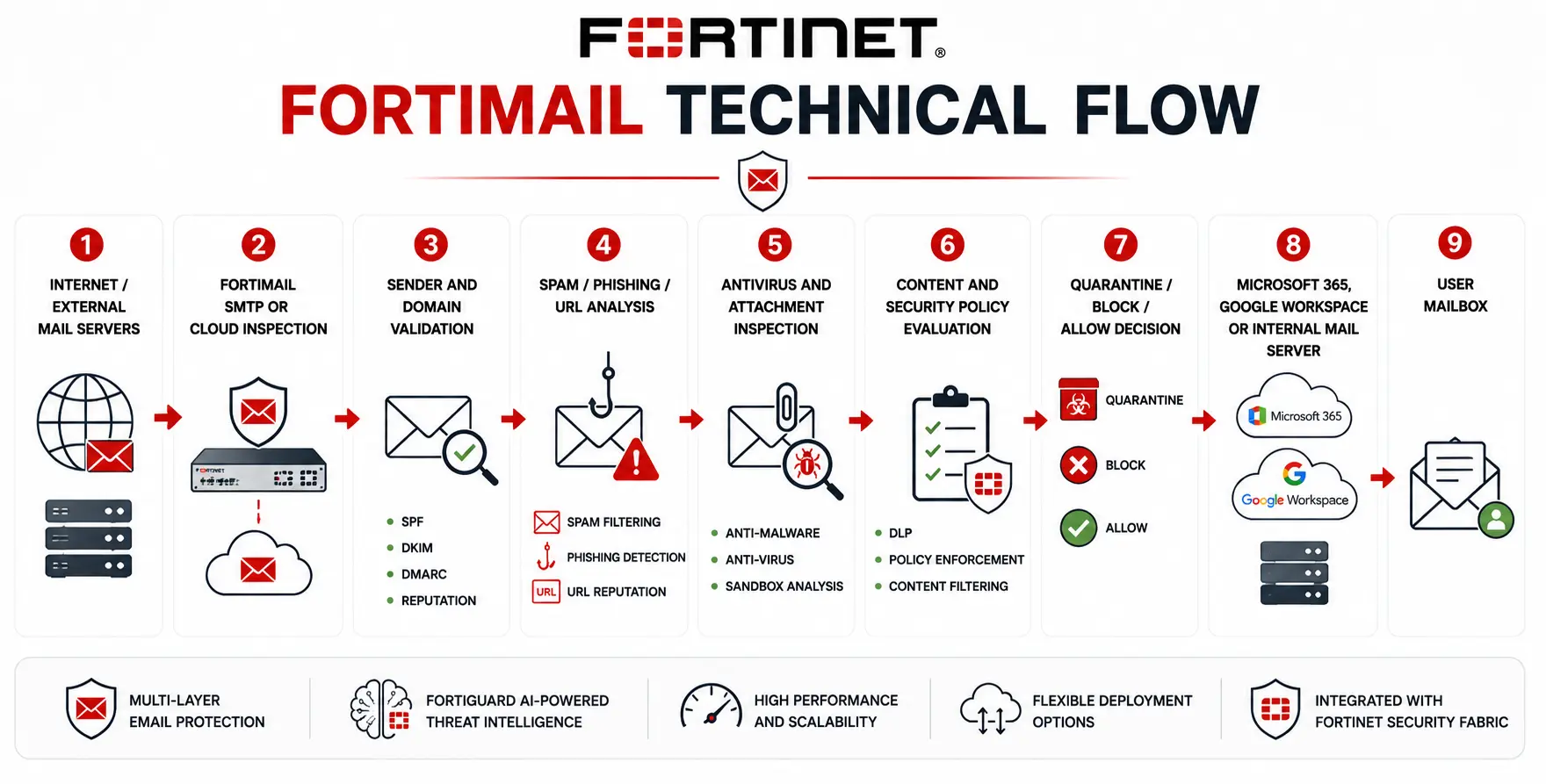
Internet / External Mail Servers
→ FortiMail SMTP or Cloud Inspection
→ Sender and Domain Validation
→ Spam / Phishing / URL Analysis
→ Antivirus and Attachment Inspection
→ Content and Security Policy Evaluation
→ Quarantine / Block / Allow Decision
→ Microsoft 365, Google Workspace or Internal Mail Server
→ User Mailbox
Options and Licensing Models
The correct FortiMail edition depends on who will operate the infrastructure and how email is delivered.
| Deployment | Best suited for | Main licensing consideration |
|---|---|---|
| FortiMail Appliance | On-premises/private infrastructure | Appliance capacity + annual subscription |
| FortiMail VM | Virtual/private/public cloud | VM resources, domains and subscription |
| FortiMail Cloud Hosted | Hosted secure email gateway | Mailboxes per year |
| FortiMail Cloud SaaS | Microsoft 365 / Google Workspace | Users per year |
FortiMail Cloud Gateway ordering is divided into mailbox bands. Fortinet’s current ordering guide includes ranges such as 25–100, 101–1,000 and 1,001–5,000 mailboxes, with additional tiers available for larger environments. Fortinet also notes that billing is based on the customer’s declared number of active mailboxes and recommends LDAP recipient verification for accurate user counts.
Features and Benefits
A major FortiMail advantage is that an organization can retain control of email flow without relying solely on the native protections built into its mail platform. This can create an additional security boundary between the public Internet and the mailbox. The different deployment modes also make FortiMail useful during email migrations. An organization moving from Exchange to Microsoft 365, for example, does not necessarily need to redesign its entire email-security strategy at the same time. FortiMail can participate in hybrid email environments while the underlying mailbox architecture changes.
For larger environments, performance should be evaluated using actual mail flow. Fortinet publishes VM routing capacity from roughly 34,000 messages/hour on VM01 to 1.2 million messages/hour on VM32 under its documented test conditions. Security scanning reduces those theoretical routing figures, so sizing should reflect the enabled inspection services rather than raw SMTP throughput alone.
Compatibility and Requirements
Before selecting a Fortinet FortiMail license, determine where the organization’s mailboxes actually reside and how mail currently reaches them. Microsoft 365, Google Workspace, Exchange, another SMTP server, or a hybrid design can each lead to a different deployment.
Mail volume should then be measured. Average messages per hour is useful, but peak periods are more important because security inspection still has to keep pace during sudden bursts. Also review the number of domains, mailboxes or users, expected attachment sizes, quarantine requirements and any need for email archiving.
For FortiMail VM, CPU, RAM and storage must match the licensed VM tier. Current Fortinet specifications allow progressively larger resources from VM01 through VM32, with storage limits ranging from approximately 1 TB to 24 TB depending on the edition. Supported environments include VMware, Hyper-V, KVM, AWS, Azure, Google Cloud, OCI and other listed virtualization platforms. DNS, MX records, SMTP routing, firewall rules and TLS certificates should also be reviewed before deployment.
How Activation and Deployment Work
For appliance and VM deployments, installation begins with network connectivity, licensing and selection of the correct operating mode. FortiMail currently defaults to Gateway Mode. Fortinet recommends choosing the operation mode before building the rest of the configuration because changing modes later can reset significant parts of the existing configuration.
Protected domains, SMTP routes, security profiles and recipient validation can then be configured. In Gateway Mode, MX records normally direct inbound email toward FortiMail, which scans the message before relaying it to the protected server. Cloud deployments reduce this infrastructure work, but Microsoft 365 or Google Workspace integration, protected-domain configuration and policy design still need to be completed correctly.
Pricing and Quote Process
Pricing for a Fortinet FortiMail license depends heavily on deployment type. For appliance deployments, provide the expected mail volume, protected domains, security services, storage requirements, redundancy design and preferred support term. For FortiMail VM, include the required vCPU, memory and storage resources along with the virtualization platform.
For FortiMail Cloud Hosted, the active mailbox count becomes a primary pricing input. For Cloud SaaS, provide the number of protected users and whether the environment uses Microsoft 365, Google Workspace or both. A useful quote should therefore include the number of mailboxes/users, domains, average and peak message volume, current email platform, deployment preference, required security functions, HA requirements and subscription term.
Fortinet pricing depends on your product edition, FortiGate model, security services, license term, deployment model, and support requirements.