

The Bitdefender GravityZone Enterprise license, officially offered as GravityZone Business Security Enterprise, provides advanced endpoint prevention, detection, investigation, and response capabilities for complex business environments. It combines multilayered endpoint protection with EDR, Threat Hunting, Cross-Endpoint Correlation, Risk Management, and centralized response workflows.
This edition is suitable for organizations that require more than business antivirus and advanced prevention. Before ordering, the number of endpoints and servers, operating systems, subscription term, management model, data-retention requirements, and required add-ons should be identified.
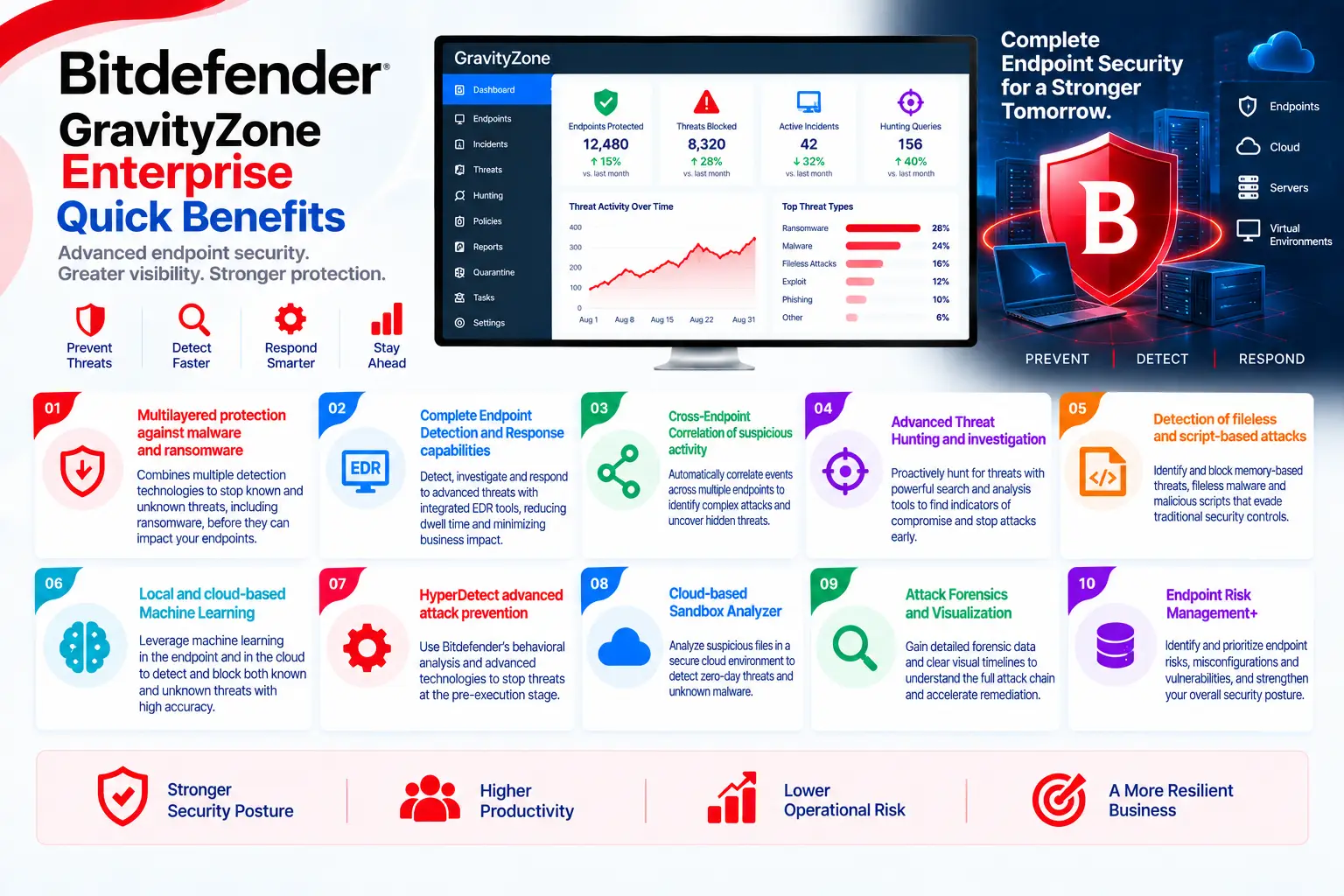
GravityZone Enterprise Quick Benefits
- Multilayered protection against malware and ransomware
- Complete Endpoint Detection and Response capabilities
- Cross-Endpoint Correlation of suspicious activity
- Advanced Threat Hunting and investigation
- Detection of fileless and script-based attacks
- Local and cloud-based Machine Learning
- HyperDetect advanced attack prevention
- Cloud-based Sandbox Analyzer
- Attack Forensics and Visualization
- Endpoint Risk Management
GravityZone Enterprise At a Glance
What it is: Enterprise Endpoint Protection and EDR solution
Product name: GravityZone Business Security Enterprise
Parent category: Bitdefender License
Primary role: Threat prevention, detection, investigation, and endpoint response
Management platform: GravityZone Control Center
Security agent: Bitdefender Endpoint Security Tools (BEST)
Protected assets: Workstations, laptops, servers, and virtual systems
Supported platforms: Windows, macOS, and Linux, depending on the enabled modules and capabilities
GravityZone Enterprise License Overview
GravityZone Business Security Enterprise is generally ordered according to the number of protected endpoints and the selected subscription term. Each active workstation, laptop, or server may consume licensed capacity. The exact metric for physical servers, virtual machines, VDI systems, and cloud workloads should be confirmed in the official quote.
This license is subscription-based. Access to security intelligence, cloud services, updates, EDR functions, and licensed modules depends on an active entitlement. Additional endpoint capacity may generally be added as the organization expands, but subscription alignment and commercial conditions should be reviewed.
The final scope should also identify the required telemetry-retention period and optional services. Longer EDR data retention, XDR integrations, MDR services, Patch Management, Full Disk Encryption, and Email Security may require separate licensing.
How Does GravityZone Enterprise Work?
After subscription activation, the administrator configures GravityZone Control Center, administrative roles, endpoint groups, installation packages, policies, exclusions, and notifications. BEST is then deployed locally, remotely, or through compatible software-distribution platforms.
Files, scripts, processes, command lines, memory activity, network connections, user behavior, and system changes are evaluated by multiple protection technologies. Known threats may be blocked through signatures and reputation services, while unknown or advanced activity is examined through Machine Learning, HyperDetect, behavioral analysis, and fileless attack defenses.
EDR telemetry is sent to GravityZone, where related events can be analyzed and correlated. Security analysts can review incident graphs, affected endpoints, process relationships, indicators, and the sequence of attacker actions. Response tasks can then be executed against the relevant endpoints.
GravityZone Enterprise Licensing Options
|
Option |
Description |
|
Business Security Enterprise |
Base endpoint protection and EDR subscription |
|
Additional Endpoint Seats |
Extra capacity for newly protected systems |
|
Multi-Year Subscription |
Coverage for the selected multi-year term |
|
Extended EDR Retention |
Longer storage of endpoint telemetry where available |
|
GravityZone XDR |
Additional correlation across supported security sources |
|
Bitdefender MDR |
Managed detection and response services |
|
Patch Management |
Optional operating-system and application patching |
|
Full Disk Encryption |
Optional centralized disk-encryption management |
|
Email Security |
Optional protection for supported email platforms |
Not every option is automatically included with the Enterprise license. Add-ons, dependencies, data-retention periods, and regional availability should be verified in the final quote.
GravityZone Enterprise Features and Benefits
GravityZone Enterprise combines signatures, cloud reputation, Machine Learning, behavioral analysis, exploit protection, and network defense. HyperDetect adds specialized models for identifying zero-day attacks, obfuscated malware, credential theft, malicious scripts, suspicious tools, and targeted attacks.
Fileless Attack Defense monitors commands, processes, connections, and code-injection behavior. Sandbox Analyzer can execute suspicious files or scripts inside an isolated cloud environment and return a verdict before the sample is trusted.
EDR provides deeper visibility into endpoint activity and enables analysts to investigate incidents rather than reviewing disconnected alerts. Cross-Endpoint Correlation connects related events across devices, while Threat Hunting allows analysts to search endpoint telemetry for suspicious behavior and indicators.
Endpoint Risk Management complements detection by identifying vulnerable applications, risky configurations, and user behavior that increase exposure. This allows teams to reduce the attack surface before a vulnerability becomes part of an active incident.
Compatibility and Requirements
Before ordering and deployment, review:
- Number of workstations, laptops, and servers
- Number of virtual machines and cloud workloads
- Operating system and version of each endpoint
- Compatibility with existing endpoint security tools
- Available CPU, RAM, and disk resources
- GravityZone cloud connectivity
- Proxy, firewall, and communication ports
- EDR telemetry and retention requirements
- Separate policies for servers and workstations
- Administrative roles and incident workflows
- Required XDR, MDR, Patch, or Encryption services
- Data residency, privacy, and compliance requirements
- SIEM, ticketing, or API integration requirements
Module availability may differ across Windows, macOS, and Linux. Supported systems and response actions should therefore be verified before deployment.
Activation and Deployment
After purchase, the entitlement is assigned to the customer’s GravityZone account. Administrators create installation packages, select security modules, define policies, and deploy BEST on target systems.
A pilot deployment should be completed before organization-wide rollout. The pilot should evaluate application compatibility, exclusions, resource usage, network communication, false positives, telemetry collection, and response permissions.
After deployment, administrators should verify that endpoints appear in Control Center, policies are applied, protection modules are active, EDR events are collected, incidents are generated correctly, and response actions work as expected.
GravityZone Enterprise License Pricing
GravityZone Enterprise pricing depends on endpoint and server quantities, subscription duration, data-retention requirements, optional modules, support level, and commercial conditions. XDR, MDR, Patch Management, Full Disk Encryption, and additional retention may affect the final cost. For an accurate quote, provide the number and type of protected endpoints, operating systems, server and virtualization requirements, subscription term, retention period, integrations, required add-ons, and expected growth.
Bitdefender pricing depends on your product edition, endpoint count, security modules, deployment model, license term, and support requirements.