

Cisco SD-WAN Manager is the centralized management and orchestration platform for Cisco Catalyst SD-WAN environments. Formerly known as Cisco vManage, it gives network teams one interface for onboarding WAN edge devices, building configurations, applying policies, monitoring application experience, and managing distributed network infrastructure. Cisco introduced the current name as part of its broader Catalyst SD-WAN terminology update.
Instead of configuring every branch router separately, administrators can use templates, centralized policies, automation, and shared operational dashboards. The platform supports branch, data center, cloud, and remote-site environments through Cisco-hosted or customer-managed deployment models.
Key Benefits
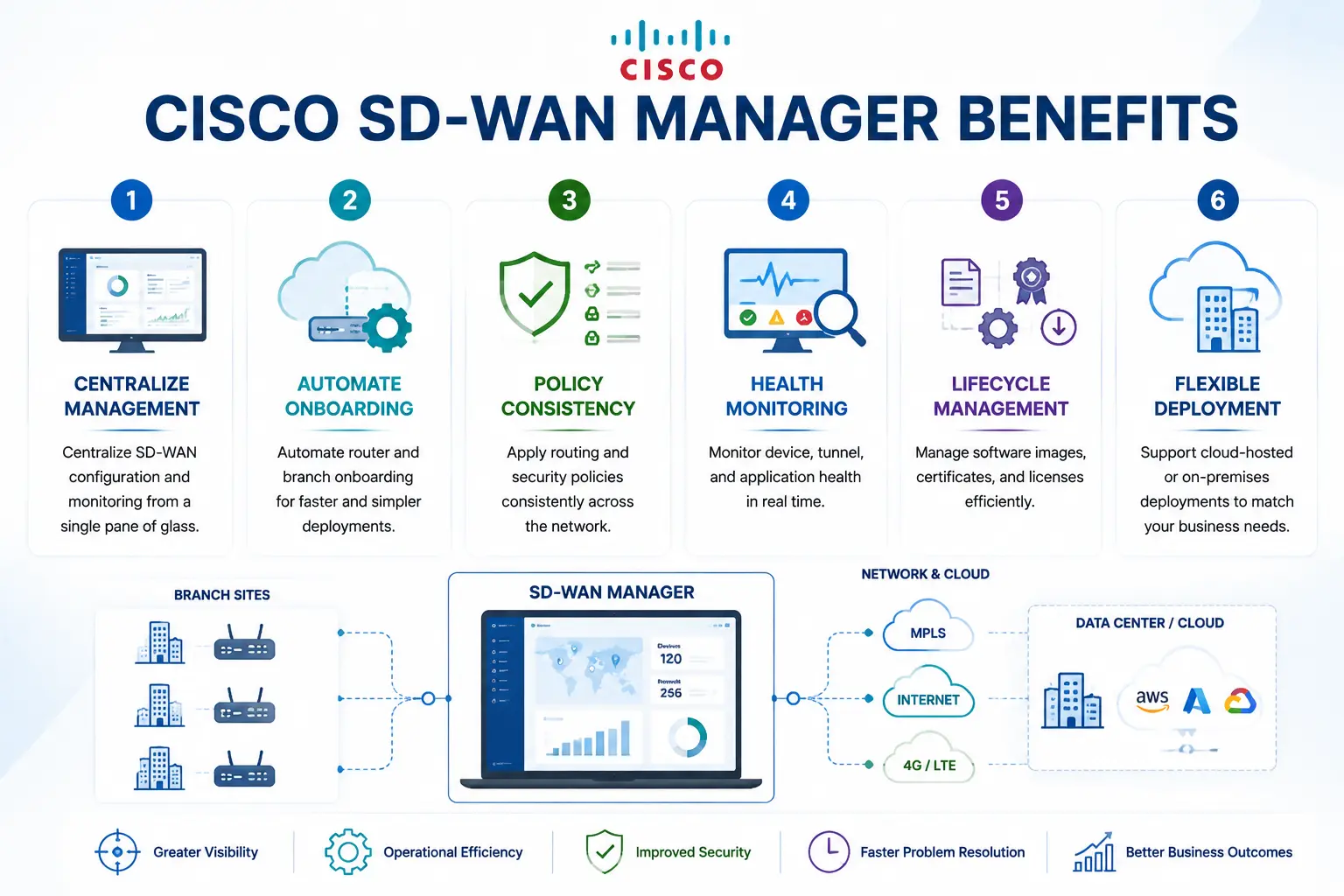
- Centralize SD-WAN configuration and monitoring
- Automate router and branch onboarding
- Apply routing and security policies consistently
- Monitor device, tunnel, and application health
- Manage software images, certificates, and licenses
- Support cloud-hosted or on-premises deployments
Review Cisco SD-WAN Manager Price List and request a quote tailored to your licensing needs.
Cisco SD-WAN Manager At a Glance
What it is: Centralized management and orchestration for Cisco Catalyst SD-WAN
Former name: Cisco vManage
Product family: Cisco Catalyst SD-WAN
Primary purpose: Configuration, policy, monitoring, assurance, and lifecycle management
Deployment options: Cisco-hosted cloud, customer-hosted cloud, or on-premises
License approach: Included through the applicable Cisco Catalyst SD-WAN subscription
Managed environment: Supported Cisco WAN edge routers and SD-WAN control components

Cisco SD-WAN Manager License Overview
Cisco SD-WAN Manager is normally obtained through a Cisco Catalyst SD-WAN software subscription rather than purchased as an isolated management dashboard. Cisco DNA Essentials and Cisco DNA Advantage include centralized SD-WAN management with cloud or on-premises options. The correct subscription depends on the router platform, bandwidth tier, required capabilities, term, and management model.
The platform can display eligible DNA entitlements, assign licenses to managed devices, monitor consumption, and synchronize licensing data with Cisco Smart Software Manager. Online, offline, and Cisco SSM On-Prem reporting methods are available for organizations with different connectivity or compliance requirements.
Cisco SD-WAN Manager Product Overview
Cisco SD-WAN Manager acts as the operational control point for a Catalyst SD-WAN fabric. Administrators use it to onboard routers, apply policies, review alarms, inspect overlay connections, and coordinate configuration or software changes.
Centralized Configuration
Reusable templates standardize interfaces, routing, segmentation, transport settings, and security functions across selected sites. A configuration can be prepared centrally and deployed to multiple compatible devices, reducing manual work and configuration drift.
Visibility and Assurance
Dashboards present network topology, device health, tunnel status, application performance, alarms, and operational events. This shared view helps administrators determine whether a service issue originates from a WAN circuit, edge router, policy, tunnel, or application path.
Policy and Cloud Integration
Centralized policies control traffic paths, applications, segmentation, quality of service, and security behavior. Cisco SD-WAN Manager also supports Cloud OnRamp and related integrations for SaaS, IaaS, colocation, multicloud, and SASE connectivity.
How Cisco SD-WAN Manager Works
Cisco SD-WAN Manager communicates with the SD-WAN control components and authorized WAN edge devices. It stores configuration and operational information, distributes templates and policies, and presents collected telemetry through a web-based interface.
- Deploy the manager: Use a Cisco-hosted service or install the supported virtual appliance.
- Configure the organization: Define system identity, certificates, users, addressing, and controller connectivity.
- Add edge devices: Import or synchronize authorized routers and prepare them for onboarding.
- Build templates: Configure interfaces, routing, segmentation, security, transport, and application settings.
- Deploy policies: Attach configurations and activate centralized policies across selected sites.
- Monitor operations: Review topology, alarms, tunnels, applications, licenses, and software status.
Cisco documentation supports standalone Manager deployments and larger clustered designs, with sizing based on the number of devices and operational scale.
Core Technical Flow
Administrator Intent → Cisco SD-WAN Manager → Templates and Policies → Control Components and Edge Devices → Telemetry and Assurance. The platform converts network requirements into repeatable configurations, distributes approved changes, and collects operational data for monitoring, reporting, and troubleshooting.
Features & Benefits
Zero-touch provisioning, reusable templates, centralized policies, and coordinated software management reduce the effort required to operate routers across many locations. New branches can be brought online with fewer manual steps, while existing sites remain aligned with approved network standards.
Network teams also gain a consistent view of overlay health, application behavior, alarms, and device status. APIs support external automation and operational integrations, while role-based access helps control which administrators can view or modify different parts of the environment.
Compatibility & Requirements
| Area | What to confirm |
|---|---|
| Edge platforms | Supported Catalyst, ISR, ASR, virtual, or Cisco Secure Router models |
| Software releases | Compatibility between Manager, controllers, and edge software |
| Deployment model | Cisco-hosted, customer cloud, VMware ESXi, or KVM |
| Scale | Number of devices, sites, tenants, and required Manager nodes |
| Infrastructure | Required CPU, memory, storage, interfaces, and database capacity |
| Licensing | Subscription tier, bandwidth, term, Smart Account, and Virtual Account |
| Integrations | Cloud, security, analytics, logging, identity, or API requirements |
Resource requirements vary according to the number of managed devices and whether the platform operates as a standalone node or cluster.
Cisco SD-WAN Manager Activation & Deployment
For Cisco-hosted deployment, the sales order and Smart Account information are used to provision the required Catalyst SD-WAN control components. In customer-hosted environments, the Manager virtual machine is installed on a supported platform and connected to the Validator, Controller, and authorized WAN edge devices.
Before activation, confirm software compatibility, certificates, organization name, addressing, Smart Account access, device authorization, backups, administrative roles, and cluster sizing.
Pricing Factors & Quote Process
Cisco SD-WAN Manager pricing depends on the SD-WAN subscription, number and type of managed edge devices, bandwidth tier, subscription term, deployment model, and required capabilities.
To request pricing, complete the quote form with your contact details, company name, Cisco as the brand, and Cisco SD-WAN Manager as the product. You may also upload an existing license list or requirements document. Additional details such as device quantities, preferred tiers, renewal status, and deployment options can be clarified during the quote process.
Cisco SDWAN Manager pricing depends on your license type, deployment model and support requirements.