

Imagicle Screen Recording is a communication quality management solution designed to capture and review agent desktop activity alongside voice interactions. An Imagicle Screen Recording License helps organizations improve customer service quality, support compliance requirements, and gain deeper visibility into how employees handle digital communication workflows.
Quick Benefits
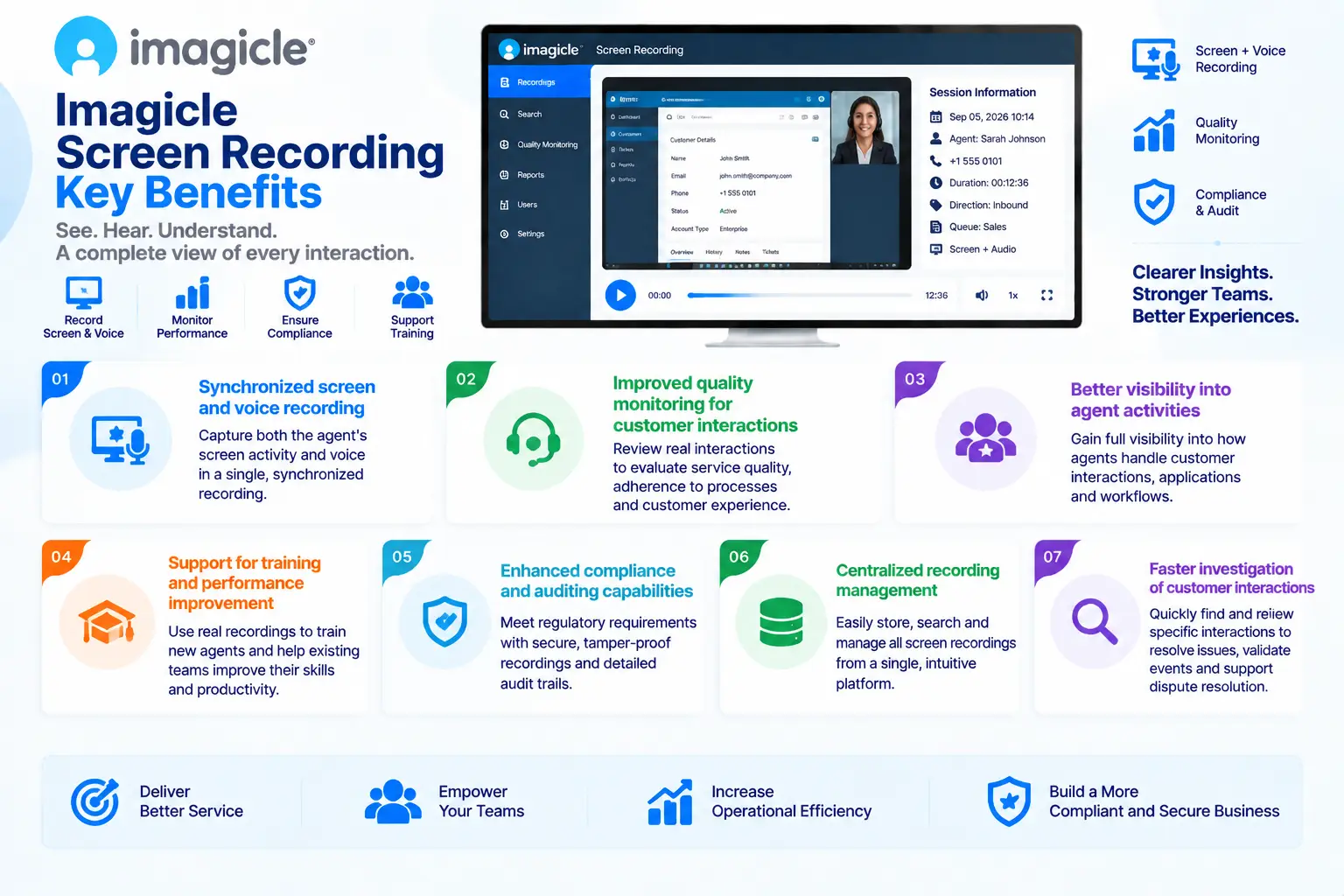
- Synchronized screen and voice recording
- Improved quality monitoring for customer interactions
- Better visibility into agent activities
- Support for training and performance improvement
- Enhanced compliance and auditing capabilities
- Centralized recording management
- Faster investigation of customer interactions
Imagicle Screen Recording At a Glance
What it is: Desktop activity and communication recording solution
Vendor: Imagicle
Parent category: Imagicle License
Primary role: Capture employee screen activity alongside voice communication for review and analysis
Main users: Contact centers, customer service teams, quality managers, compliance teams, and communication administrators
Core capabilities: Screen capture, synchronized call recording, quality monitoring, session review, and performance analysis
Integration platforms: Cisco Unified Communications Manager, Cisco Webex, and supported collaboration environments
License Overview
An Imagicle Screen Recording License is generally determined by the number of users or agents whose desktop activity needs to be captured and reviewed. Since screen recording is usually deployed alongside voice recording and quality management processes, licensing considerations are closely related to the number of monitored employees and the scope of recording required.
Organizations should evaluate which departments require screen capture, whether all interactions or only selected users should be recorded, expected recording volume, and storage requirements before selecting the appropriate license model.
For customer service and contact center environments, screen recording is often used together with voice recording to provide a complete view of customer interactions. This allows supervisors to review not only what was said during a call but also how applications, workflows, and systems were used during the interaction. The selected Imagicle Screen Recording License should also consider privacy policies, compliance requirements, retention periods, and access permissions because recorded desktop sessions may contain sensitive business information.
Product Overview
Combined Voice and Screen Interaction Recording
Voice recordings provide important information about customer conversations, but they do not always show the complete interaction process. In many business environments, employees use multiple applications, customer databases, ticketing systems, and internal tools while communicating with customers.
Imagicle Screen Recording extends communication recording by capturing the employee desktop activity associated with a voice interaction.
This provides organizations with a more complete understanding of customer interactions and allows managers to review both the conversation and the workflow followed by the employee.
Quality Monitoring and Agent Improvement
Customer service quality depends not only on communication skills but also on how efficiently employees use business applications and follow established procedures.
Imagicle Screen Recording helps supervisors evaluate real working processes and identify opportunities for improvement.
By reviewing recorded sessions, organizations can provide more accurate coaching, identify training needs, and improve operational consistency across customer-facing teams.
Compliance and Audit Support
Some industries require organizations to maintain detailed records of customer interactions and demonstrate control over communication processes.
Screen recording adds another layer of visibility by showing how employees handled digital workflows during customer interactions.
This can support internal reviews, compliance processes, and investigations where understanding both communication and system activity is important.
Core Technical Flow
Customer Interaction Begins
→ Voice Communication Platform
→ Agent Desktop Activity Capture
→ Imagicle Recording Platform
→ Synchronized Voice + Screen Storage
→ Authorized Review / Quality Analysis / Training
The solution captures relevant desktop activity and connects it with communication records for later review.
Options and Licensing Models
| Licensing Factor | Description | Suitable For |
|---|---|---|
| Recorded Users / Agents | Number of employees whose screens are captured | Contact centers and support teams |
| Recording Scope | Full-time or policy-based screen recording requirements | Organizations with different monitoring needs |
| Storage Requirements | Retention period and recording archive size | Compliance-focused environments |
| Integration Requirements | Connection with voice and collaboration platforms | Enterprise UC environments |
| Quality Management Features | Additional review and analysis capabilities | Organizations requiring advanced monitoring |
| Support and Subscription | Updates, maintenance, and technical assistance | Long-term deployments |
The appropriate licensing model depends on the number of monitored employees, recording policies, storage requirements, and business objectives.
Features and Benefits
Imagicle Screen Recording helps organizations gain a complete view of customer interactions by combining voice communication data with employee desktop activity. This additional visibility is valuable for organizations where employees rely on multiple applications and digital workflows during customer conversations.
A major benefit is improved quality management. Supervisors can review real examples of employee interactions, identify process improvements, and provide more targeted coaching based on actual workflows.
The solution also helps reduce operational risks by providing better insight into how business processes are performed. When combined with voice recording, screen capture creates a more complete record of customer interactions.
For contact centers and regulated organizations, Imagicle Screen Recording provides a stronger foundation for training, auditing, and continuous service improvement.
Compatibility and Requirements
Before deploying Imagicle Screen Recording, organizations should evaluate their communication environment and monitoring objectives.
Important considerations include:
- Existing voice platform
- Number of agents requiring recording
- Desktop applications involved
- Storage requirements
- Retention policies
- Compliance requirements
- User privacy policies
Imagicle Screen Recording is designed to work alongside enterprise communication environments such as Cisco Unified Communications Manager and supported collaboration platforms. Organizations should define recording policies carefully to ensure that screen capture aligns with internal security and privacy requirements.
Activation and Deployment
Imagicle Screen Recording deployment begins with activating the purchased license and preparing the communication environment.
Typical deployment steps include:
- License registration and activation
- Configuring recording policies
- Installing required components
- Connecting voice and desktop recording systems
- Testing synchronized recordings
Organizations usually begin with selected teams or departments before expanding screen recording coverage across larger user groups.
Pricing and Quote Process
Pricing for an Imagicle Screen Recording License depends mainly on the number of recorded users, recording scope, storage requirements, integration environment, and selected capabilities.
Before requesting a quote, organizations should define:
- Number of agents or users to monitor
- Required recording coverage
- Expected recording volume
- Storage and retention requirements
- Existing communication platform
- Compliance requirements
Accurate planning helps organizations select appropriate recording capacity without unnecessary licensing costs. Organizations should also consider future expansion because additional agents, longer retention periods, or increased interaction volumes may affect licensing and storage requirements.
Imagicle pricing depends on your selected applications, licensing model, deployment environment, subscription term, and support needs.