

ManageEngine DDI Central is an integrated DNS, DHCP, and IP Address Management (DDI) platform designed to help organizations gain centralized visibility and control over their network addressing infrastructure. Instead of managing IP addresses, DNS records, and DHCP services through separate systems, DDI Central brings these core network services together into one unified management platform.
Modern enterprise networks are becoming increasingly complex. Hybrid cloud environments, remote offices, IoT devices, virtual machines, containers, and distributed applications continuously increase the number of IP resources that administrators need to track. Without proper IP visibility, teams often struggle with duplicate addresses, outdated records, unmanaged devices, DNS inconsistencies, and inefficient troubleshooting.
Quick Benefits
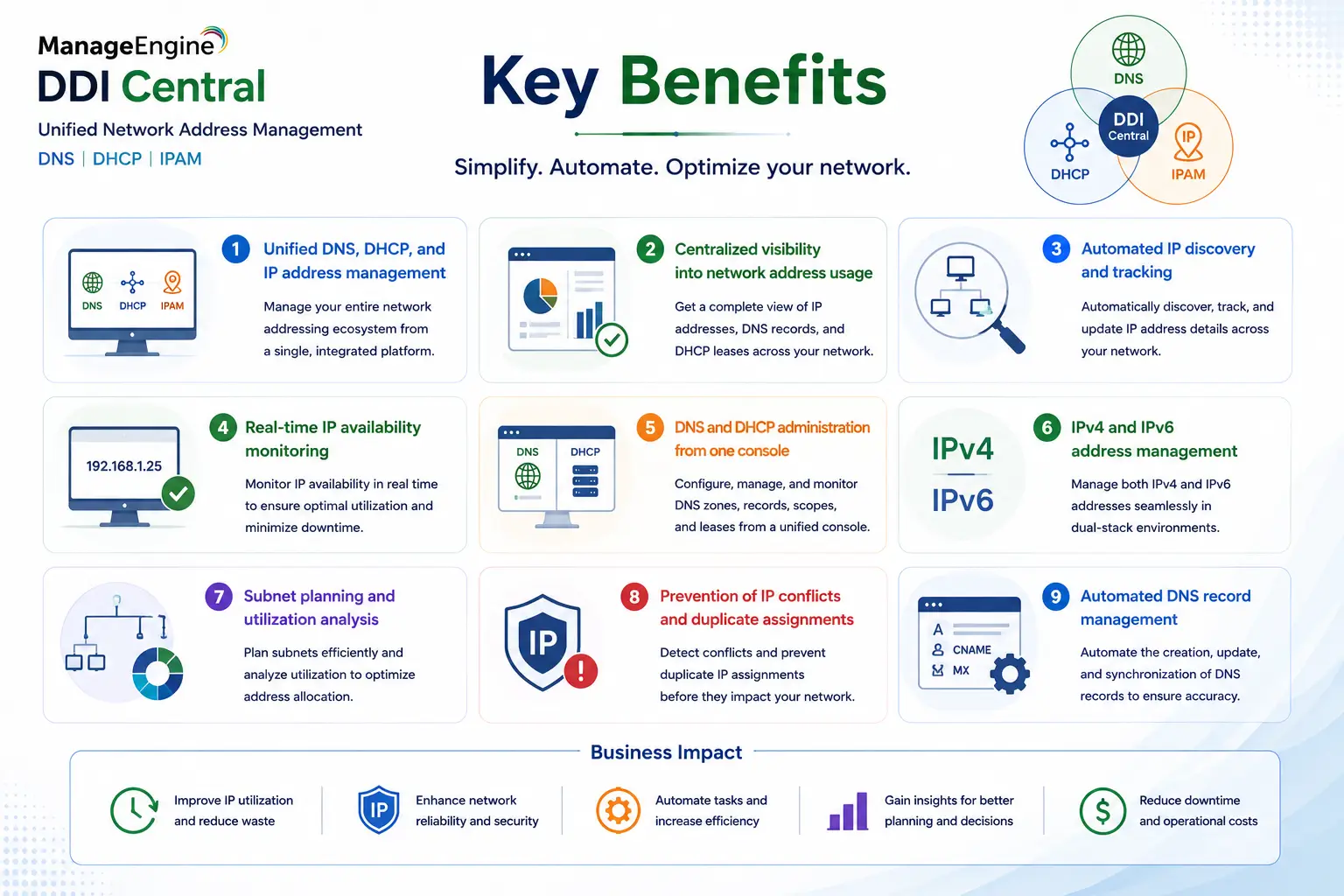
- Unified DNS, DHCP, and IP address management
- Centralized visibility into network address usage
- Automated IP discovery and tracking
- Real-time IP availability monitoring
- DNS and DHCP administration from one console
- IPv4 and IPv6 address management
- Subnet planning and utilization analysis
- Prevention of IP conflicts and duplicate assignments
- Automated DNS record management
ManageEngine DDI Central At a Glance
What it is: Integrated DNS, DHCP, and IP Address Management platform
Parent category: ManageEngine License
Primary role: Network address lifecycle management
Core capabilities: DNS management, DHCP management, IPAM, discovery, automation, reporting
Deployment: Enterprise network management platform
Supported addressing: IPv4 and IPv6
Primary users: Network administrators, infrastructure teams, NOC teams, and IT operations

License Overview
A ManageEngine DDI Central license is designed around the size and complexity of the network environment rather than only the number of administrators using the platform. The main licensing considerations are the number of managed IP resources, network devices, subnets, DNS zones, DHCP scopes, and the overall scale of address management required. Organizations with a small number of office networks may need only basic IP visibility, while large enterprises may require centralized management across multiple locations, cloud environments, and business units.
The licensing model should also consider operational requirements. A company that only needs IP tracking has different requirements from an organization that wants automated DNS updates, DHCP management, approval workflows, compliance reporting, and integration with existing infrastructure.
Product Overview
Integrated DNS, DHCP, and IPAM Management
DDI represents the combination of three critical network services:
- DNS (Domain Name System) manages how devices and applications are resolved across the network.
- DHCP (Dynamic Host Configuration Protocol) automatically assigns network configuration information to devices.
- IPAM (IP Address Management) provides visibility and control over IP allocation and utilization.
Traditionally, these services are often managed separately. DNS administrators may maintain records manually, DHCP teams may manage address pools independently, and network engineers may track IP allocations through spreadsheets. ManageEngine DDI Central brings these functions together, allowing administrators to understand the complete relationship between IP addresses, devices, DNS records, and DHCP assignments. This unified approach reduces administrative overhead and improves troubleshooting because teams can quickly determine which device owns an address, where it is located, and how it is configured.
IP Address Management and Network Visibility
One of the main challenges in enterprise networks is maintaining accurate IP information. As devices connect and disconnect, static assignments change, cloud resources are created, and applications move between environments, traditional tracking methods quickly become outdated.
DDI Central provides automated discovery capabilities that help identify network resources and maintain an updated IP inventory. Administrators can view address utilization, identify unused addresses, detect conflicts, and plan future subnet allocation. For large organizations, this visibility improves both daily operations and long-term network planning.
DNS and DHCP Automation
DNS and DHCP changes are frequent sources of operational issues. A missing DNS record can prevent application access, while incorrect DHCP configuration can create connectivity problems across an entire network segment.
ManageEngine DDI Central helps automate these processes by allowing administrators to manage DNS zones, records, DHCP scopes, and address assignments from a centralized platform. Automation reduces dependency on manual changes and lowers the possibility of configuration mistakes, especially in environments where multiple teams manage different parts of the infrastructure.
How ManageEngine DDI Central Works
DDI Central collects information from network environments through discovery processes and integrations with DNS and DHCP services. The platform builds an IP inventory by identifying available addresses, assigned devices, subnet utilization, DNS records, and DHCP allocations. This information is then presented through dashboards, reports, and management workflows.
When an administrator needs to allocate a new IP range, modify DNS records, or review DHCP usage, the required information is available from a single interface instead of requiring multiple systems or spreadsheets. In larger environments, workflows and automation capabilities can help standardize changes and maintain consistency across multiple locations.
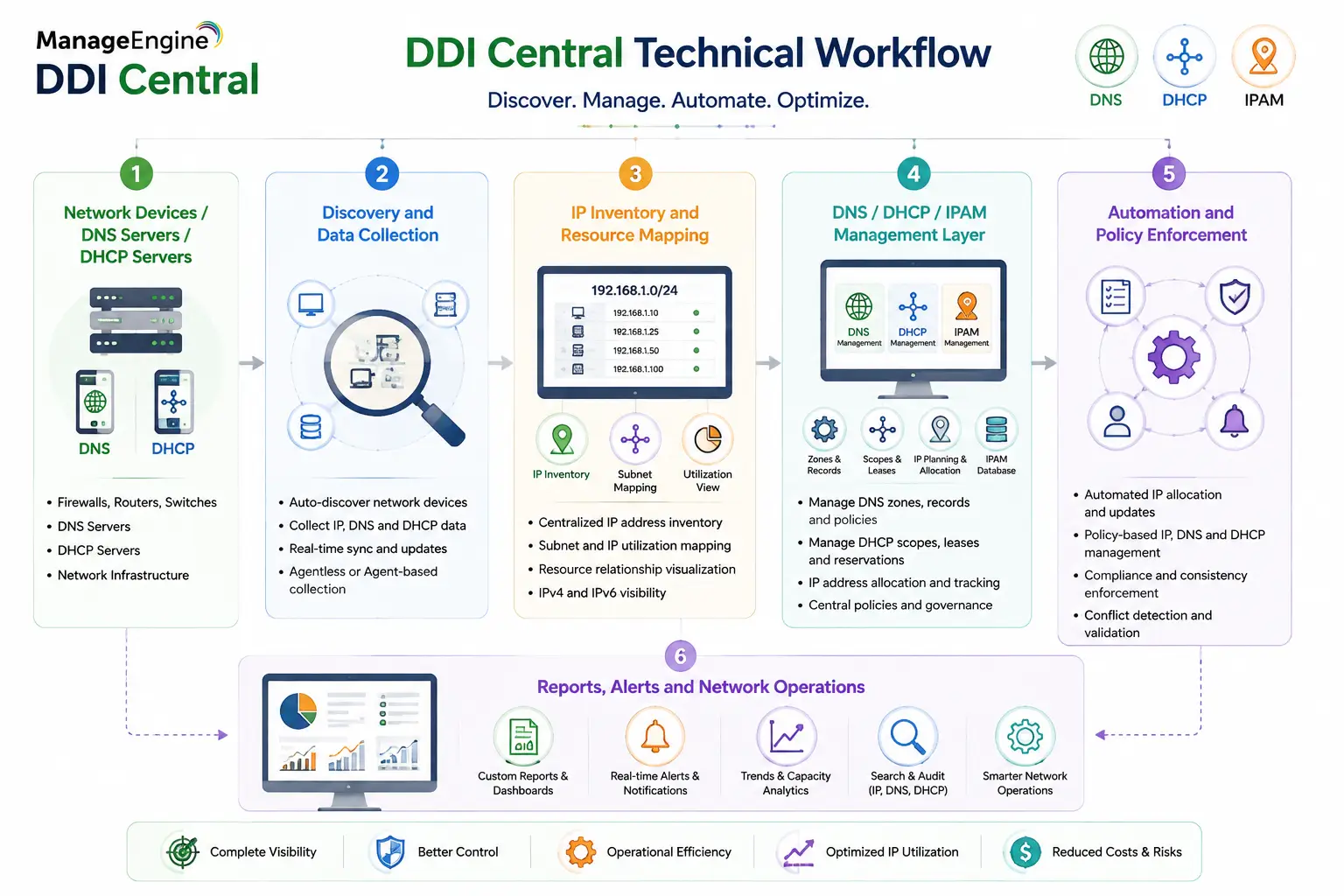
Core Technical Flow
Network Devices / DNS Servers / DHCP Servers
→ Discovery and Data Collection
→ IP Inventory and Resource Mapping
→ DNS / DHCP / IPAM Management Layer
→ Automation and Policy Enforcement
→ Reports, Alerts and Network Operations
The platform creates a relationship between network resources so administrators can understand not only what addresses exist, but how those addresses are being used.
Options and Licensing Models
| Deployment / Capability | Description | Suitable For |
|---|---|---|
| IP Address Management | Centralized tracking of IP resources, subnets, and address utilization | Organizations needing visibility and control over IP allocation |
| DNS Management | Centralized DNS zone and record administration | Networks managing multiple DNS environments |
| DHCP Management | Monitoring and administration of DHCP scopes and assignments | Enterprises with distributed DHCP infrastructure |
| Integrated DDI Management | Combined DNS, DHCP, and IPAM operations from one platform | Large organizations requiring unified network service management |
| Enterprise Deployment | Multi-site management with reporting and operational controls | Distributed enterprises and large networks |
Licensing should be evaluated according to the number of managed resources, network complexity, required integrations, and automation requirements. A simple IP inventory deployment will typically require fewer capabilities than a complete enterprise DDI architecture.
Features and Benefits
The primary advantage of ManageEngine DDI Central is operational visibility.
Without a centralized DDI solution, network teams often spend significant time searching through spreadsheets, DNS servers, DHCP consoles, and monitoring tools to answer basic questions about address ownership and availability.
By combining these functions, DDI Central improves troubleshooting speed and reduces administrative effort.
For example, when a user reports a connectivity issue, administrators can quickly determine whether the problem relates to incorrect addressing, DNS resolution, DHCP assignment, or another network configuration issue.
The platform also supports better governance by maintaining records of changes and providing reporting capabilities. This is important in environments where network modifications need to be reviewed for compliance or operational accountability.
Compatibility and Requirements
Before deploying DDI Central, organizations should evaluate their current DNS and DHCP architecture.
Important considerations include:
- Existing DNS server platforms
- DHCP infrastructure
- Number of managed subnets
- IPv4 and IPv6 usage
- Multi-site network structure
- Cloud and hybrid workloads
- Required integrations
- Administrative roles and permissions
Large organizations should also review how IP ownership is managed between network, security, cloud, and application teams. A successful DDI deployment depends not only on software installation but also on establishing clear ownership rules for address allocation and DNS/DHCP changes.
How Activation and Deployment Work
Deployment begins with installing and configuring DDI Central within the organization’s management environment. After activation, administrators connect existing DNS and DHCP infrastructure and begin collecting IP information through discovery and integration processes.
The initial phase usually focuses on creating an accurate IP inventory. Once visibility is established, organizations can gradually introduce automation, approval workflows, reporting, and centralized DNS/DHCP management. For enterprise environments, deployment planning should include migration considerations. Existing DNS records, DHCP scopes, subnet documentation, and ownership information should be reviewed before moving toward centralized management.
Pricing and Quote Process
Pricing for a ManageEngine DDI Central license depends on the size of the network environment and the required management capabilities.
For an accurate quote, organizations should provide information about:
- Number of managed IP addresses
- Number of subnets
- DNS zones and records
- DHCP scopes
- Number of locations
- Existing DNS/DHCP platforms
- Required integrations
- Automation and reporting requirements
A small organization managing a limited number of networks may require basic IP management, while a large enterprise with multiple data centers and cloud environments may need a broader DDI deployment. The correct license should match both current infrastructure size and expected network growth.
ManageEngine pricing depends on your license edition, users, devices, deployment model, term, and support needs.