

SaaS Manager is a cloud-based software management solution designed to help organizations discover, track, govern, and optimize the SaaS applications used across their business. Within the ManageEngine portfolio, this capability is delivered through ManageEngine SaaS Manager Plus, a centralized platform for managing SaaS subscriptions, user access, vendor information, application usage, renewal dates, and software spending.
ManageEngine SaaS Manager addresses these issues by bringing subscription data, user activity, license information, invoices, and vendor details into one console. This allows IT, procurement, finance, and operations teams to manage the SaaS portfolio as an ongoing business process rather than as a collection of disconnected subscriptions.
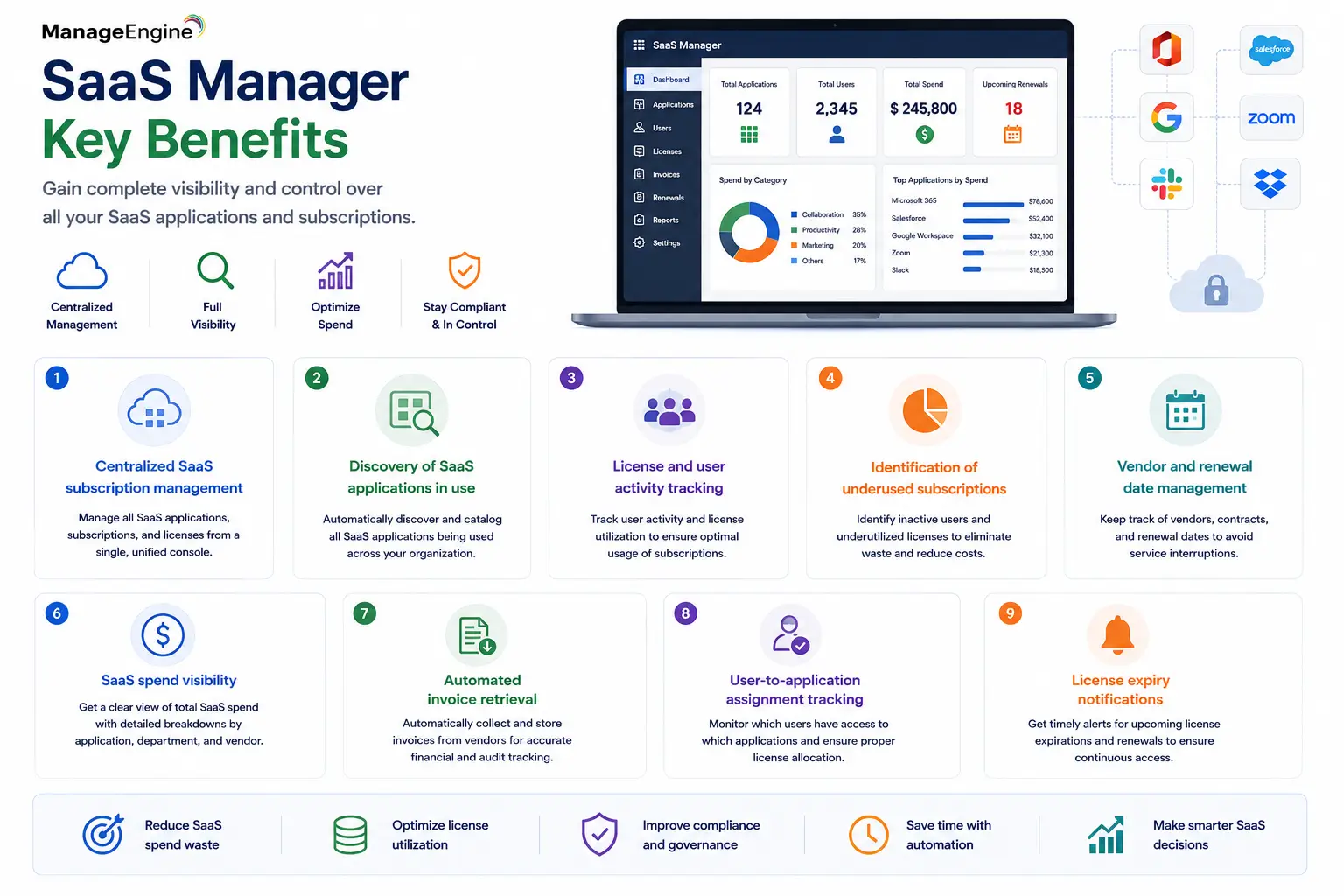
Quick Benefits
- Centralized SaaS subscription management
- Discovery of SaaS applications in use
- License and user activity tracking
- Identification of underused subscriptions
- Vendor and renewal date management
- SaaS spend visibility
- Automated invoice retrieval
- User-to-application assignment tracking
- License expiry notifications
SaaS Manager At a Glance
Official product name: ManageEngine SaaS Manager Plus
Parent category: ManageEngine License
Primary role: SaaS discovery, subscription management, cost optimization, and user/license governance
Deployment: Cloud / SaaS
Main users: IT administrators, procurement teams, finance teams, SaaS managers, and operations teams
Key capabilities: Application discovery, spend tracking, user activity, vendor management, renewals, and reporting
Current licensing model: Subscription based on number of managed applications
License Overview
A ManageEngine SaaS Manager license is currently priced according to the number of SaaS applications being managed rather than the number of employees in the organization.This is an important distinction because a company with 2,000 employees and a highly standardized SaaS estate may require fewer managed applications than a smaller business with many specialized cloud tools.
ManageEngine’s current pricing starts with a free tier for up to two applications. Paid annual tiers then increase through 5, 10, 25, 50, 100, and 200 managed applications. Organizations managing more than 200 applications are directed to contact ManageEngine for custom pricing.
Each connected application counts toward the license limit. Suites such as Microsoft 365 or Google Workspace count as one application per account, while multiple accounts from the same suite are counted separately. This becomes important in multi-tenant or multi-business-unit environments where several Microsoft 365 or Google Workspace environments are administered independently.
Product Overview
SaaS Discovery and Inventory
The first challenge in SaaS governance is knowing which applications actually exist. Employees frequently adopt cloud services without going through a formal procurement process. Over time, the organization may accumulate project-management tools, collaboration services, CRM platforms, design applications, file-sharing services, and other subscriptions that are poorly documented.
SaaS Manager Plus helps build a centralized SaaS inventory by combining direct application integrations, imported data, finance information, invoices, and identity-provider data. This gives administrators a clearer view of subscriptions and ownership across the organization.
License Usage and Cost Optimization
Unused licenses are one of the most common sources of SaaS waste.An employee may leave the company, change roles, or simply stop using a particular application while the organization continues paying for the subscription. ManageEngine SaaS Manager can correlate users, licenses, last-login information, application activity, and spending data so teams can identify opportunities for reassignment, downgrade, or cancellation.
This becomes particularly valuable before renewal dates. Instead of negotiating based on the number of licenses historically purchased, procurement teams can review actual usage and determine which seats are still justified. ManageEngine specifically positions SaaS Manager Plus around identifying underutilized subscriptions and improving ROI.
Vendor and Renewal Management
SaaS applications are often owned by different departments, which makes renewal management difficult.
SaaS Manager Plus allows organizations to maintain vendor information, license details, subscription values, invoices, renewal dates, and ownership records centrally. Expiry notifications can then be configured so finance and IT teams are not surprised by automatic renewals or upcoming contract changes.
How ManageEngine SaaS Manager Works
The platform begins by connecting to the organization’s SaaS applications and related data sources. Direct integrations can retrieve information such as users, license assignments, subscription details, and login activity. Other applications can be added manually, imported from CSV, or discovered through financial and identity integrations.
Once the data is centralized, SaaS Manager Plus can compare license counts with user activity and application usage. Spending information can be correlated with those records, making it easier to determine which applications are valuable and which are creating unnecessary cost. Reports then provide visibility into vendor spending, application adoption, user activity, renewal exposure, and license utilization. Teams can use those insights during renewals, onboarding, offboarding, or SaaS portfolio reviews.
Core Technical Flow
SaaS Applications / Identity Providers / Accounting Platforms
→ App Integrations / APIs / Invoice Imports
→ SaaS Manager Plus Inventory
→ Users / Licenses / Vendors / Spend Mapping
→ Usage and Activity Analysis
→ Renewal / Cost / Utilization Reports
→ Optimization and Governance Decisions
ManageEngine currently documents dozens of native integrations as well as custom API integration capability for applications that are not provided out of the box. Custom integrations can map user, license, and activity APIs into SaaS Manager Plus.
Options and Licensing Models
| Plan / Scope | Managed Applications | Annual Pricing | Typical Fit |
|---|---|---|---|
| Free | Up to 2 apps | $0 | Very small SaaS estate or evaluation |
| 5 Apps | Up to 5 | $250/year | Small teams with limited SaaS usage |
| 10 Apps | Up to 10 | $480/year | Growing organizations |
| 25 Apps | Up to 25 | $960/year | Small-to-mid-size SaaS environments |
| 50 Apps | Up to 50 | $2,000/year | Larger departmental or enterprise environments |
| 100 Apps | Up to 100 | $3,800/year | Broad enterprise SaaS portfolios |
| 200 Apps | Up to 200 | $7,500/year | Large SaaS estates |
| Custom | More than 200 | Quote-based | Large enterprises with extensive SaaS portfolios |
Current ManageEngine pricing applies the same core feature set across listed tiers, including discovery, vendor management, user management, app integrations, reporting, invoice extraction, and expiry notifications. The primary commercial difference is the number of managed applications.
Features and Benefits
The biggest operational benefit of SaaS Manager Plus is that it gives organizations one place to understand their cloud software estate. Without a centralized SaaS management platform, procurement may know what was purchased, finance may know what was paid, IT may know which users have access, and business teams may know which applications are actually being used—but no single team has the complete picture.
ManageEngine SaaS Manager combines those views. The platform can also improve offboarding. If an employee leaves, IT can identify the SaaS applications assigned to that user and remove or reassign access rather than leaving licenses active indefinitely. For finance and procurement teams, usage reporting provides better leverage during contract renewals. Instead of automatically renewing the same number of licenses, teams can review real adoption and negotiate from actual usage data.
Compatibility and Requirements
Before adopting SaaS Manager Plus, organizations should identify which SaaS applications they want to track and whether direct integrations are available. ManageEngine currently supports integrations with applications such as Microsoft 365, Google Workspace, Salesforce, Box, Dropbox, Jira, ServiceNow, HubSpot, DocuSign, Webex, Zoho products, and others. Okta can also be used to discover active applications and associated users.
Some integrations require administrative privileges, OAuth authorization, client IDs, client secrets, or API access from the application vendor. Microsoft 365 integration, for example, currently requires appropriate Microsoft administrative roles and OAuth authorization. If a SaaS vendor is not available as a predefined integration, SaaS Manager Plus also supports custom API integration where suitable user, license, and activity endpoints are available.
How Activation and Deployment Work
SaaS Manager Plus is delivered as a cloud service, so there is no local application server to install. After the organization creates its SaaS Manager Plus account, administrators begin by adding or integrating the SaaS applications they want to manage. OAuth-based applications can be authorized directly, while other services may require client ID and client secret configuration.
Invoice sources and accounting platforms can then be connected so financial data becomes part of the SaaS inventory. Users and license assignments are synchronized from supported applications, and reporting begins as usage data becomes available. A sensible rollout starts with the highest-cost or most widely used SaaS applications—such as Microsoft 365, Google Workspace, Salesforce, collaboration tools, or design suites—rather than attempting to onboard every subscription immediately. Once the core portfolio is visible, smaller applications can be added and governance processes can be standardized.
Pricing and Quote Process
Pricing for a ManageEngine SaaS Manager license is relatively straightforward compared with many infrastructure-management products because the primary metric is the number of applications managed. For an accurate quote, organizations should identify the total number of SaaS applications they want to track and determine whether multiple accounts exist for suites such as Microsoft 365 or Google Workspace. Each separate account should be considered because it can count independently toward the managed-application total.
It is also useful to identify planned integrations, accounting systems, identity providers, reporting requirements, and future SaaS growth. An organization already close to a tier limit may be better served by selecting the next tier rather than upgrading shortly after deployment. For estates above 200 applications, ManageEngine currently directs customers toward custom sales pricing.
ManageEngine pricing depends on your license edition, users, devices, deployment model, term, and support needs.