

Low-Code App Development enables organizations to create custom business applications with minimal traditional programming by using visual development tools, prebuilt components, workflow automation, and configurable application logic. Within the ManageEngine ecosystem, ManageEngine Low-Code App Development capabilities are delivered through AppCreator, a low-code application development platform designed to help businesses and IT teams build custom applications for operational processes, data management, workflow automation, and internal business requirements.
Traditional application development often requires long development cycles, specialized programming skills, and significant maintenance effort. However, many organizations need applications for specific operational needs such as approval workflows, asset tracking, service requests, field operations, customer management, and internal processes that may not justify a full software development project.
Quick Benefits
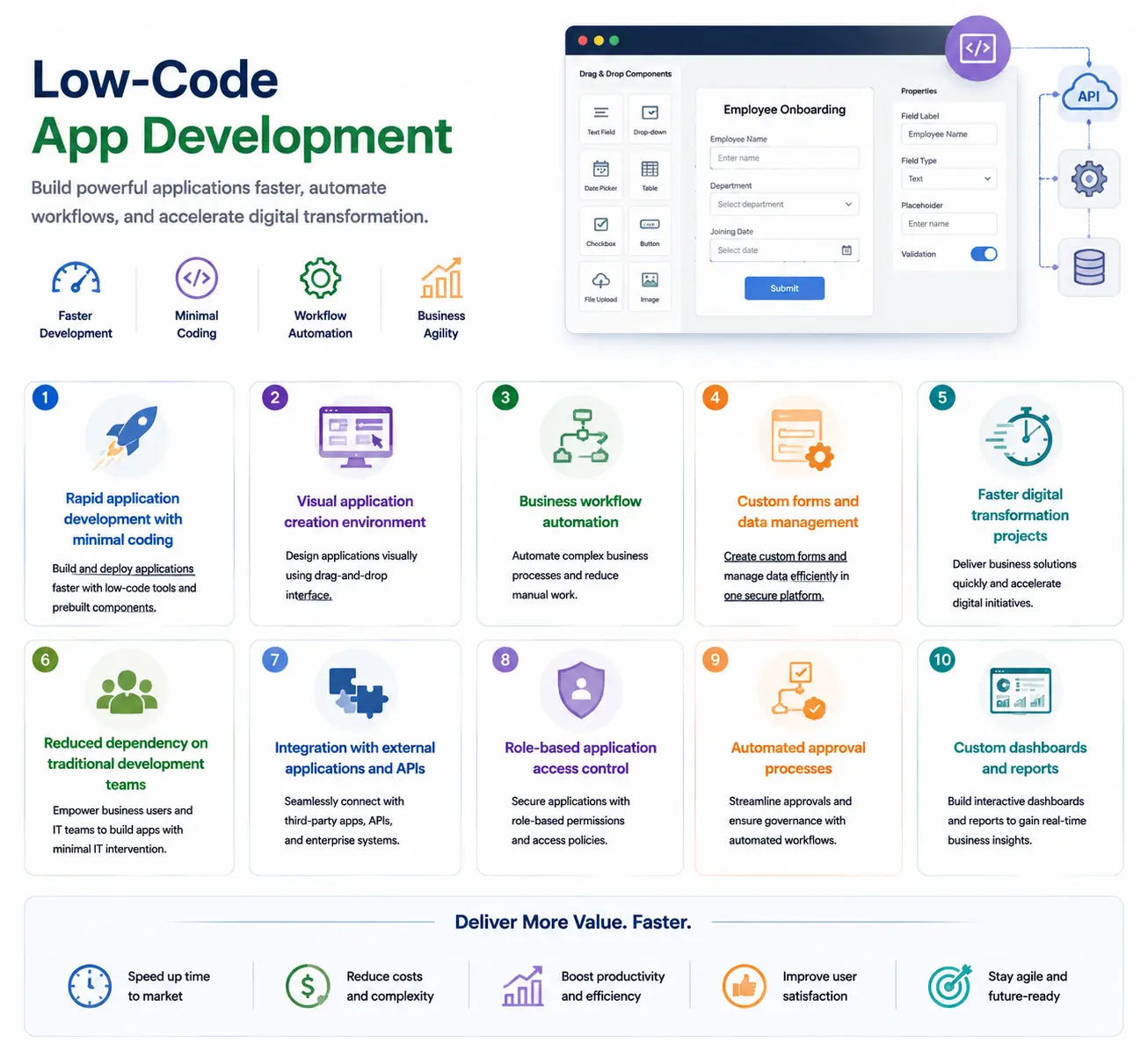
- Rapid application development with minimal coding
- Visual application creation environment
- Business workflow automation
- Custom forms and data management
- Faster digital transformation projects
- Reduced dependency on traditional development teams
- Integration with external applications and APIs
- Role-based application access control
- Automated approval processes
- Custom dashboards and reports
Low-Code App Development At a Glance
What it is: Visual application development platform with low-code capabilities
ManageEngine solution: AppCreator
Parent category: ManageEngine License
Primary role: Build custom business applications and automate workflows
Main users: IT teams, business departments, developers, administrators, and process owners
Deployment: Cloud-based low-code development platform
Core capabilities: Application design, workflow automation, forms, integrations, reporting, and customization
License Overview
A ManageEngine Low-Code App Development license is designed around application usage and organizational requirements rather than traditional infrastructure metrics such as devices or endpoints. The main licensing considerations depend on how many users will interact with applications, how many applications need to be developed, the complexity of workflows, and the level of customization required.
Unlike traditional software development projects where costs are often associated with developer resources and long implementation cycles, low-code platforms focus on enabling faster application delivery through reusable components and simplified development processes. Organizations should evaluate whether applications will be used internally by employees, externally by customers or partners, or across multiple business units. These factors influence the appropriate licensing approach and platform capacity.
Product Overview
Visual Application Development
The main advantage of low-code platforms is reducing the technical barrier required to build business applications. ManageEngine Low-Code App Development allows users to create applications through visual interfaces instead of writing every component manually. Forms, fields, workflows, dashboards, and application logic can be configured through graphical tools.
This approach allows IT departments to respond faster when business teams require new applications. For example, an organization may need a custom approval application, inventory tracking system, employee request portal, or operational workflow tool. Instead of starting a traditional development project, teams can create and modify these applications using low-code methods.
Workflow Automation
Many business processes still depend on manual approvals, spreadsheets, emails, and disconnected systems. Low-code application platforms help transform these processes into structured digital workflows.
With ManageEngine Low-Code App Development, organizations can create workflows that automatically route requests, assign tasks, notify users, collect approvals, and maintain process records. This reduces repetitive administrative work and improves consistency across departments.
Custom Business Applications
Every organization has unique operational requirements. Standard enterprise applications often provide common functionality but may not fully match specific business processes. Low-code development allows companies to create applications tailored to their internal workflows.
Examples include:
- Employee onboarding applications
- Asset request workflows
- Purchase approval systems
- Customer request portals
- Compliance tracking applications
- Internal operational dashboards
These applications can be created faster and modified more easily compared with traditional custom software development.
How ManageEngine Low-Code App Development Works
The development process begins by defining the business requirement and identifying the workflow that needs improvement.
Users can create application structures by designing forms, defining data fields, configuring relationships, and setting workflow rules.
Once the application structure is created, permissions and user roles can be configured to control who can access information and perform specific actions.
The completed application can then be deployed for business users, monitored through dashboards, and modified as requirements change.
This creates a continuous improvement cycle where applications evolve alongside business processes.
Core Technical Flow
Business Requirement
→ Application Design and Data Model Creation
→ Forms and Workflow Configuration
→ Integration and Permission Setup
→ Application Deployment
→ User Interaction and Data Collection
→ Analytics and Process Improvement
The low-code approach reduces development time by allowing organizations to focus more on business logic and less on manual software coding.
Options and Licensing Models
| Licensing Factor | Description | Suitable For |
|---|---|---|
| Application Users | Number of employees or external users accessing created applications | Organizations building applications for different user groups |
| Application Scope | Number and complexity of applications created | Businesses developing multiple operational tools |
| Workflow Requirements | Automation complexity, approvals, and process rules | Organizations replacing manual processes |
| Integration Needs | Connections with external systems and APIs | Businesses requiring connected applications |
| Deployment Model | Cloud-based application development environment | Organizations preferring SaaS delivery |
| Advanced Features | Additional customization, analytics, and automation capabilities | Enterprises with complex application requirements |
The correct licensing model depends on whether the platform is used for a few internal applications or becomes a broader application-development framework across the organization.
Features and Benefits
The biggest advantage of ManageEngine Low-Code App Development is speed.
Organizations often identify process improvements but struggle to implement them because traditional development resources are limited. Low-code platforms allow IT teams and business users to create solutions faster without waiting for long development cycles.
Another benefit is flexibility. Applications can be adjusted as processes change, which is especially useful for organizations with evolving operational requirements.
For IT departments, low-code development also improves governance. Instead of employees creating unmanaged spreadsheet-based processes or unsupported applications, teams can provide a controlled platform for business innovation.
The platform can also reduce development costs by allowing organizations to solve smaller business problems without creating full-scale software projects.
Compatibility and Requirements
Before selecting a ManageEngine Low-Code App Development solution, organizations should evaluate:
- Number of application users
- Required workflows
- Data sources and integrations
- Security requirements
- User permission models
- Compliance requirements
- Application ownership responsibilities
It is also important to define governance policies. While low-code platforms make application creation easier, organizations should maintain standards for security, data management, and application lifecycle control. Integration requirements should be reviewed carefully, especially when applications need to exchange information with existing business systems.
How Activation and Deployment Work
Deployment begins by activating the ManageEngine AppCreator environment and configuring the required users and permissions.
Organizations usually start with a specific business process rather than attempting to replace multiple systems immediately.
After the initial application is created, workflows, integrations, and reporting features can be expanded gradually.
A structured deployment approach helps ensure that applications remain maintainable and aligned with business objectives.
For larger organizations, establishing application governance is important so that different departments can create solutions while maintaining security and consistency.
Pricing and Quote Process
Pricing for a ManageEngine Low-Code App Development license depends on application usage requirements and organizational scale. For an accurate quote, organizations should define:
- Number of application users
- Number of applications planned
- Required workflows
- Integration requirements
- Security and permission needs
- Expected growth of application usage
ManageEngine pricing depends on your license edition, users, devices, deployment model, term, and support needs.